Audit log
What the append-only, hash-chained audit log records, how to filter and search it, verify the chain, export evidence for an auditor, and what it records for a notification.
How-to · Updated 2026-10-26 · Describes release 0.1.164
Settings · Account → Audit log (/portal/audit) is the append-only trail of every consequential act in your workspace, whoever performed it, sealed into a hash chain you can verify and hand to an auditor. This page is that page: what is recorded, the filters, the chain check, the export and its offline verifier. Who can see the trail without a membership is on Support access; the permission it needs, report.view, is in the Permissions reference.
Append-only, hash-chained audit. Audit rows are written, never updated and never deleted; there is no UI or API that edits them. Within about a minute each row is also sealed into your workspace's sha256 hash chain, so a row changed, removed or reordered directly in the database breaks the chain at an exact seq. Verify chain on the audit page recomputes it, and Export hands the rows with their chain fields to an auditor.
The audit log
Open Settings · Account → Audit log (/portal/audit). Both the destination and its data need report.view.
What is recorded
Every consequential act, whoever performed it. The chip row on the page is the authoritative list for your tenant — it is generated from the rows that actually exist, so it can never drift from what the platform writes. The groups below are representative:
- People, access and configuration:
member.add,member.remove,member.auto_provisioned,role.create,role.update,role.delete,idp.updated,idp.removed,idp.provisioned,support.granted,support.revoked,tenant.create,tenant.update,tenant.webhook_token,pillar.update,guardrails.updated,web.allowlist_updated,models.tiers_updated, historicalterms.accepted,feature.granted,feature.revokedrecords. - Operating an incident:
concern.raised,incident.escalate,incident.remediate(which also writes anincident.statusrow for the move toremediating),incident.resolve,investigation.triggered,approval.approved/approval.denied/approval.edited,feedback.create,feedback.scored,chat.ask,agent_api.completion,risk.requested/risk.decided/risk.rejected/risk.revoked(a risk decision — including a suppression of a resource on one of the platform's own compliance checks, whose payload names the control, the resource and the expiry — was sent as a request, approved by an approver (requested_bynames the requester;self_approvedmarks a sole approver signing off their own request), rejected, or withdrawn),compliance.scan_started/compliance.scan_finished(a control scan a person started / any control scan finished; a scheduled scan starts withpillar.scheduled),compliance.scanner_synced/compliance.scanner_synced_manual(a scanner pull, scheduled or on request),compliance.attested(a person's attestation of a requirement),compliance.no_firewall_acknowledged(an owner or approver recorded on the Estate map that this environment has no firewall; targetestate:no-firewall),compliance.control_override(a control set not applicable or disabled),compliance.change_requested(a control's fix requested through Changes),compliance.interpretation_exported(the interpretation sheet saved as an artifact),compliance.table_agreed(the customer's acceptance of a version of the comparison table recorded; targetcompliance:agreed-table),compliance.custom_requirement_saved/compliance.custom_requirement_removed(one of the workspace's own requirements added, replaced or removed),risk.register_exportedandrisk.posture_exported(the risk register and a posture period saved as artifacts),risk.mitigation_landed(a mitigation's compensating change completed),compliance.rule_unmuted(a human removed a legacy muted compliance finding;compliance.rule_mutedis no longer written since suppressions replaced muting in 0.1.95),risk.suppressed_at_source/risk.unsuppressed_at_source(a scanner finding accepted in the risk register was written to — or lifted from — Security Hub / Defender through the write connection). - Configuration of the estate:
datasource.create,datasource.update,datasource.delete,datasource.test,datasource.audit_permissions,datasource.discover_operations,datasource.adopt_read_paths,route.create/route.update/route.delete(each with the route's values before and after — credentials masked, long values shortened, each with a sha256 fingerprint — and its revision),route.certified/route.certification_requested/route.certification_dropped/route.certification_withdrawn(who certified which revision and why, who asked, which change dropped it, who withdrew it;self_certifiedmarks a sole approver certifying their own revision),route.skips_acknowledged,knowledge.create/knowledge.delete/knowledge.activate/knowledge.deactivate,skill.promoted/skill.rejected/skill.retired,benchmark.run/benchmark.import/benchmark.override,lake.spec_create/lake.spec_update/lake.spec_delete/lake.specs_seeded,lake.erased,lake.dropped,xray.launched,xray.cancelled,xray.applied,xray.context_adopted,xray.context_rejected,xray.deleted. - Written by an agent (actor
agent:<pillar>):approval.requested,approval.executed,approval.edit_rejected,model.escalated,model.downgraded,artifact.created,change.reverts/change.undone_by_external(a captured cloud change re-opened what a completed platform fix closed on the same resource: a sensitive port open to the internet on the same security group or NSG, not necessarily the one the fix closed, or anonymous blob access on the same storage account — one row on each of the two changes). - Written by the system (actor
system, orsystem:verifyfor a post-close check):route.match_skipped(actorsystem:auto: a pre-approved route matched the incident and did not run, once per route and reason, with the reason in words),incident.open,incident.status,incident.recheck,incident.reopened,incident.normalised,incident.resolved,ingest.batch,approval.expired,pii.detected,xray.finished,rca.routed,compliance.rule_muted_hit(a captured change matched a legacy muted control + resource pair that has not yet lapsed and was skipped — recorded once per pull, never silently). An incident a scan closed because every flagged resource is suppressed writesincident.resolvedwithby: risk-acceptanceand the decision ids; a human's last suppression closes it throughincident.resolvewithclassification: risk_accepted. The audit payloads keep those risk-acceptance names. With Act when an exception expires on (Guardrails → Risk exceptions), the expiry sweep (actorsystem:risk-expiry) writes Risk exception expired (risk.expired: the decision, what it reopened, the posture before and after, whether the scanner suppression was lifted — the label adds finding reopened only when it reopened something) and, for each incident it reopens,incident.reopenedwithby: risk-expiryand the reason. Such a reopen never counts against a last-known-good fix record: the suppressed resource was never fixed. Every change the platform observes writeschange.recorded, labelled by who made it: Unmanaged change recorded (principal: outside), Platform write recorded from the audit log (principal: platformwith thereceiptthat matched it), Change with the platform's credential recorded (principal: platform,receipt: none), Deployment of a platform change recorded (deploys: the platform change whose merged revision it names), else Observed change recorded. A model route under the Singapore flag adds the region and the RCA model's route tomodel.routed, and a run resumed after a pause or a restart writes a secondmodel.routedwithresumed: true.
One note on that last group. incident.recheck is what a post-close verification run writes, and it records the verdict on an incident that was already closed. A Still present verdict on a closed incident IS a reopen: the incident moves to escalated, its close timestamp is cleared, and the row is written as incident.reopened. A Cleared or Uncertain verdict records incident.recheck and leaves the incident closed. See Incidents → Limits and gotchas.
Columns:
- When — local timestamp.
- Action — what happened, in words (
Approval recorded,Status changed), after a badge naming its group (Incidents, Approvals, Changes, Compliance & risk, Access, Platform & settings and so on). Hover the words for the dotted verb the row stores; a verb this console has no words for yet reads as its parts, for exampleRisk · expiry reminded. - Actor — the person's email;
Platformfor the platform itself (Platform (pre-approved)for a pre-approved automatic fix),<Pillar> agentfor an agent (Correlation agentfor the grouping agent). An account nobody can resolve any more shows its id. Hover for the stored value. - Target — a link to the incident or the change (
CHG-…) the row touched, the email of the account an access row is about, else the target as stored, a generated id cut to its first eight characters (hover for the whole id). An approval on an incident points at the approval itself, so it shows that short id; an approval recorded on a change links the change. - Detail — one plain line built from the row's own fields (
open → investigating,1 of 2 approvals · tier L3,sent · teams · open), and Raw record under it, which opens the row exactly as stored: id, actor, action, target, payload and the chain fields.
The same words label the Timeline at the bottom of each incident's pipeline card and the change timeline, so a row reads the same wherever you meet it. The Timeline folds the rows nobody acted on — the model's raw wrap-up answer, scheduler and intake markers, a validation that measured nothing — behind Show N system events. The labels are presentation only: filters, the export and the hash chain keep the dotted verb.
Payloads never carry secrets. A gated command's invocation (approval.requested, approval.executed, approval.edit_rejected) is stored with any credential in it hidden, the way the approval shows it; an older row that still holds one is hidden the same way in the incident Timeline, and on this page wherever the credential's shape shows it (a password in a URL, a secret-named argument or header) — a bare value the agent copied from what it read can stay as written there — while the export keeps every row as stored so the chain still verifies. Several are deliberately hashed, truncated or scrubbed: a chat question is recorded as a 16-hex hash of the text only, a lakehouse erase records only the hash of the needle plus the row count, and remediation route detail passes the PII scrubber and is cut to 200 characters before the row is written.
Staff actions on your tenant land in your log as well as the platform's, with the staff account as actor and your tenant id: support.granted, support.revoked, feature.granted, feature.revoked, idp.provisioned, tenant.create, the first member.add, pillar.update and tenant.webhook_token. Current MCP tools use the same handlers and action names as REST. A tenant-owned operation still requires its normal tenant permission; a support grant does not carry members.manage or pillars.manage.
Current and historical MCP audit names
Current MCP operations call the same REST handlers as the portal and produce the same audit verbs. Older records from the retired MCP implementation can retain different names. Include the historical spelling when reviewing older periods:
| Current portal, REST and MCP name | Historical MCP name | Historical server |
|---|---|---|
datasource.create |
datasource.created |
tenant MCP (/mcp/aiops) |
datasource.test |
datasource.tested |
tenant MCP |
knowledge.create |
knowledge.upserted |
tenant MCP |
tenant.create |
tenant.created |
admin MCP (platform staff) |
pillar.update |
pillar.updated |
admin MCP (platform staff) |
tenant.webhook_token |
webhook_token.minted |
admin MCP (platform staff) |
Build evidence filters from the chip row rather than from memory: the chips are generated from the actions your tenant really has, so a verb you never see in the chips has never happened here, and a verb you do see is the exact string to filter on.
Filter and search
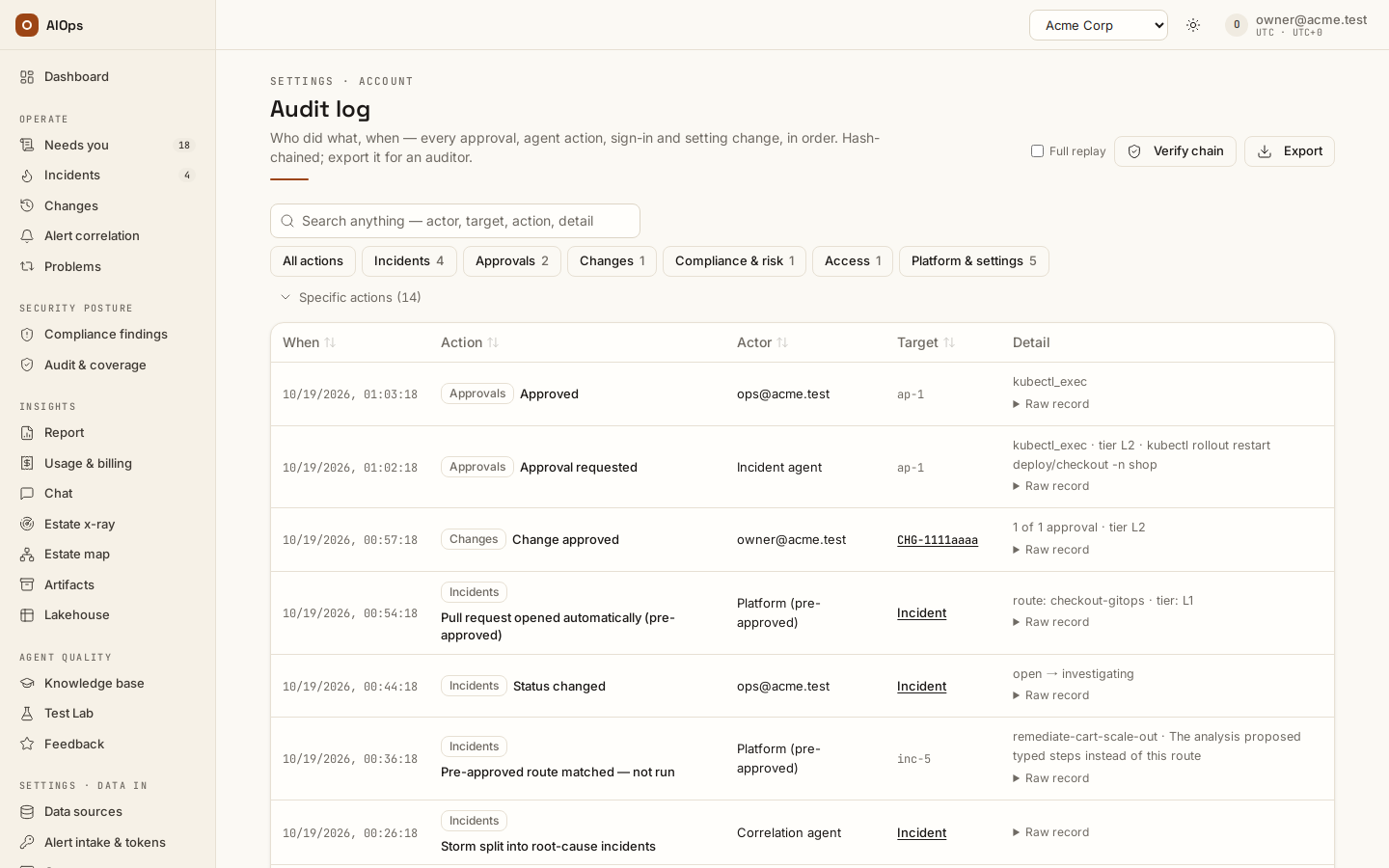
- Click a group chip (Incidents, Approvals, Access …) to show every action in that group. To filter to one action, open Specific actions under the group chips: it lists the action chips group by group, and while it is closed it still says how many actions are selected. Combine chips to build a set; click All actions to clear. A group chip reads as partly selected when only some of its actions are picked, and clicking it then picks the rest. Chips are generated from the actions your tenant actually has, group by group and most frequent first, with a count each; hover an action chip for its dotted verb.
- Type in the search box (Search anything — actor, target, action, detail) to match free text across action, actor, target and payload. It is a case-insensitive substring match and fires about a third of a second after you stop typing.
The table reloads and the footer count changes to the number of matching rows.
One lifecycle. With Stamp one correlation ID on every audit row of an incident lifecycle on (Guardrails → Change safety), every row about one incident — the incident itself, its change requests, approvals (the change's and the agent's own approval gate), execution, post-change validation, rollback, its notification, and reopen — carries that incident's ID as its correlation ID (a change with no incident uses its own ID). While the switch is on, the link the whole lifecycle in the audit log under an incident's Timeline, and Whole lifecycle in the audit log on a change's Timeline, open this page filtered to it: a line names the correlation ID, and Show every row clears it. The ID is inside each row's payload, so the hash chain covers it and an export carries it. Rows written while the switch was off carry none, so the filtered view starts when the switch was turned on.
Both filters run server-side across the whole table, not just the page on screen, and combine as AND. Paging is 50 rows per page; the footer shows from–to of total with Prev / Next and only appears once there are more than 50 matching rows. Clicking a column header sorts the rows on the current page only.
Verify the chain
- Click Verify chain in the page header. Requires
report.view. - Read the line under the header.
Chain intact reports how many rows were replayed and the chain head: the newest sealed seq and the first 12 characters of its hash. The default replays the newest 500 sealed rows. Tick Full replay first to replay every row from the first one; replay time depends on trail size, and one full replay per workspace runs at a time (a second one is refused with a full replay of this chain is already running — retry when it finishes).
Chain broken at seq N means a sealed row was altered, removed or reordered after it was sealed. The application has no path that does that, so it points at a change made directly in the database: export the trail as evidence and raise it with your platform operator. N newer rows await sealing is normal — new rows join the chain within about a minute.
The same check is GET /api/aiops/{tenant_id}/audit/verify with window=<rows> (at most 10,000) or full=true; it returns ok, checked, first_bad_seq, head_ok, unsealed, last_seq and last_hash. The compliance control LOG-01 runs the 500-row replay on every compliance scan.
Export evidence for an auditor
- Click Export in the page header. Requires
report.view. - Pick From and To — your browser's calendar days, To included; the default is the last 30 days.
- Pick the Format: CSV for the audit binder, NDJSON to re-verify the file offline.
- Leave Rows per file at 10,000 or raise it, up to 50,000.
- With action chips selected, Only the selected actions narrows the export to them. The search box does not apply to the export.
- Click Download.
The file holds the period's rows oldest-first with their chain fields — seq, at, actor, action, target, payload, prev_hash, row_hash and id — and the line under the header reports how many rows it holds and the last seq. When the period holds more rows than one file, the line says so and Download the next file continues from that seq: each file picks up exactly where the previous one stopped, so a period is never cut short silently. Rows written in the last minute are still being sealed into the chain and arrive in a later export. The export itself is recorded in this log as audit.exported, with the period, the row count and whether more rows remained.
To script it, mint a read-scope API token on Alert intake & tokens (/portal/tokens; see Integrations) and find your tenant id (GET /api/aiops/me returns one entry per membership with its tenant_id; the route takes the id, not the slug). Then page the export endpoint:
after=0
while :; do
  curl -s -D headers.txt -H "Authorization: Bearer $AIOPS_TOKEN" \
    "https://aiops.example.com/api/aiops/$TENANT_ID/audit/export?fmt=json&after_seq=$after&limit=50000" \
    -o "audit-after-$after.ndjson"
  after=$(grep -i '^x-next-after-seq:' headers.txt | tr -d '\r' | cut -d' ' -f2)
  grep -qi '^x-truncated: true' headers.txt || break
done
The parameters:
fmt—jsonis NDJSON, one row per line plus a finalchain_headline;csvis the binder copy.since/until— ISO 8601 times bounding the event time; a time without an offset is UTC, anduntilis exclusive.action— one action or a comma-separated set.limit— rows per response, 10,000 by default and at most 50,000.after_seq— the cursor. Without it the response holds the newestlimitrows of the filter, oldest-first, with rows still awaiting their seal last (theirrow_hashreads(unsealed)). Withafter_seq=Nit holds sealed rows afterseqN, in order, andX-Next-After-Seqis the next call's N.
Every response reports X-Row-Count, X-Truncated (true = more rows match than this response holds), X-Chain-Last-Seq and X-Chain-Head-Hash (the chain head when the file was cut) and X-Chain-Unsealed. A period filter can leave seq gaps, because a row that committed late belongs to a different period; paging with after_seq and no period is the gap-free way to archive the whole trail.
Re-verify a file offline. scripts/verify-audit-export.py ships with the product source; it needs Python 3 and nothing else, and no access to this platform:
python3 scripts/verify-audit-export.py audit-after-0.ndjson
It rebuilds each sealed row as {id, tenant_id, actor, action, target, payload, at, seq} (the tenant id comes from the trailer's chain), serialises it as JSON with sorted keys and , / : separators, and checks that the sha256 of prev_hash followed by that JSON equals row_hash. Consecutive seq values must link — prev_hash is the previous row's row_hash, and seq 1 links to an empty hash — and a file that reaches the chain head must end on the trailer's last_hash. The file must also hold exactly the number of rows its trailer records. A filtered or period export skips the rows outside its filter, so a seq gap there is reported as a gap: line and every row is still checked against its own prev_hash; a newest-rows export (no after_seq) can show one too, where rows were sealed while it downloaded. A cursor export with no filter — after_seq alone, as in the loop above — is the chain itself, so the script fails it on any gap: a file you keep as an archive must print OK and no gap: line. The script exits 0 when the file is intact and 1 with the first bad seq or a row count that does not match. It prints the seq and hash the file links back to and, as anchor:, its last seq and hash: the next file must link back to that anchor. CSV is for reading; verify the NDJSON copy.
For narrative evidence rather than event rows, use the durable artifacts: an exported RCA and an estate x-ray report are append-only records with their own timestamps, listed on /portal/artifacts.
Notification setup checks
Under Settings · Account → Notifications & on-call, every webhook target needs an HTTP or HTTPS URL. Email targets need a recipient or the on-call option. A PagerDuty or Opsgenie target needs its key the first time it is saved; afterwards the field reads Key stored — leave blank to keep it, and removing the target deletes the stored key. A blank target stops the save with an error; use Remove when you intend to delete it.
Email delivery saves SMTP configuration. The success message confirms the save, not successful delivery. STARTTLS (verify certificate) selects certificate verification; it is not a connection-test result.
What the audit log records for a notification. Filter the Audit log on incident.notified:
- A message sent to a target writes one row with the
event, the targetkindandok— whether the target accepted it, not whether anyone read it. An email row also counts itsrecipientsand says whether the target includes the on-call person (oncall); addresses are not recorded. - Incident events (
open,escalate,resolve) reach a Slack, Teams or email target at most once per interval (120 seconds unless the workspace setsaiops_notify_min_interval_s). An event inside the interval is held: its row carriesheld: trueand nothing is sent yet. - When the interval ends, one row with target
digestandevent: digestrecords what was sent in place of the held events: thekind, thecount, up to 50incident_idsandok. A target removed in the meantime, or given a new URL or recipient list, writesdropped: truewith the count instead. - Held events live in the control plane's memory until their digest is sent. A restart loses a pending digest; the held rows stay in the log, so you can see what never went out.
- Webhook targets are never held: every event writes its own row.
- PagerDuty and Opsgenie targets are never held either. Their rows also name what the send did to the page —
actiontriggerorresolve(PagerDuty),createorclose(Opsgenie) — and a target whose key is missing writesok: falsewitherror: no key storedinstead of sending. The key itself is never recorded. A pager also gets eventreopenwhen its incident reopens (the page triggers again) and aresolvefrom the closes that send no chat message (a bulk close, a merge, a storm split, a risk acceptance, a passing control).
Use cases
A SOC 2 evidence request (compliance officer)
The auditor asks: who approved production changes last quarter, and did anything execute without a human. Working from report.view alone, the officer opens Settings · Account → Audit log, selects the chips approval.approved, approval.denied, approval.edited and approval.executed, and confirms every approval.executed is preceded by a decision row. They click Verify chain, then Export with Only the selected actions ticked, a quarter's dates and NDJSON, and run the offline verifier on the file before handing it over. To evidence that estate x-ray cannot write, they open the scan's report on /portal/xray — it states Write attempts blocked by the read-only guard: N — and pair it with the matching xray.launched / xray.finished rows for the timeline. To evidence access reviews, member.add, member.remove, member.auto_provisioned, role.create, role.update, support.granted and support.revoked show every change of standing, including the platform's own.
Troubleshooting
Cross-cutting symptoms — a queued investigation, a missing page, an empty approval queue — are in Troubleshooting. The table below covers only the errors the Audit log page produces.
| Symptom | Cause | Fix |
|---|---|---|
| Audit log is missing | The selected role lacks report.view, or the profile is stale |
Confirm the workspace and permission, then refresh |
Verify chain reports Chain broken at seq N |
A sealed row was altered, removed or reordered outside the application | Export the trail as evidence and raise it with your platform operator; rows before N still verify |
a full replay of this chain is already running — retry when it finishes |
Someone started a Full replay of this workspace's chain | Wait for it, or untick Full replay for the 500-row check |
| The export line says more rows remain in the period | The period holds more rows than Rows per file | Click Download the next file until the line no longer says so |
| The newest rows are missing from an export | They were written in the last minute and are not sealed yet | Export again a minute later; the next file picks them up |
Limits and gotchas
- Audit access is report access. The Audit log destination and API require
report.view, which every builtin role holds. A custom role without it also loses Reports and Feedback access. - The page shows emails; the export keeps account ids. The Actor column shows the person's email, while the export and Raw record keep the account id, so the file can be re-verified against the chain. Map ids to emails from the members API (
GET /api/aiops/{tenant_id}/members), which itself needsmembers.manage— a compliance officer holding onlyreport.viewwill need an owner to produce that mapping for an exported file. Search matches the stored id, so searching an email finds only the rows whose payload records one, such asmember.add. - Historical MCP verbs may differ. Current MCP and portal operations share audit names; older records such as
datasource.createdmay coexist withdatasource.create. Include the names present in the period you are reviewing. - A failed post-close recheck re-opens the incident. A Still present verdict writes
incident.reopenedand moves the incident back toescalated; a cleared verdict writesincident.recheckand leaves it closed. Both verdicts are auditable evidence that the close was checked. - Audit rows are never deleted or edited by the product, including by owners, and nothing sweeps them: rows stay online until a retention period is agreed and applied. The written retention policy — the monthly export-and-verify archive procedure, the archive manifest that anchors the chain outside the platform, and storage sizing — is the Audit trail retention policy in the delivered product documentation. Automatic archive-then-truncate is not in this release.
- Sorting is per page, filtering is not. Chips and the search box query the whole table server-side; clicking a column header reorders only the 50 rows currently displayed.