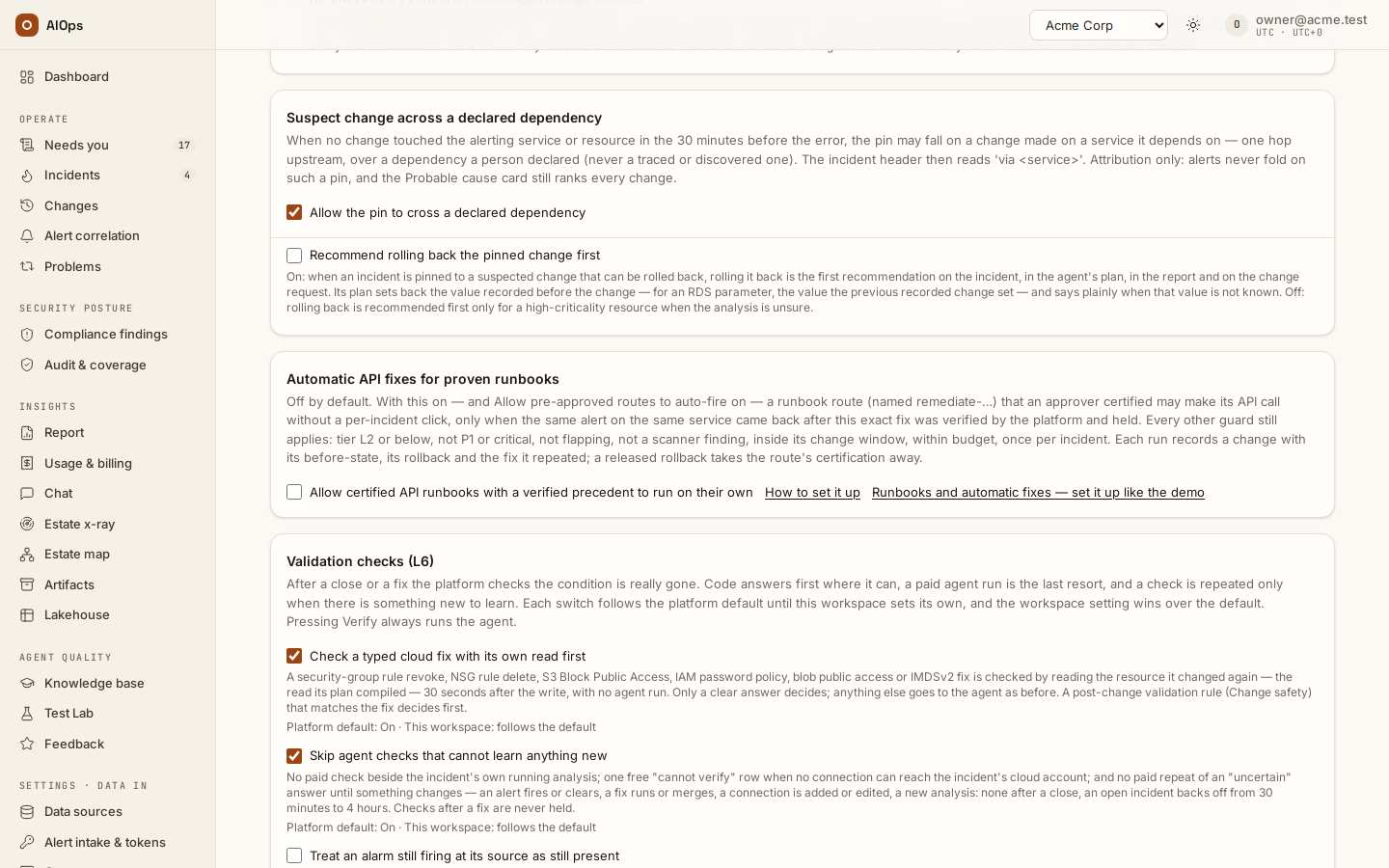
Automatic API fixes for proven runbooks
Let a certified API runbook repeat, on its own, a fix the platform already verified for the same alert — off by default — and set it up like the demo.
How-to · Updated 2026-10-26 · Describes release 0.1.164
What it does
By default every live cloud write waits for a person. With Allow pre-approved routes to auto-fire on, a pre-approved route that opens a pull request may open it on its own; the pull request changes nothing until someone merges it.
Automatic API fixes for proven runbooks adds one more case, and only one: a runbook route that calls a cloud API (mode api, named remediate-…) and that an approver certified may make its own call with no per-incident click — but only when it repeats a fix the platform already verified for the same alert on the same service. Everything else still waits for a person.
It is off by default. Two switches on Guardrails & cost must both be on:
- Allow pre-approved routes to auto-fire — the master switch, and the live kill switch for every automatic fix;
- Allow certified API runbooks with a verified precedent to run on their own — on the Automatic API fixes for proven runbooks card.
"A verified precedent" means, in plain words, that all of this is true:
- The same alert came back on the same service: a repeat of an earlier incident, not a reopen of this one.
- Last time, this runbook route — at exactly this revision — made the fix.
- The platform verified that fix. A verdict a person recorded by hand does not count.
- The alert source itself reported every alert of that incident cleared, after the fix.
- The fix held through the post-close check (its last-known-good record exists), nothing since says it did not hold, it did not fail to hold twice in 30 days, and it is less than 30 days old.
- The call it would make, and the write connection it would use, are exactly the ones that made the verified fix.
So the first time an alert happens, a person releases the runbook. When the same alert comes back, the platform may repeat that exact, verified fix by itself.
Before you start
- A write connection to the cloud account: Use this connection for set to Approved changes only (separate credential), Allow use for approved plans ticked, tested (Connections (in the product:
/portal/datasources)). - The alert source sends both its firing and its cleared notifications. A CloudWatch alarm needs the intake topic on its OK action as well as on ALARM: without the OK, the source never reports the condition cleared and no fix ever becomes a precedent.
- The alert is not critical. CloudWatch alarms carry no severity and arrive as
criticalunless the alarm's description declares one, for exampleseverity=warning. A critical or P1 incident never runs on its own through this lane: a person releases it (a certified runbook still makes its change standard, released under the standard rules). This is deliberate and differs from a step runbook, whose exact match may run on its own even at P1: this single-call lane repeats one call on the strength of an earlier occurrence, so it keeps a person on every P1. - Last-known-good records stay on (the default). With
aiops_lkg_recordoff there are no records, so no precedent, so nothing ever runs on its own. - Two people: a route editor (
datasources.manage: owner or operator) writes the runbook and an approver (approvals.decide) who did not change it certifies it — the builtin approver role cannot write routes. Only when the workspace's one approver also changed the runbook does the certification read self-certified.
Set it up like the demo
The demo workspace runs this on one EC2 instance whose CloudWatch alarm fires when the instance's metadata service is used without a token (the MetadataNoToken metric, dimension InstanceId). The fix makes the instance require IMDSv2. The alarm's dimension, the instance id, becomes the incident's service, so the incident key is service=i-0123456789abcdef0.
1. The alarm
Give the alarm the description severity=warning — instance metadata used without a token. Point its ALARM and OK actions at the SNS topic subscribed to your intake address, /webhook/cloudwatch-sns/<workspace> (the address and its token are on Alert intake & tokens (in the product: /portal/tokens)). Leave INSUFFICIENT_DATA without an action: the intake reads it as firing.
2. The runbook route
POST /api/aiops/{tenant_id}/routes (datasources.manage):
{"name": "remediate-imdsv2-web-1", "priority": 40, "selector": {"service": "i-0123456789abcdef0"}, "mode": "api",
 "datasource_id": "<aws write connection id>", "enabled": true,
 "params": {"operations": ["aws.ec2.require_imdsv2"],
   "service": "ec2", "region": "ap-southeast-1", "action": "ModifyInstanceMetadataOptions", "version": "2016-11-15",
   "params": {"InstanceId": "i-0123456789abcdef0", "HttpTokens": "required"},
   "snapshot": {"service": "ec2", "region": "ap-southeast-1", "action": "DescribeInstances",
                "version": "2016-11-15", "params": {"InstanceId.1": "i-0123456789abcdef0"}},
   "rollback": {"service": "ec2", "region": "ap-southeast-1", "action": "ModifyInstanceMetadataOptions",
                "version": "2016-11-15", "params": {"InstanceId": "i-0123456789abcdef0", "HttpTokens": "optional"}},
   "change_window": {"days": ["mon", "tue", "wed", "thu", "fri"], "hours": "01:00-23:00"}}}
operationsnames the one typed operation the call is, in the platform's operation names.- The call —
service,region,action,version,params— is exactly what that operation does:ModifyInstanceMetadataOptionswithHttpTokens=requiredon oneInstanceId. A call that differs in any value (another action, the undo, an extra setting) never runs on its own. snapshotis a read-only call made before the write, to record the before-state.rollbackis the call that undoes the fix.change_windowis when the route may write (UTC).
A runbook that runs on its own carries fixed values only: no ${…} placeholder anywhere, so the bytes an approver certified are the bytes that run. That is why the demo has one runbook per instance.
3. Pre-approved operations
On Guardrails & cost → Pre-approved operations, tick aws.ec2.require_imdsv2 and save (members.manage). Every operation the route lists must be ticked. An operation that only undoes a fix (such as aws.ec2.restore_metadata_options) never runs on its own, and every operation must belong to the connection's own cloud.
4. Ask for certification, then certify the route
- The route editor asks: on Legacy remediation routes (in the product:
/portal/datasources/legacy-routes) (no menu entry) Edit, tick Pre-approved (L1 auto-fix) and save, or send"preapproved": trueonPOSTorPATCH /routes. That is a certification request on the approvers' Needs you; a route nobody asked about is on nobody's. - An approver certifies: Needs you → Certify (or Certify on the route's row), read the revision and parameters, say why, certify. Through the API it is
POST /api/aiops/{tenant_id}/routes/{route_id}/certification(approvals.decide) with{"action": "certify", "revision": "<revision from GET /routes>", "note": "…"}; through MCP,certify_route.
A later change to the route's name, selector, mode, connection, parameters or tier drops the certification. The chapter Runbooks and automatic fixes — set it up like the demo covers certification in full, and the GitOps runbooks, ticket routes and switches around it.
5. Turn the switches on
PATCH /api/aiops/{tenant_id}/guardrails (members.manage):
{"auto_remediation": true, "runbook_routes_with_typed_plans": true, "auto_remediation_direct": true}
runbook_routes_with_typed_plans lets the analysis name the route instead of writing typed steps in a workspace that has write connections, as the demo does. On the page these are Allow pre-approved routes to auto-fire, Let the analysis pick a matching route instead of typed steps and Allow certified API runbooks with a verified precedent to run on their own.
6. The first occurrence: a person releases it
The alarm fires and the analysis names remediate-imdsv2-web-1. The incident's Timeline shows Pre-approved route matched — not run — No verified earlier fix of this alert by this runbook revision: this is not a repeat of an earlier alert. An approver releases the fix from the incident. The platform records the before-state, makes the call and starts verifying at once. The alarm goes back to OK, the incident resolves, and after the post-close check (one hour by default) its last-known-good record lands.
7. The same alarm again: the platform repeats the fix
The next time the alarm fires on that instance, the analysis names the route again and the Timeline shows Fix applied automatically (pre-approved). It must fire as a new incident: where the workspace keeps a reopen window (Alert intake & tokens → Intake rules), an alarm back inside it reopens the old incident instead, and a reopen always waits for a person. The change record says who certified the runbook, which earlier change it repeats, the before-state it captured and the rollback it prepared.
Every guard, and what to change when one stops a run
A guard that stops a run leaves one Pre-approved route matched — not run row on the incident's Timeline, with the reason below. The rows marked Needs you are also listed for the people who edit routes, because a change to the route or a setting fixes them; the others are about one incident.
| Reason shown | What to do | Needs you |
|---|---|---|
| Only API routes may run on their own; a … route waits for a person | Nothing: command-line, MCP and network-device routes never make a live write on their own. | no |
| An API route: automatic API fixes are off | Turn on Allow certified API runbooks with a verified precedent to run on their own. | no |
| Pre-approved before certification existed — an approver must certify it … | An approver certifies the route (Needs you lists it). | no |
| The route changed after it was certified | An approver certifies the new revision. | yes |
| Its certifier can no longer approve — an approver must confirm it | Another approver certifies it again. | no |
| Only a runbook route (named remediate-…, with a selector) may make API calls on its own | Name it remediate-… and give it a selector. |
yes |
| Its operations are not all on Guardrails → Pre-approved operations, or one only undoes a fix | List the route's operations in params.operations, tick each one on Pre-approved operations; an undo operation never runs on its own. |
yes |
| Its call is not exactly what its one declared operation does (…) | Declare exactly one operation and make the call that operation's own call on one target (step 2): the same action and fixed values, nothing added. | yes |
| Its call uses incident values (${…}) … | Replace every placeholder with a fixed value: one runbook per resource. | yes |
| It declares no snapshot read, so no before-state can be captured | Add a read-only params.snapshot call. |
yes |
| It declares no rollback | Add params.rollback. |
yes |
| The alert that opened the incident does not match the route's selector | The selector is checked against the alert that opened the incident's current episode (after a reopen, the alert that reopened it), among its own alerts — never one that joined later or one a merge brought in from another service. Fix the selector or the alert's labels. | yes |
| The fix targets a resource of an alert merged into this incident, not the incident's own | The route's fixed target is the resource of another service's alert that a merge, a fold or the grouping wait brought into this incident. Release the right fix yourself; narrow the selector so this runbook matches only the alerts of the resource it writes to. | no |
| More than one certified API runbook matches — a person picks | Narrow the selectors so one runbook matches. | yes |
| A P1 or critical incident (or an emergency change) never runs on its own: a person releases it | Nothing: through this lane a P1 or critical incident is always released by a person (a step runbook's exact match is not held back this way). A CloudWatch alarm with no severity= in its description arrives critical. |
no |
| The analysis asked for a person | Read the analysis's escalation reason and release it yourself. | no |
| The incident reopened — a person decides | Release it yourself: a reopen — the alert back inside the reopen window, or a check that found the condition still present after a close or after a fix — means the last fix did not hold. | no |
| This route already ran on this incident — a person releases the next run | Look at that run on the incident and release the route again yourself if it should run again. The platform repeats a verified fix as an occurrence's first write, never as a second try. | no |
| Outside the change window (…) | Wait for the route's or the workspace's window, or release it yourself. | no |
| A change freeze is in force (…) | Wait for the freeze to end. | no |
| An earlier automatic run of this route is not verified yet, or failed — a person releases the next one | Look at the earlier run. Once a person's release of this route succeeds and is verified, automatic runs resume. | yes |
| No verified earlier fix of this alert by this runbook revision: … | Release it yourself: a verified release becomes the next occurrence's precedent. The words after the colon say which condition failed. | no |
The words after No verified earlier fix… are one of: this is not a repeat of an earlier alert, the last occurrence has no last-known-good record yet, the last fix was verified by a person, not by the platform, the last fix did not hold, this fix did not hold twice in 30 days, the last fix is older than 30 days, the last occurrence was fixed another way, the alert source never reported the condition cleared after the fix, the route changed since that fix, the call would differ from the verified one or the write connection changed since that fix.
Every other rule of automatic fixes still applies: tier L2 or below (a wide blast radius or a forced L3 never runs on its own), not an unmapped or flapping incident, not a fix that did not hold twice in 30 days, never a compliance control, scanner finding, vulnerability or security alert (a finding is fixed only after a person approves it), within the cost limits and not while agents are paused, not in computer-assist mode, with a valid licence, and at most one automatic fix per incident. A release refused before anything was recorded does not use up that one try, nor does one a switch, Pause all agents or a cost limit stopped right before the write: nothing ran, so a person — or the next automatic try — may still release the same action.
What the incident and change pages show
- Incident Timeline: Fix applied automatically (pre-approved) for an automatic run, or Pre-approved route matched — not run with the reason.
- Change record: released by
system:autoand recorded as a standard change. Its reason names the runbook and its revision, who certified it and when, and the verified change it repeats — for example Released automatically: certified runbook route 'remediate-imdsv2-web-1' revision 3fa94c1e (certified by Ana on 2026-10-14), repeating CHG-8d2e41b0, which the platform verified. The before-state the platform read and the rollback the route declares are on the record before anything is written; a run whose before-state cannot be read is refused and writes nothing.
After the write: verify, rollback, demotion
- Verification starts as soon as the call returns: a metric validation rule decides first when one matches, otherwise the platform's read-only verify.
- Cleared: the incident resolves; after the post-close check its record lands and becomes the next occurrence's precedent.
- Still present: the change fails. Its declared rollback runs on its own only where automatic rollback is on, at L2 or below, and never when the fix was a start, restart or reboot; otherwise a person is asked.
- A released rollback of an automatic API run takes the route's certification away, whether or not Demote a pre-approved route after one rollback is on. An approver certifies it again when it is safe.
- One failed automatic run — or one still waiting for its verdict, such as a run whose incident was closed with verification muted — stops the route on every service until a person's release of it succeeds and the platform verifies it.
Five ways to stop it
- Turn off Allow pre-approved routes to auto-fire: every automatic fix stops, even one whose before-state is being read — the switches, Pause all agents and the cost limits are read again right before the write.
- Turn off Allow certified API runbooks with a verified precedent to run on their own: API runbooks wait for a person again; pull-request routes are unaffected.
- Withdraw the route's certification.
- Disable the route.
- Pause all agents on the AI budgets & kill switch card.
API reference
| Call | Permission | What it does |
|---|---|---|
GET /api/aiops/{tenant_id}/guardrails |
any member | auto_remediation_direct: the value in force |
PATCH /api/aiops/{tenant_id}/guardrails with {"auto_remediation_direct": true} (or false, or null) |
members.manage |
turns it on or off; null follows the platform default. Refused (409) in computer-assist mode, which also turns it off |
PATCH /api/aiops/{tenant_id} with {"settings": {"aiops_auto_remediation_direct": true}} |
members.manage |
the same setting; a JSON boolean or null only |
POST /api/aiops/{tenant_id}/routes, PATCH /api/aiops/{tenant_id}/routes/{route_id} |
datasources.manage |
write the runbook route |
POST /api/aiops/{tenant_id}/routes/{route_id}/certification |
approvals.decide |
certify or withdraw it |
Through MCP the same calls are patch_guardrails, patch_tenant, create_route, patch_route and certify_route. Staff set the platform default with AIOPS_AUTO_REMEDIATION_DIRECT (off).
What this does not protect against
- Someone who takes over an approver's account can release one run and certify the route; the same alert then repeats that exact call on its own — still behind the owner's two switches and every guard above.
- Someone who takes over an owner's account controls the workspace, by design. Every step is in the hash-chained audit log.
- Someone who controls an alert source, or changes which label names the service, can make a verified fix repeat on its own key: one run per incident, a recurrence marks the fix as not holding, two in 30 days block it, flapping blocks it sooner, and the call and its target stay the certified ones.
- A workspace with one approver has no separation of duties; its certifications read self-certified.
params.operationsbinds the call (the operation's fixed values), so Pre-approved operations limits what runs on its own; which instance it acts on is the value the approver read and the precedent pins.