Service delivery report
The 7, 30 or 90-day report: service levels, noise and correlation, remediation outcomes, compliance posture, recurrence, agent quality, and platform cost as an appendix.
Reference · Updated 2026-10-24 · Describes release 0.1.164
The service delivery report
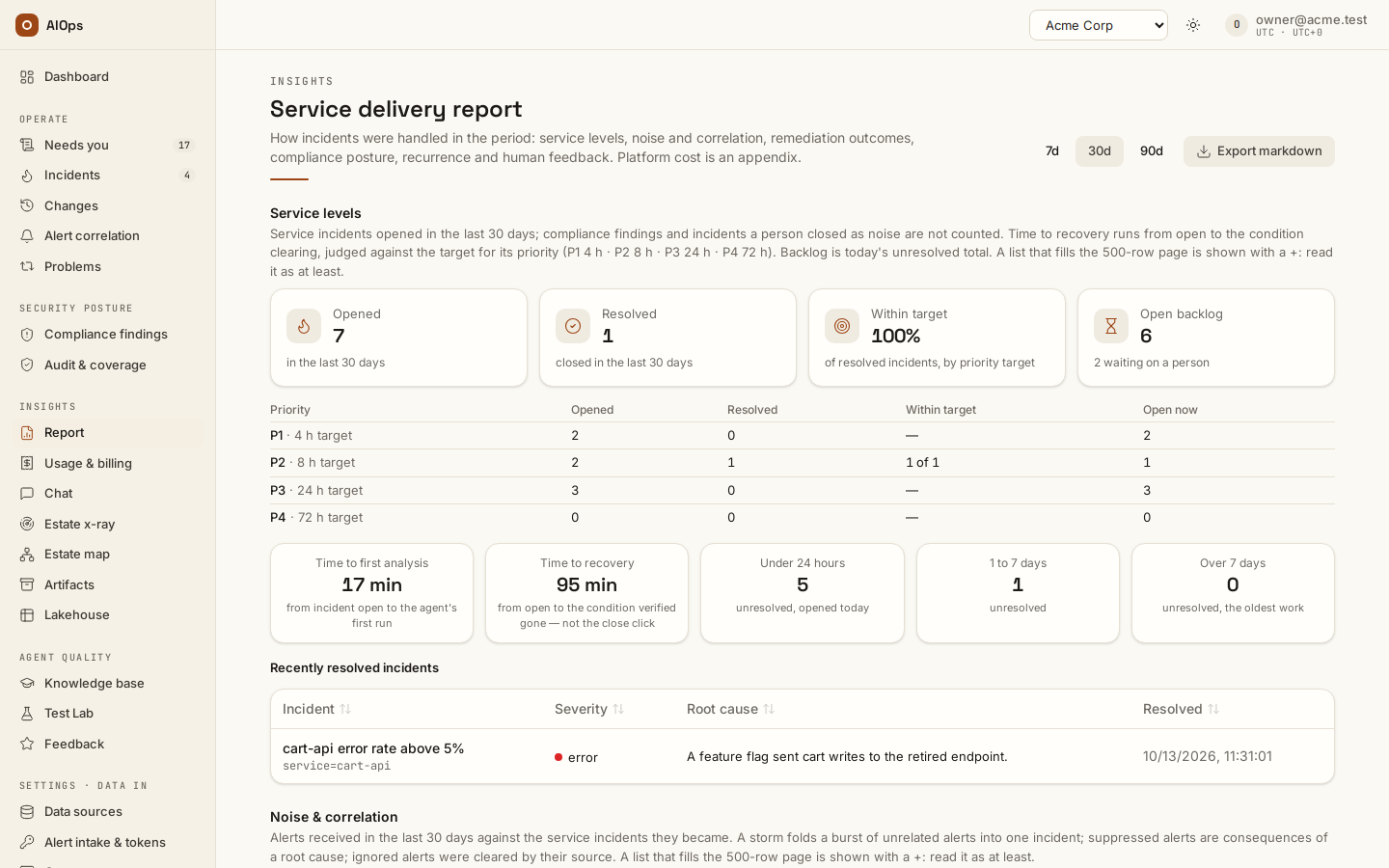
Open Insights → Report (/portal/report). Reading the report needs report.view; incident evidence also needs incidents.view, and test results need benchmark.view. Missing access leaves the affected source unavailable while the permitted results remain useful.
Read it top to bottom
The Service delivery report answers, in order, what happened to your services in the period, how fast it was handled, what the agents changed and what still needs a person. Pick 7d, 30d or 90d at the top; the choice applies to every section. Platform cost is not part of that story: it sits in a closed appendix at the end, and the month-by-month statement of the same spend is Usage & billing.
| Section | What it shows |
|---|---|
| Service levels | Opened, Resolved, Within target and Open backlog, a table by priority (P1 to P4, plus any unclassified incident) with opened, resolved, resolved inside target and open now, Time to first analysis, Time to recovery, the backlog by age (under a day, one to seven days, over seven) and the 25 most recently closed incidents |
| Noise & correlation | Alerts received against the incidents they became, Noise reduction, Grouped (incidents merged into a related incident — by the service graph, the grouping agent or a person — counted with it, not as incidents), Suppressed and Ignored alerts |
| Remediation outcomes | Changes the platform proposed or made: pre-approved automatic against human-approved, Validated, Completed, not verified, Pending approval, Failed and Rolled back, by risk tier, with the mean Approval turnaround |
| Compliance posture | The scanner-cleared score now against the first scored day of the period, unresolved findings by severity, Suppressed findings and findings Fixed — awaiting CSPM, with a link to Security posture |
| Recurrence & problems | Open problems, automation candidates, problems Blocked because a recorded fix did not hold, and the most recurring |
| Human feedback & agent quality | Analysed automatically, Root cause written, Test Lab pass rate (the lowest pillar, each pillar's newest finished run), Reviewer score and the latest Test Lab result per pillar |
| Appendix · Platform cost (FinOps) | Closed by default: cost per analysis, the last 30 days of spend per agent layer with its pricing caveats, and the costliest incidents. Test runs are excluded. AI spend is a platform cost, not a service outcome; the same run records by calendar month are on Usage & billing |
Compliance findings are not counted as incidents (they are the Security posture worklist), and neither are incidents a person closed as noise. A resolved incident is within target when its condition cleared inside the target for its priority: P1 4 hours, P2 8, P3 24, P4 72 unless your workspace sets sla_targets_h; an unclassified incident has no target. Time to recovery uses the close time only for an incident without a verified clear or a source resolution. Approval turnaround pairs each approval request with its first decision. Counts come from one page of up to 500 rows per list: a full page shows a + after the figure, because the period may hold more. A section whose data your role may not read says which permission it needs and the rest of the report stays.
Export markdown downloads the same sections in the same order, platform cost last, with the pricing caveats. It is a local download and does not create an artifact.
Use cases
A monthly service report — executive
Open Insights → Report and read it top to bottom: service levels, noise and correlation, remediation outcomes, compliance posture, recurrence and problems, then human feedback and agent quality. A + after a count means the period may hold more than one page of rows. Open Appendix · Platform cost (FinOps) only when cost is the question — or Usage & billing when the question is a calendar month's statement — then use Export markdown to download the same document.
Troubleshooting
Symptoms specific to this page. Sign-in problems, missing nav entries in general, stuck or queued investigations, and $0.0000 costs are in the Troubleshooting chapter.
| Symptom | Cause | What to do |
|---|---|---|
| Latest benchmarks missing from the report | No benchmark.view, or no graded run yet |
Grant the permission, or run the builtin suite once. |
Next steps
- Usage and billing — the same spend by calendar month.
- Feedback — the reviewer scores the report summarises.
- Benchmarks and scores — where the Test Lab pass rate comes from.
- Knowledge, x-ray and insights — the hub for every page of this group.