Lakehouse
Collection specs that fill the per-workspace telemetry store, the bronze and silver tables, read-only SQL, PII findings as compliance incidents, retention and erasure.
How-to · Updated 2026-10-26 · Describes release 0.1.164
Lakehouse
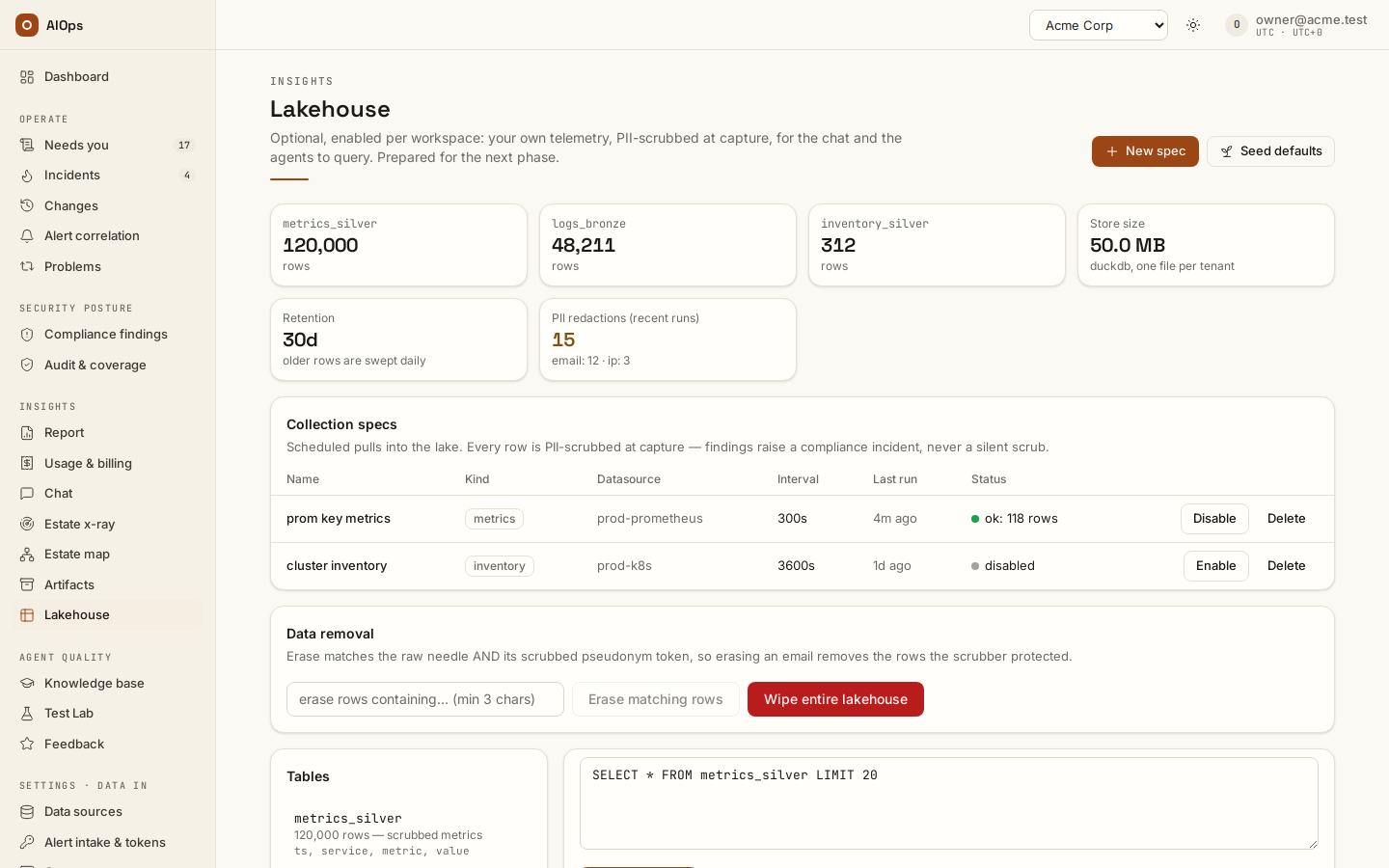
Lakehouse is included for every enabled workspace. Role permissions control access to collected data and collection management; configure and review the collection specifications before relying on its evidence.
Reading the overview and running SQL needs datasources.view. Listing, creating, editing, seeding and deleting collection specs needs datasources.manage. Erasure and wipe need members.manage.
The stat row shows a card per table with its row count, then Store size (one DuckDB file per tenant), Retention in days, and PII redactions (recent runs).
Collection specs
Requires datasources.manage.
- Select New spec.
- Fill Name, Datasource (read-role connectors only), Kind (
metrics,logs,inventoryorcustom), Interval (seconds, 60–86400) and Spec (JSON). The dialog opens onmetrics, a 300-second interval and a worked example spec. - Select Create spec. The confirmation states that the collector starts pulling on this schedule and that every row passes the PII scrubber before it lands. A duplicate name is refused.
- Or select Seed defaults to create sensible specs for your connected datasources. It reports what it created, or that defaults already exist.
You should see the spec in the table with a Last run of never and a pending status, then a real status from the collector's first pull within one interval.
The table lists Name, Kind, Datasource, Interval, Last run and Status — the collector's last result, or disabled. Use Disable and Enable per spec to pause collection, and Delete to remove one. Deleting stops collection; rows already collected stay until retention sweeps them.
Not every combination has a collector behind it. Today a typed pull exists for Prometheus with metrics, and Loki or Elasticsearch with logs; custom works against any API datasource. Anything else records a status of error: no collector for (<type>, <kind>) on its first tick — the honest signal that the pair is unimplemented, not that your credentials are wrong.
Bronze and silver
Every fetch lands a raw envelope in bronze_records — one row per collector fetch, already scrubbed. Normalized rows then land in the typed tables: metrics (name, labels, value), logs (service, severity, message, labels) and inventory (resource, rkind, config — the column is rkind, not kind). Bronze is the provenance layer; the typed tables are what you query and what lake_query exposes to the analyst. A custom spec lands its payload in bronze_records only.
The Tables panel lists the real tables, their row counts, descriptions and columns. Select one to rewrite the editor, then select Run query:
SELECT service, severity, count(*) AS n
FROM logs
WHERE severity IN ('error', 'critical')
GROUP BY service, severity
ORDER BY n DESC
LIMIT 20
You should see a result grid under the editor. Results are capped at 200 rows, and the response says when it truncated. Broken SQL, or SQL the guard rejects, comes back as an error message rather than a partial result.
PII findings are a compliance incident
The scrubber runs at capture and has no off switch. When it finds personal data in collected telemetry it does not silently redact and move on: it raises a compliance incident with the correlation key pii:<datasource id>, deduplicated while one is active, and writes a pii.detected audit event. Your own leak becomes a tracked incident with an owner, not a hidden statistic. A webhook token counts: an access log that records an intake URL with the token in its path — POST /webhook/<source>/<workspace-slug>/<webhook-token>, the form an SNS subscription must use — raises it on the connection's next collection; a sender that carries the token in a header does not.
The PII redactions (recent runs) card totals those audit events — the most recent 500 — and breaks them down per kind.
Retention and erasure
- The Retention card shows the window in days, 30 unless your platform operator changed it. Older rows are swept daily.
- To satisfy an erasure request, use the Data removal card, visible with
members.manage: enter at least three characters and select Erase matching rows. Erase matches the raw needle and its scrubbed pseudonym token, so erasing an email address also removes the rows the scrubber already protected. The confirmation names the needle; the audit trail records only a hash of it, plus how many rows went. - Wipe entire lakehouse drops every table for the tenant. It cannot be undone; collection restarts from empty on the next scheduled pull.
You should see the row-count cards drop by the reported number. Erasure is the tenant-scoped control; the platform-wide data story is in the Security and data chapter.
Troubleshooting
Symptoms specific to this page. Sign-in problems, missing nav entries in general, stuck or queued investigations, and $0.0000 costs are in the Troubleshooting chapter.
| Symptom | Cause | What to do |
|---|---|---|
| Lakehouse missing from navigation | Missing role permission, disabled workspace or old client | Features are included; check workspace status and role permissions, then refresh the client. |
| An older client asks for feature activation | Obsolete grant/acceptance workflow | Update the client and inspect workspace/permission status; no acceptance step remains. |
A collection spec's status reads error: no collector for (…) |
That datasource type and spec kind pair has no collector | Use Prometheus with metrics, Loki or Elasticsearch with logs, or custom against an API datasource. |
A collection spec's status reads error: collection exceeded 120s |
One run's whole fetch, every query included, has a 120-second limit; the endpoint was still sending | Check the endpoint's response time, or split the spec's queries across specs. |
A collection spec's status reads error: request exceeded 30s |
One request of the run, its whole answer included, has a 30-second limit | Check that query's response time on the endpoint, or narrow it (a shorter look-back, fewer series). |
A collection spec's status reads error: response exceeded 16777216 bytes |
One pull's response, once decompressed, is capped at 16 MiB | Narrow the pull: a shorter look-back, fewer series per query, or a lower limit / size. |
A spec runs ok but the typed table stays empty |
A custom spec only writes bronze_records |
Query bronze_records, or switch to a typed kind that has a collector. |
Next steps
- Estate harvest and x-ray — a scan suggests collection specs as disabled drafts.
- Insights chat — ask the analyst over the collected rows.
- Security and data — the platform-wide data story.
- Knowledge, x-ray and insights — the hub for every page of this group.