How incidents work
The concepts, the six statuses and the moves between them, severity, priority and risk tier, and how the incident list and the compliance findings table are read.
Concept · Updated 2026-10-28 · Describes release 0.1.164
An incident is the unit of work in this platform. Alerts arrive in volume; incidents are what a person actually opens. This page is the model behind the incident page: the words, the six statuses and the moves between them, how severity, priority and risk tier are set, and how the incident list and the compliance findings table are read. Reading one incident is Read an incident and its analysis; the rest of the path is listed on the Incidents hub.
Concepts
Short definitions, in the order you meet them. Fuller entries are in the Glossary chapter.
- Pillar agent — the agent that owns one operational pillar (incident, compliance, change, secops, finops, improvement, exec reporting). Every incident is routed to exactly one pillar at ingest, and that pillar's agent is what investigates it. Tuning them is the Agents and guardrails chapter.
- Incident — the case file. It holds the status, the correlation key, the grouped alerts, the assignee and every run performed against it.
- Investigation — one agent run against an incident. An incident can carry several: the first triage, a later re-trigger, a run resumed after an approval.
- Automated triage — the seven steps every incident triage takes, in the order they run: check the dependency map (blast radius); compare against known issues (incidents on neighbouring services, open tickets, earlier occurrences); check cloud health (is the cloud provider itself having an issue); check recent changes; pull the latest alerts, logs and traces; generate the incident summary; identify the fault domain (the layer — provider, change, dependency, compute, network, data or application — and where). Known issues and cloud health are checked by code before the agent starts, with Check cloud health and known issues before each analysis on Guardrails (on by default), and code names the fault domain after the wrap-up; the dependency map is code too when the blast radius was recorded at intake, and the recent changes when the platform pinned a suspect change. The agent checks the recent changes, pulls the alerts, logs and traces and writes the summary. When a certified step runbook's selector matches the incident, the agent also reads that runbook first, as the known fix (runbooks as triage knowledge). The incident page shows each step's result on the Automated triage card — see The incident page, top to bottom.
- Root cause analysis (RCA) — the written analysis an investigation produces at the end of its run. Spelled out here once; the rest of these pages say RCA.
- Approval gate — the point at which tool or egress policy requires a named human; a gated request may be a read. What is gated is set by the intrinsic write floor plus any extra gates your tenant adds; how you decide one is Approve and run a fix.
- Recheck — a bounded, read-only re-analysis that asks "is this condition still happening right now?". Throughout these pages, recheck is the mechanism and the card on the incident page; post-close verification is the specific recheck that Mark resolved starts. They are the same machinery pointed at different questions.
Four properties are worth reading before you use the page.
One incident per root cause, within limits. Ingest deduplicates alerts and correlates alerts on the same service into one incident: 300 distinct alerts on one service land in the list as one row whose Alerts column reads 300, not 300 rows (re-fires of one alert do not add to it). A burst across unrelated services opens one incident per service, however many there are. Services failing together on a recorded dependency are grouped under the top-most failing one — at once over edges allowed to fold, otherwise by the grouping agent (on by default); victims remain as suppressed evidence on the root incident and a merged incident points to it. The rules that decide all of this — dedupe, correlation, suppression and grouping — are owned by Storms, unmapped and flapping signals.
Correlation only ever joins an active incident. Joinable means anything not yet resolved — escalated included, so a fresh burst folds into the incident a human is already working. A resolved incident is not re-joined, so a fresh alert on the same correlation key opens a new incident row — unless the workspace sets a reopen window (aiops_reopen_window_h, off by default), inside which the incident resolved most recently on that key reopens, unless a person closed it as known noise. When you are hunting a recurring problem you will find a series of incidents, not one incident with a growing alert count; each is tagged reopened, repeated or new when it opens (see Last-known-good record and the reopened, repeated or new tag). An incident that keeps reopening inside the window can be marked flapping, and an alert that names no service can be kept out of every group — see Flapping incidents and Unmapped signals.
Investigation and execution are separate. Read access is enough to investigate. A prepared incident plan needs an execution-capable connection with Allow use for approved plans enabled, the supported operation, a confirmed target and required access. Choose separate credentials or a shared investigation/execution credential on Data sources. The platform selects a compatible connection or asks you to choose; it does not require a saved remediation route for these prepared steps. Route-based plans still require an enabled matching route. Open the action with Review fix or Review pull request, then inspect Prepared change before approving it; approvals and change windows still apply. Configured pre-approval automation can open eligible pull requests, but does not merge them. When the fix follows a step runbook, the incident's L5 row lists the runbook's steps in order — check, back up, change, validate, roll back — each with its status (Not started, Running, Done, Failed, Skipped — an earlier step stopped the run, Not needed), and the change page shows the same list as Runbook steps.
A close is a claim. Marking an incident resolved starts a bounded, read-only verification run and records its verdict against the incident. Read Verify recovery for exactly how far that goes today — it records evidence, and a Still present verdict hands the incident back to a human.
The incident lifecycle
Six statuses exist. The list, the Dashboard and the incident header all use the same words; compliance findings use the same six.
| Status | Meaning | How it is entered |
|---|---|---|
open |
Found, not analysed yet — no agent run has worked it. | From an alert webhook only when the alert is held at intake: the workspace sets aiops_require_identity_labels and the alert carries neither a service/app/deployment/namespace label nor an alertname. No run starts, and its summary reads Held for triage — missing identity labels with the fix at the source. With Send alerts that name no service to the triage queue on (see Unmapped signals), an alert with no service label after the label map opens here as an unidentified service incident, whatever its alertname, app or namespace: its summary reads Held for triage — unidentified service — no service label, and Analyse lifts the hold. A built-in detection warning opens here too, held: no analysis, ticket or notification until Analyse or an unheld alert joining it lifts the hold (see the Built-in detection guide). An alert on a service that depends on another over a dependency allowed to fold opens (or reopens) here for the group window, its analysis waiting in case that dependency fails too (the grouping wait, not for a P1; see Alert storm): its ticket and notification go out, and the analysis starts when the window ends or at Analyse. Otherwise alert ingest stamps investigating immediately. Compliance findings open here routinely: a P3/P4 scanner finding, with or without a prepared fix for its type (a P1/P2 finding — CRITICAL is P1, HIGH is P2, or a mission-critical resource — analyses on its own while Automatic analysis of P1/P2 findings is on in Guardrails, the default), or one pulled while automatic compliance analysis is off, paused or over budget; a failed platform check with no agent analysis (a check of platform settings, or an estate check while automatic analysis is off, paused or over budget); the telemetry collector's PII finding. Its summary reads Not applicable — no prepared fix yet with why no run started (for a check of platform settings, the setting to change) — or A prepared fix is available — waiting for a person to start it for a P3/P4 finding whose fix is ready — and Analyse starts a run on any of them. |
investigating |
An agent run is working the case. | Ingest opens the incident and starts the run; also a re-triggered or scheduled run. |
awaiting_approval |
At least one policy-gated action is waiting for a human decision. | The engine paused at the approval gate. Not the shipped default — see Which posture your deployment runs. |
remediating |
An approved write ran, or a remediation route executed. | Approve at the gate, or a released Approve & run succeeding. |
resolved |
Closed. The only status with no agent work left. | The alert source cleared every grouped alert, an investigation found nothing left to do, or a person clicked Mark resolved — or resolved, in their own ticket system, the customer's ticket the incident came in from. Also when built-in detection stops watching its alerts (Turn off, a rule switched off, a connection opted out): nothing was seen to clear, so its resolution note says so, it is not verified after the close, and its ticket gets a note and stays open. |
Needs attention (escalated in the API) |
Analysed and handed to a person: waiting for the human who will apply the fix. | The agent found work left to do, someone pulled the andon cord with Escalate, an approval expired, or the run failed — including when its pillar agent is disabled. |
Properties of this machine that matter operationally:
escalatedis not closed. It is where an incident waits for a person. Review and execution remain available when the plan, permissions and execution checks allow them; Mark resolved records the human's closing decision.- Out of
resolvedthere are three legal moves:investigating(a fresh analysis of the same incident — the Re-analyse with all alerts button on the Pipeline card, the REST callPOST /incidents/{id}/reinvestigate, or the tenant MCP tooltrigger_investigation, all with permissionincidents.act, a scheduled pillar run, or its alert firing again inside the workspace's reopen window),escalated(the post-close verification re-opening a wrong close) andopen(a held built-in detection warning or an unmapped alert firing again inside the reopen window: held again, with no analysis). A fresh alert does not re-open a resolved incident; it opens a new one — unless the workspace sets a reopen window (aiops_reopen_window_h, off by default), inside which it re-opens the incident intoinvestigatingwith a fresh analysis (a held built-in warning or an unmapped alert re-opens it intoopen, held again, with no analysis). - Escalation is legal from every status, including
resolved. It goes through the state machine like every other change, so it is FSM-guarded and audited; every source state permits it, so nothing is refused. The portal only offers the Escalate button while the incident is neitherresolvednor alreadyescalated, so re-opening a closed incident by hand means using the API or the MCP tool rather than the page. - The alert source can only auto-close an incident from
openorinvestigating. An incident inawaiting_approval,remediatingorescalatedis never pulled shut by aresolvedwebhook; those states belong to a person. One exception: anescalatedincident that came in from a customer's ticket (a ServiceNow or Jira inbound webhook) resolves when that ticket is resolved in its own system and no other alert of the incident still fires — the person closed it there. Its resolution note reads auto-resolved: its ticket INC… was resolved in ServiceNow, unless a person already wrote one, and Keep an incident open while its fix waits for a decision holds it as it holds the quiet-window close. The separate quiet-window close (Settings → Guardrails → Auto-close stale escalated incidents) does close anescalatedincident whose alerts all cleared and stayed quiet; with Keep an incident open while its fix waits for a decision on, it skips one whose change request is still drafted, requested, waiting for approval or approved but not run, or proposed for a fix a certified runbook matches, and the timeline records Kept open — a fix waits for a decision once. escalatedcan move toremediating. A human releasing the prepared change with Approve & run on the incident the agent handed them is the normal way a fix gets applied through the platform, and that action must reach post-fix validation.- Illegal transitions are logged and skipped rather than raised. Concurrent actors race legitimately, and the platform never loses an incident to a race. The trade-off is that a status change the code asks for but the machine forbids is silently a no-op — that is exactly what happens to a post-close verification, described in Verify recovery.
Severity, priority and risk tier
Four words, four questions. Fixed rules set each one; no model does.
Severity is how bad one alert or finding says it is: critical, error, warning or info. It comes from the source (a label, Azure Monitor's Sev0–Sev4, a scanner's rating); the workspace severity map translates other words. A CloudWatch alarm is critical unless its description declares severity= or a severity dimension does. A ticket's priority is read as its severity (Azure DevOps: Severity, else Priority). A scanner finding with CVSS 9 or more on an internet-facing resource becomes critical. An incident takes the highest severity among its alerts. Severity is not criticality.
Criticality is how important the resource is: low, medium, high or mission-critical. You declare it with an alert label (criticality or business_criticality) or the workspace criticality_map of name patterns; the higher of the two wins, and an incident keeps the highest among its alerts. tier0–tier3, ServiceNow's 1 - most critical to 4 - not critical and SLA figures such as 99.99 are accepted; other words are ignored. It is never inferred, and cloud resource tags are not read.
Priority is P1 to P4, the order to work in: critical is P1, error P2, warning P3, anything else P4. It goes one step higher when two or more services sit in its blast radius (any service-graph edge, up to three hops), and one more for a mission-critical resource, never above P1. It is re-derived as alerts join, and after a merge or a storm split.
Risk tier is L0 to L3: who may release a fix (always approvals.decide; operators only request). L0 is advice with no write path. L1 is a reviewed pull request. L2 is a change to live infrastructure, released by one approver; a production label (env, environment, stage or tier set to prod, production, prd or live) lifts any fix to at least L2. L3 is a network-device push, or a fix whose blast radius over declared or traced dependencies reaches three or more services; it needs two distinct approvers. A person releases L2 and L3 only inside the change window, when one is set. An override or a change class may raise a tier, never lower it. A compliance finding's tier follows the reach of its fix, not its severity, one step higher on an internet-facing or sensitive-data resource. The risk tier is not the model tier.
Change class
The change class is how the fix is released: standard only when a certified runbook covers it — even at P1, when it is released under the standard rules, not the emergency ones; emergency for any other P1 or critical incident; normal otherwise. Demoting or disabling the runbook makes the request normal again. A person can only raise a class, normal to emergency. Every fix — standard included — is then validated against its change request's validation plan: a typed posture fix by its own compiled read; a fix a Post-change validation rule matches, or whose alarms and health signals the platform can read, by code in rounds a few minutes apart before any agent run; any other fix — an Azure or GCP fix with no alarm, or with Watch the signals of a fix that no validation rule matches off — by the verify as before. A reboot-type fix on an instance or VM is preceded by a backup (see Verify recovery and Changes reference → Pre-change backups).
The incident list
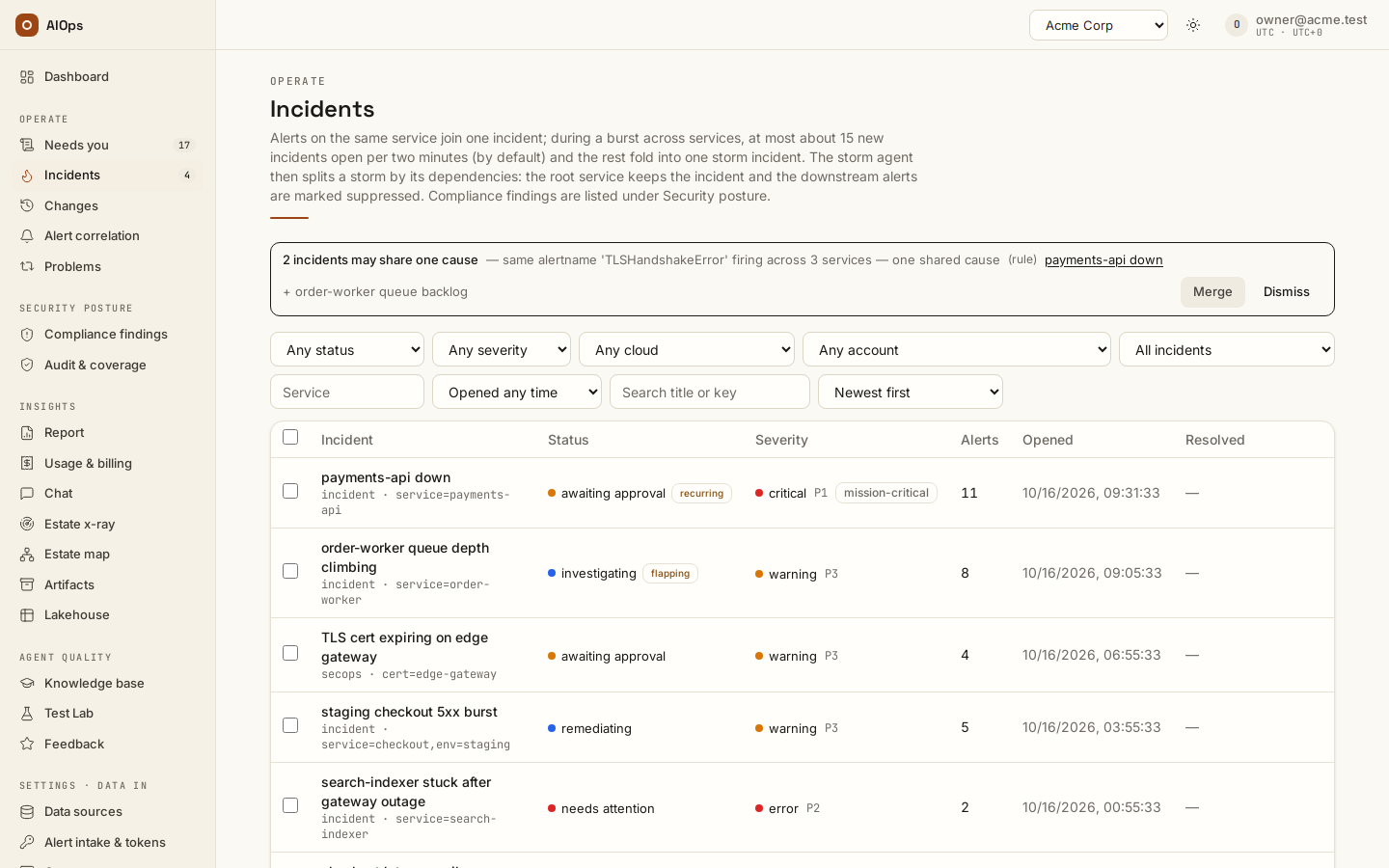
Open Operate → Incidents. Reading the list needs incidents.view. The default order is newest first, and each record leads with the issue, its service, current state and priority.
Above the filters, Incidents at a glance counts what the filters match: the total, then by Severity and Status — each count is a button that sets that filter (pressed again, it clears it), and each is counted under every other filter but its own, so picking a severity still shows how the other severities stand — and Opened per day, the incidents opened on each of the last 14 days (UTC). The Compliance findings list opens with Findings at a glance, the same counts plus Domain (Posture, Vulnerabilities, Patching, Backup), where a count opens that domain's list. Narrow the list with the filters above it — Status (one status, or Unresolved (any but resolved) for every status but resolved: ?status=unresolved, the Dashboard's open count), Severity, Fix state, Cloud, Account, Triage, Service and Opened — search titles and keys, and pick the order under Sort; Clear filters resets them. Cloud (AWS, Azure or Other / not cloud-tagged) is read from the incident's alerts: an alert's own cloud label counts first, else the webhook that delivered it — CloudWatch and Security Hub are AWS, Azure Monitor and Defender are Azure. An incident whose alerts came from more than one cloud shows under each of them and never under Other. Account keeps the incidents with an alert that names that AWS account (CloudWatch stamps account) or Azure subscription (Azure Monitor stamps subscription) and composes with Cloud; it lists the accounts a read connection or a finding names, so an account seen only on alerts is not offered (open the URL with ?account=<id> to use it anyway). Alerts that arrive through Grafana, Datadog or a generic webhook count as Other unless they carry a cloud label; map your own tag to cloud with the workspace label map. Triage set to Unidentified service — waiting for triage keeps the incidents an alert naming no service opened while the workspace sends such alerts to triage and that nobody has analysed yet (?triage=unmapped) — the same queue as Needs you → Triage. Fix state set to Fixed — awaiting CSPM keeps the incidents waiting for their scanner (?awaiting_cspm=true; see Finding states below). In the Status column an unidentified service chip marks those incidents, a flapping chip an incident that kept reopening and a Fixed — awaiting CSPM chip an incident waiting for its scanner; see Unmapped signals and Flapping incidents. There is no pillar filter: the sidebar is the switch between pillars, and this list holds every operational pillar's incidents with the pillar named under each title. Sorting and filtering run on the server across the matching history; paging loads 50 records at a time. The URL preserves the current view for bookmarks and the Back button. A report's Review these incidents link also preserves the report's exact opening-date period.
The Incidents list never offers the compliance pillar. Compliance findings — the compliance pillar's incidents, opened by a scanner finding, a failed platform check, a captured cloud change or a PII scan — live under Security posture, one menu item per compliance domain — Posture, Vulnerabilities, Patching and Backup (/portal/incidents?pillar=compliance&domain=<domain>; without domain, every domain at once with a Domain column). A row belongs to one domain: its findings' domain when they all share one, else Posture (an older incident holding the findings of several rules, such as the shared Software and Configuration Checks one). It is one table, one row per rule: Rule, Finding (the rule's title and one resource it names, cut to the column's width with the whole name on hover — an image finding names its sha256 digest), Source (AWS Security Hub, Defender for Cloud, AWS Backup (platform read), Patch Manager (platform read), Platform check or Telemetry PII scan), Resources and Status, with the same statuses as incidents. From 1280 px the table fits its card and Finding keeps room for its title: a long source wraps at its spaces, a CVE id after its hyphens and a Fixed — awaiting CSPM chip at its spaces. The Source filter narrows the table to one of those sources. The Account filter keeps the rules with a Security Hub or Defender finding in one AWS account or Azure subscription, and Resources then counts that account's resources only; the incident's Resources card has the same filter and names each row's account. It offers every account a read connection names or a Security Hub or Defender finding names. An account reads as connection name (account ID) when a read connection names it — an AWS connection through its role ARN, the account its last Test confirmed or the accounts in its Scope JSON, an Azure connection through its subscriptions — and as the bare ID otherwise; connection names, and accounts only a connection names, are shown to people with datasources.view. A platform check EST-01 to EST-06 stays under the filter when a resource it flagged, open or suppressed, is in that account; its Resources count includes the ones past the 50 its evidence lists (a scan before 0.1.110 counts only those 50). These checks read only the account of each AWS connection's own credential (role ARN, else the tested account, else a lone Scope account) and each Azure connection's subscriptions, never the other accounts a Scope JSON lists; the line under the filters names the connections that check the picked account. Other platform checks and PII scans have no account and are hidden while an account is picked. A row opens the incident, which is where the fix is reviewed. The Dashboard's Incident & Problem section leaves compliance findings out the same way; its Compliance section counts them by domain. The incident record, its actions and its permissions are identical in both views.
Scanner sync. The card shows with report.view or pillars.manage. A workspace owner (members.manage) sets Pull from scanners automatically, from Off through daily, and reads Last automatic pull. Sync now needs pillars.manage; other readers are told a workspace owner can press it. The pull result names pacing, partial coverage and stale repeats; see pulling findings.
Score cards and Posture trend. The four cards above the table — Scanner-cleared score, Unresolved scanner findings, Scanner-cleared and Scanner findings suppressed — count Security Hub and Defender findings as of now. The cards and the trend follow the page's Account and Source filters, and a line above the cards says so; with no filter they count every account (a Telemetry PII scan source has no posture of its own, so they then count every scanner finding). Posture trend shows the same numbers over time: Day (the last 30 days), Week (the last 12 ISO weeks, Monday first) or Month (the last 12 calendar months), a week or month showing its closing day (its New and Resolved add up all its days), with the change from the previous one. Trend account keeps one AWS account or Azure subscription, named as in the Account filter; Trend source picks AWS Security Hub, Defender for Cloud or Platform checks — the checks in scope when each day was saved (a check you disable stops counting from the day you disable it; the days already saved keep counting it), per offending resource, with no score. Both take the page's Account and Source whenever those change — Following the page filter says so while they match — and can be set apart from them to compare. With an account chosen, Platform checks counts the resources EST-01 to EST-06 flagged in that account, matched as the Account filter matches them; the other platform checks have no account and are left out, as the line under the trend filters says. The platform saves each workspace's posture once a day, at the close of the UTC day. Its first save also rebuilds every earlier day (since the workspace was created, at most a year) from the stored findings, risk decisions and check results and marks those days reconstructed, as it does for a day it could not save within an hour of its close; until a day has been saved at its close, the line under the cards says when snapshots start, and from then on it names the first saved day. A saved day never changes afterwards. Solid marks are days saved at their close and faded ones reconstructed, including the earlier days the first save rebuilt, which are kept as saved but stay faded; an outlined one is today, which stays live until midnight UTC. Show the numbers lists every period; Export period (report.view) saves the period as a report under Artifacts, its title naming the account or source chosen — one row per day with where it came from, plus the weekly or monthly rollup. The same data is GET /api/aiops/{tenant_id}/findings/score with range, account and source.
Where rule codes come from. A code such as EC2.19 or S3.13 is an AWS Security Hub control ID, read from the finding Security Hub sent through its API. A Defender for Cloud row names the recommendation Defender reported. A code such as EST-02 or ACC-02 is one of the platform's own catalogue checks: EST-01 to EST-06 read your cloud estate through your connections, and the other prefixes check platform, repository and connection settings. None of them comes from the knowledge base or from the agent's own knowledge; the Source column says which it is. A row reading Many rules (storm) is a burst of scanner findings across many rules that arrived within a couple of minutes and was folded into one incident; open it and its Resources card lists every finding, each with its own Decide.
Deciding on a resource. Every row of an incident's Resources card ends in Risk decision: Decide with approvals.decide (Change decision on a resource a live decision already covers), Request decision with incidents.act alone; the opened finding's header offers the same. The dialog offers Fix (opens a change request the Change agent drafts) or Suppress (the risk is owned until the expiry, left out of every fix) — neither is chosen for you — for that resource or the whole rule, with a Reason of at least 10 characters and an expiry date — 90 days out by default, from tomorrow to at most a year, none for Fix. A decision is a request: it lands in the risk register as requested and takes effect once an approver other than you approves it. An approver finds it under Operate → Needs you (Risk request), in the finding's Decision history and under Decisions (filter Requested), with Approve and Reject (a rejection takes an optional note for the requester; nothing was in effect, so nothing changes). Your own request offers Approve as the only approver: the platform allows it only when no one else in the workspace can approve, records it as self-approved, and otherwise answers another approver must approve this request. With Never let a requester approve their own exception on (Guardrails → Risk exceptions) the button is gone and the request always waits for a second approver. Each decision names who requested it and who approved or rejected it, with the times. A suppression always carries an expiry, and so does a compensating control decided before Fix and Suppress replaced the three-way choice (its rows still read mitigated (compensating control)); with Act when an exception expires on, the moment it passes the platform marks the decision expired, reopens the finding's incident for a person (Needs you shows it as exception expired, and the incident's summary as Reopened — the suppression expired …), and records the posture before and after — the decision's history reads expired · the platform reopened 1 incident at … · managed-risk score … → …. Off, an expired exception just stops suppressing until the scanner re-sends the finding.
Fixing a finding. A compliance control, a scanner finding, a vulnerability or a security alert (anything routed to SecOps, such as an alert from Trivy, Wazuh, CrowdStrike or Falco, and any alert whose labels name a CVE: a cve, cve_id or cve_ids label or a CVE id in its alertname) is not an incident: its fix runs only after a person approves it, never on its own, whatever switch is on or runbook is certified. Its fix is the prepared plan, reviewed and released through its change request like any other; its analysis, routing and runbook match still run automatically. In a workspace with a write-capable connection its analysis is never offered a single-call route; with Let the analysis pick a matching route instead of typed steps on, it is offered only the enabled step runbooks certified at their current revision whose selector matches and whose targets come from the alert, none when a person left resources out of the run, and naming one puts that runbook's steps, bound from the finding's alert, into the same change request. A pre-approved route or a certified step runbook that matches it is recorded as not run — A finding is fixed only after a person approves it: a compliance control, scanner finding, vulnerability or security alert never runs on its own — even when the runbook makes its change request standard and both automatic-fix switches are on; an incident's matching runbook still runs on its own. A finding's auto stance means its fix is eligible for a pre-approved change a person releases, not an unattended one; with Standard change for a runbook route's operations on, a pre-approved remediate-… route that covers the fix's operations can still record that change as standard.
Security posture → Audit & coverage holds the reports around that table, not another list of findings: Decisions (the risk register, with Export for auditor, whose last column names each decision's account the same way, or every account for a decision on a whole rule), Frameworks (the read-only SOC 2 and ISO 27001 report — each requirement's status from the platform's own checks and your attestations) and Coverage. There is no separate Findings tab: scanner findings are worked from their rule's row in their domain's list.
Finding states. A scanner finding is open until the scanner itself clears it. In between it can carry a fix marker: fix reported — awaiting CSPM after a person chose Mark resolved (a claim), or after an approver released a prepared fix that wrote to its resource (stamped at the write, and taken back when the post-fix validation finds the condition still present or the change is rolled back), or fixed — verified on the resource, awaiting CSPM after the post-fix validation read the resource and found the fix in place. The CSPM is the cloud's own posture scanner — Security Hub or Defender for Cloud. An operator's Verify now on an escalated scanner incident that comes back cleared stamps the same verified marker. Neither marker clears the row: only the scanner's own PASSED / RESOLVED state does, on its next evaluation. While any finding of an incident carries a marker and is still open, the incident shows Fixed — awaiting CSPM in its header and on its list row, even when the incident itself is already resolved; it is a derived label, not a status (API: awaiting_cspm on each incident). The post-fix validation reads the resource through your connection; the post-close verification that Mark resolved starts on a scanner incident reads only the platform's finding register. Neither re-pulls Security Hub or Defender. A scanner re-send whose observation time is not newer than the recorded fix is a stale repeat, not a regression: it is skipped — the marker stays, no new incident, no run — and counted as stale skipped in the sync report on the Scanner sync card. For Security Hub the observation time is the later of LastObservedAt and UpdatedAt; for Defender it is the assessment's statusChangeDate, the last time Defender changed its verdict. A re-send observed after the fix drops the marker and opens the incident again, as before. Defender gives no time for a re-check that leaves the verdict unchanged, so a Defender re-send is skipped this way only within 48 hours of the fix: one still unhealthy after that drops the marker and opens the incident again.
Open an incident to review its impact, evidence and next action. Incidents enter through incoming signals — your alerts, built-in detection and synthetic checks (source synthetic) — scheduled work or Dashboard → Raise a concern. Assignment and other permitted actions live on the incident record.
Use cases
Dana, SRE on-call (operator)
Paged at 02:40. She opens Incidents and sees one row for what her phone reported as eleven alerts. The incident page already shows a finished investigation: the root cause names a bad config pushed at 09:12 the previous day, blast radius is one service, confidence is 0.86, and the plan says the change is in a repository. She selects Review pull request, confirms Approve & create PR, reviews and merges the resulting PR, then returns to the incident and clicks Mark resolved with the note merged PR that reverted the canary config. Four minutes later she checks the Recheck card, sees Cleared, and goes back to bed with a durable record of the whole path.
Priya, approver
Her role can decide approvals and submit feedback, but it holds neither incidents.act nor pillars.manage, so she sees no Mark resolved or Export RCA buttons, and Review fix only when the next step is releasing a fix. Her queue is Needs you. She opens the linked incident, reads the proposed command and the two tool rows that justify it, notices the namespace is wrong, clicks Edit, corrects it, then Run edited command. Her edit, her identity and the executed result are all in the audit trail. Because her tenant runs the pause posture, this is a routine part of her week; on a default install it would be rare.
Marco, incident reviewer
Every Friday he opens the resolved and escalated incidents from the week, reads each RCA and rates it 1 to 10. Where the root cause was wrong he clicks Needs correction and writes what the agent should have checked. Each correction lands as a draft in Knowledge base → Review queue, badged From your corrections, where an approver accepts it before the agent uses it; his scores move the model-tier suggestions. He needs incidents.view to read the incidents and feedback.submit to rate them, and nothing more.
Aisha, compliance officer (executive)
She never touches a command, and her role runs no analysis: no Mark resolved, no Export RCA. As an executive she does approve — risk requests, suppressions and change releases — which is when she sees Review fix. She uses the incident page as evidence. The provenance banner shows how each incident closed, the approval cards prove a named human authorized every write, and the recheck history shows what was verified and when. When she needs a citable copy of an RCA she asks an operator to run Export RCA, then reads the append-only artifact from the Artifacts page. Tenant-scoped audit for the same events is in the People, access and audit chapter.