Read an incident and its analysis
The incident page top to bottom, the Probable cause card, the last-known-good record, how to read an RCA and how to ask the incident a follow-up.
How-to · Updated 2026-10-27 · Describes release 0.1.164
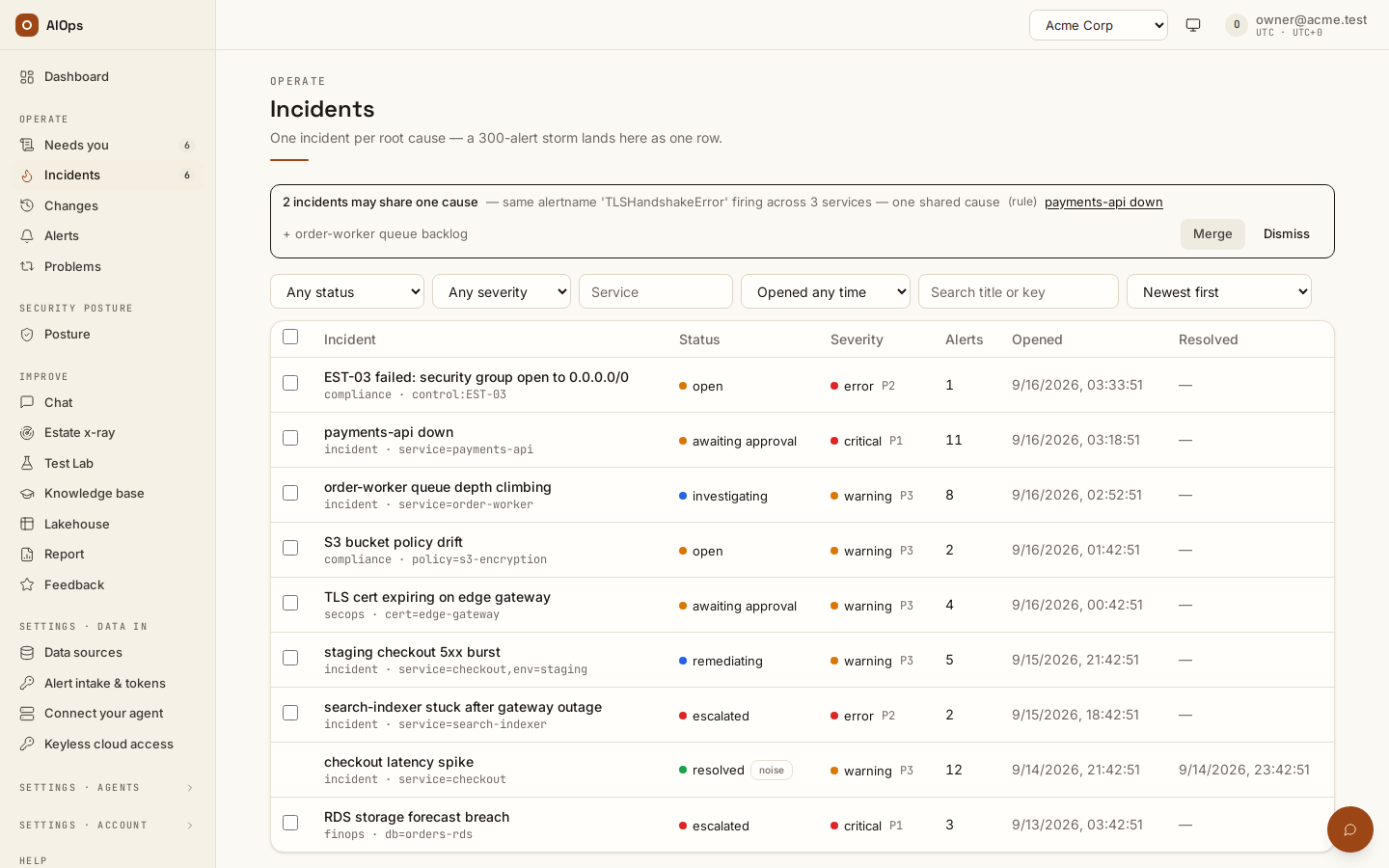
The incident page is where every decision about an incident is made. This page reads it top to bottom — header, banners, grouped alerts, pipeline, recheck card, investigation panels and artifacts — then the Probable cause card, the last-known-good record, the RCA and the incident's own conversation. The words and statuses it uses are defined in How incidents work; acting on what you read is Approve and run a fix.
Watch an alert become a fix
A walkthrough with English narration and synchronized captions: the incident list, one incident's detail, the agent activity trail with a step expanded, the pipeline view and the approval gate. It is a guided tour of those screens, not a click-by-click tutorial, and no change is released in it. Recorded on the restored portal with sample data; these clips demonstrate the controls and do not prove real-cloud operation.
Video: An alert becomes a fix: incident, agent activity and the approval gate — Watch (1 min) · Captions
Recorded 16 Sep 2026 on 0.1.74 — the page has changed since; see The incident page, top to bottom.
The incident page, top to bottom
1. Header and actions
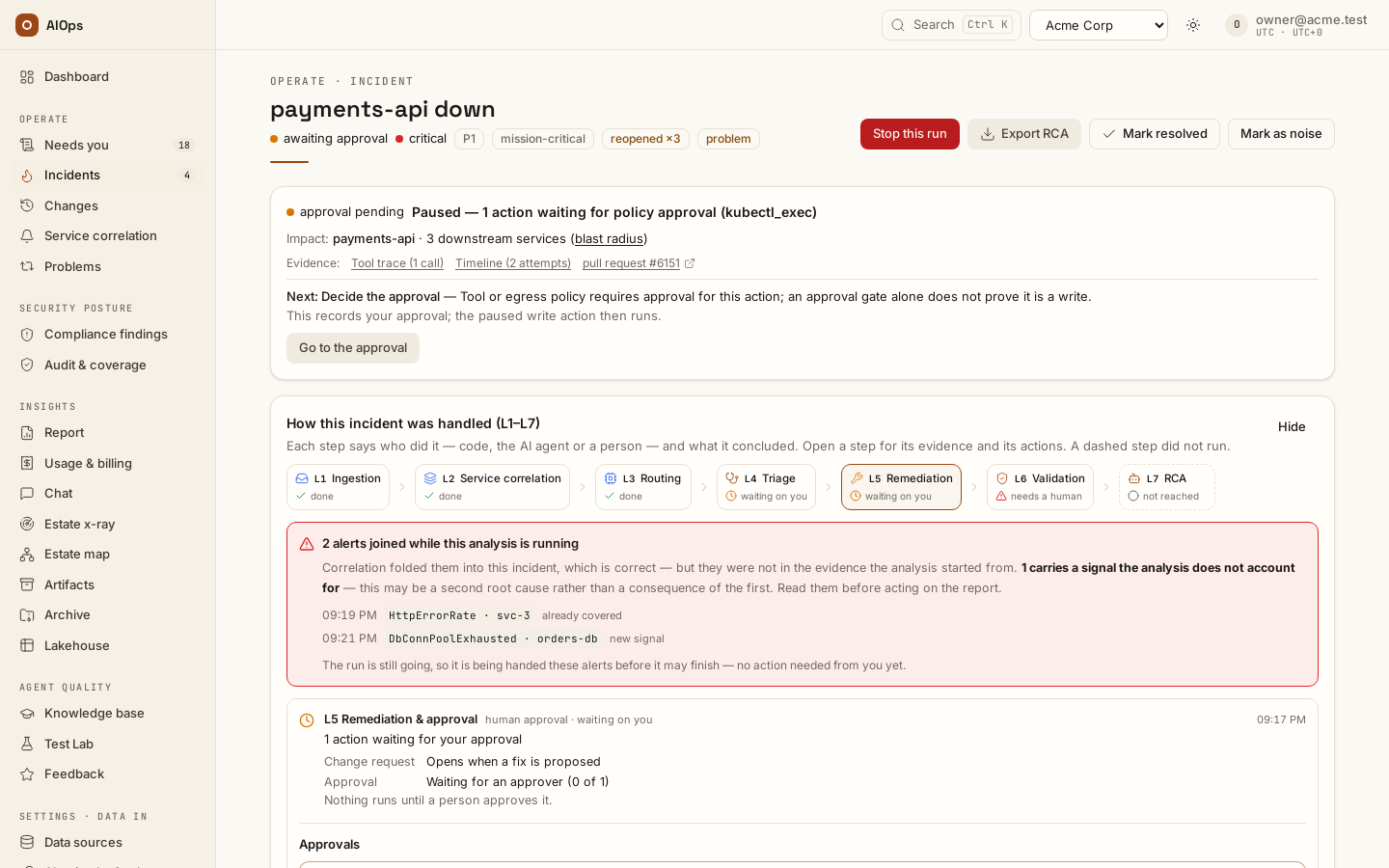
The header shows the incident title, status, severity and priority, with Export RCA. A compliance finding opens its own page, /compliance-findings/<id>, whichever link opened it (a link to /incidents/<id> moves there): its header names its domain, its rule and where it came from (Rule S3.9 · AWS Security Hub) with Export report, its resources come before the pipeline, whose L1 and L2 read Finding received and Grouped by rule, and the incident-only cards and chips below are left out. A suspected change-induced · CHG-… chip names the change fixed code pinned to the incident; when the incident reopens, the pin is chosen again for the episode it opens, and cleared when no change qualifies (audited Likely change re-pinned); a later change harvest re-pins from the alert that opened that episode, never from one merged in from another service. The Probable cause card ranks every change. When that change was made on a service this one depends on — one hop upstream, over a dependency a person declared — the chip adds · via <service>; such a pin is attribution only and never groups alerts (Settings → Guardrails → Suspect change across a declared dependency turns it off). An unidentified service chip marks an incident whose alert named no service, and flapping · reopened N× in W h one that kept reopening; a problem proposed chip links to the problem record that flapping proposed (a plain problem chip is an open one). With Recommend rolling back the pinned change first on (the default since 0.1.133), a Recommended first card sits above the pipeline for a pinned change: what it was, why it is suspected, the exact rollback (for an RDS parameter, the command that sets back the value the previous recorded change set) and Draft revert of this change; a platform change points to Roll back on its change page, and a change that cannot be rolled back says why — never an invented value. The summary's next step then reads Roll back CHG-… first (Go to the rollback opens the card) instead of applying the proposed fix, the stored plan and its change request list the rollback as their first step, and the agent is told to lead its plan with it. A value the privacy filter redacted, or one only some of a write's parameters recorded, is named as not known and left out of the command. Once the rollback has run, or the incident is resolved, the card steps aside. The summary leads with what is known and the next action. Its Review fix button (Review pull request for a repository change) opens the L5 layer of the pipeline, which holds the proposed action and its execution controls; Mark resolved, Mark as noise and Stop this run stay in the header beside Export RCA.
A noise chip marks an incident closed as known noise and names who closed it. A similar: noise chip means the previous incident with the same correlation key inside the problem window (30 days by default) was closed as known noise by a person: hover for who, when and their note, click to open it. A noise close is never reopened, even inside a reopen window: the next alert on the key opens a new incident with this chip. It is a hint only; the incident is analysed, paged and counted as usual, and with the automated triage switch on its analysis is told the same in its known issues.
Which buttons you see depends on both permission and status:
| Button | Shown when |
|---|---|
| Export RCA | You hold incidents.act. Always shown, including on a resolved incident. |
| Review fix / Review pull request | You hold incidents.act (to request) or approvals.decide (to release), a route matched, every step of the proposal is a supported typed operation (a plan runs only as a whole), or the analysis named a step runbook its change request follows, the incident is neither resolved nor remediating, and platform execution is available outside computer-assist mode. When no route matched and any step has no supported operation, the next step reads Not applicable — no runnable fix and there is no button. |
| Mark resolved | You hold incidents.act and the incident is not resolved. |
| Mark as noise | You hold incidents.act and the incident is not resolved. It opens the Mark resolved dialog with the known-noise box already ticked. |
| Stop this run | You hold incidents.act and an analysis is running or paused for an approval. A running analysis stops at its next step, without its wrap-up; a paused one has its pending approvals denied. |
| Escalate | Any member who can see the incident, while the incident is neither resolved nor already escalated. |
A review does not prove the credential can execute the action. The connection must remain enabled, explicitly allow approved plans and have the exact required access. If access is missing, users with connection-management access can choose Connect write access (Connect repository for a repository fix) on the prepared change to return to the setup form.
2. Provenance banners
A resolved incident carries a banner saying how it closed, because an incident should never silently disappear:
- If every grouped alert ended up Cleared (
ignored), the banner reads that the alert source cleared them (auto-resolved), and notes that a live underlying issue will surface again on the next alert — as a new incident, or on this incident when the workspace sets a reopen window (aiops_reopen_window_h). - Otherwise it names who closed it: a person, who reported the fix (recovery still needs its own check), or a verified remediation, whose post-fix check confirmed it.
An escalated incident carries its own banner naming the assignee and stating that the incident is out of the agent loop until a new investigation is started on it.
3. Grouped alerts
The alerts folded into this incident are listed in the pipeline below: L1 Signals received as they arrived (time, name, service), and L2 Service correlation & noise suppression as chips with each alert's role, root first. Each shows the first eight and counts the rest. Each chip shows the alert status (Received, Root alert, Related — grouped or Cleared — API values received, correlated, suppressed, ignored) plus the service label, the alert name, or the first 16 characters of the fingerprint when neither label exists.
Why a given alert carries a given status — what dedupe collapsed, what correlation joined, what suppression folded in as a consequence and how services failing together are grouped — is documented once, in Storms, unmapped and flapping signals. Read it there rather than inferring the rules from these chips.
4. Pipeline
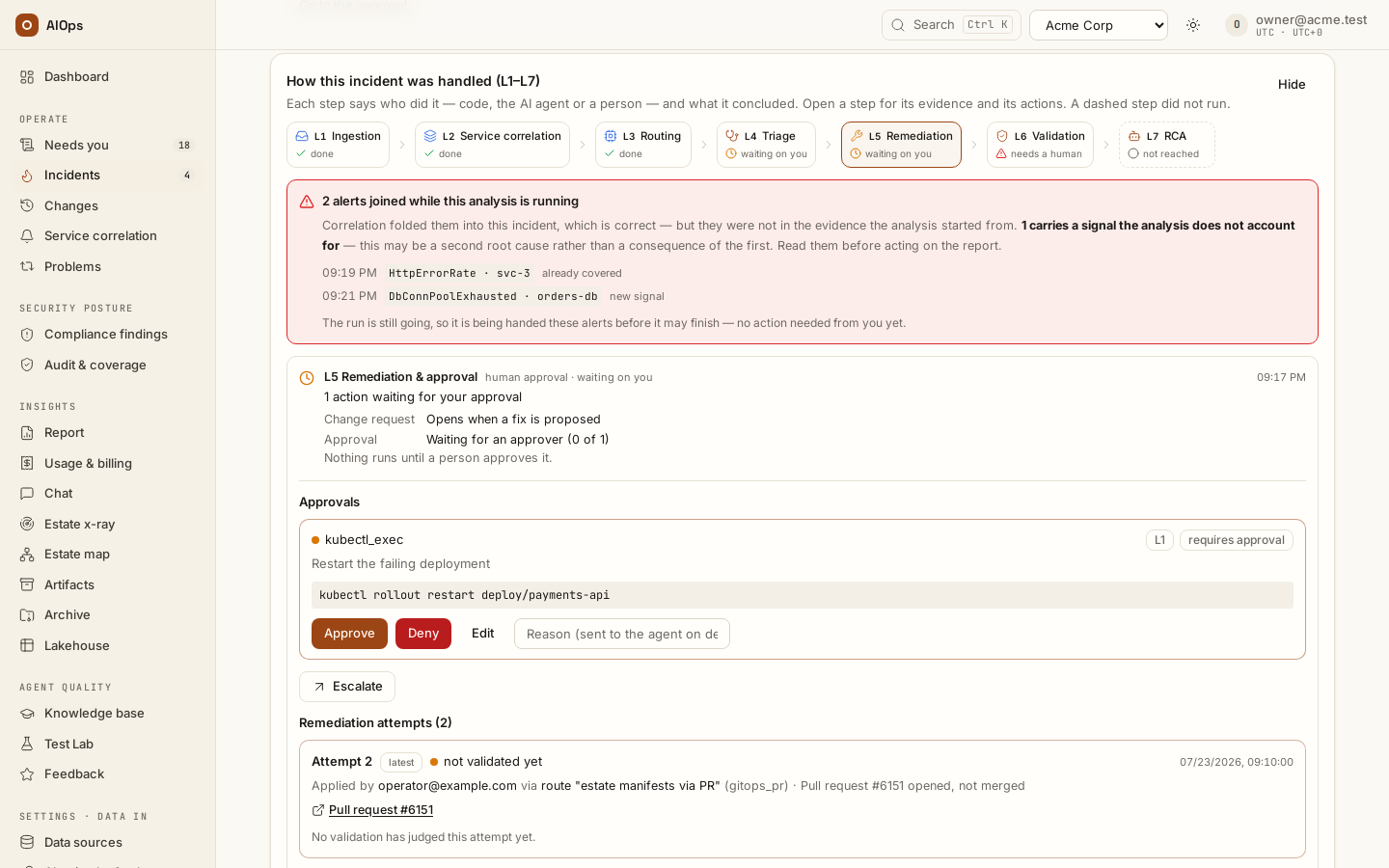
The seven layers, traced on this incident: what ran, when, and the evidence for each step. It is the fastest way to answer "how far did this get, and can I trust it" without reading the whole page.
- The strip across the top is the whole pipeline at a glance. Each step carries
an icon and a text label for its state, never colour alone:
done,running,waiting on you,needs a human,not reached,draft,not used here. - L1 says how many signals arrived, from where, and when the first did; L2 says how they were grouped (one root, the rest related) and the blast radius, with the grouping mechanics under How these were grouped.
- L5 carries two lines under its conclusion: the Change request the fix
rides on (a link to its change page) and the Approval — who signed and
when, how many approvers are still needed, or that a pre-approved runbook
needed none — then its header reads
deterministic, never human approval. When the released fix failed before any verdict, L5 readsCHG-<id> failed — nothing may have been appliedand holds the Execution failed — what next? card: give feedback, mark it resolved or as noise, re-analyse or hand it off — never a retry — with a line on the backout and a link to the change (see When the execution fails). The Remediation attempts box lists that failed execution and any operator's report of running the change (operator report — not verified by the platform) beside the attempts, unnumbered, each with the resources it targeted. L6 and L7 count only the fixes the platform ran. - When a pre-approved route matched the incident and did not run, the Timeline says so once per reason: Pre-approved route matched — not run, with the route and why (automatic fixes off, the analysis chose typed steps, the route changed after it was certified, tier L3…). What each reason asks of you is in Runbooks and automatic fixes.
- L6 and L7 wait for a fix: until one has run, validation reads
not reachedand the report is adraft— written at analysis time, it becomes the incident's record once a fix is validated and a person has reviewed it. A check that ran before any fix is shown as such, not as a failed validation. When the post-change validation rounds decided nothing, L6's headline is theirs — for example Inconclusive — 3/3 rounds clean (a neighbour failed) — and a check that cleared the condition after them is a note of its own, never the headline over rounds that read a neighbour failed. - L4 opens with the Automated triage card: the seven steps every
triage takes, numbered in the order they run — Check dependency map,
Compare against known issues, Check cloud health, Check recent
changes, Pull latest alerts, logs, traces, Generate incident summary,
Identify fault domain. Each step reads
done,nothing found,not availableornot runand gives one line of what it found with its evidence: the tool calls in the trace, or the record the platform wrote. Steps 2, 3 and 7 are always code; step 1 is code when the blast radius was recorded at intake, step 4 when the platform pinned a suspect change. Step 1 also counts the service's resources in the estate model and how many a connection can read: before the agent's first turn they go to the analysis as Resources of this service, one line each with the ids and dimensions to read it by, or no connected source reads it (a coverage gap the analysis should name). Before the agent's first turn the platform reads the cloud provider's own health through your read connections — AWS Health (on an account without a Business or Enterprise support plan, the public AWS Health Dashboard, which is not account-specific), Azure Resource Health for the alerting resources and the subscription's Service Health events, for the accounts, regions and services the alerts name and the ones the service's resources in the estate model run in (an alert naming an account or region keeps resources outside it out; the result then ends scope from the service's resources: …) — and looks for incidents open, or resolved in the last 24 hours by default, on services one hop away in the dependency map, and for open tickets naming the service in a connected ServiceNow, Jira or Azure DevOps. Compare against known issues also wears a Relevancy level, read by code: 100 % when the same correlation key was resolved in the problem window (30 days by default) by a fix with a verified last-known-good record, with the same alert names, no change recorded since the fix on the resources it touched, the resource the alert names or the service (an instance's ARN and its bare id are one resource), no open provider issue (cloud health that could not be read does not count against it), no reopen and no noise close on the newest same-key incident; 85 % when that record exists but the alert names, a change, a provider issue or a noise close differs; 70 % for a resolved same-key incident without such a record — or with one whose fix did not hold twice in the problem window, which the reasons say (its last fix did not hold 2 times in 30 days — no fast path) — or a reopen; 50 % for an incident open on a neighbouring service; else 0 %. It is an order, not a probability; hover it for the reasons. At 100 % an alert-started analysis (never a P1) is capped at 3 steps, fast path, 3 steps on the badge, unless the Guardrails switch Shorten the analysis of a known issue is off. What it finds goes to the analysis; when it finds nothing, the analysis is handed exactly what it was before. After the wrap-up, code names the fault domain: the layer —provider,change,dependency,compute,network,dataorapplication— and, where the alerts or the estate model say, the account, region, AZ, cluster and namespace. The Guardrails switch Check cloud health and known issues before each analysis (on by default) turns steps 2 and 3 off for the workspace; the card then shows themnot run. - The agent's own steps are under L4, one Agent activity · N steps disclosure per analysis run, newest step first.
- Below it, one row per layer with a timestamp and real numbers — the alert collapse, the tool-call count and model, the approval count, the latest verdict, the report's confidence.
- A Not built yet line names the capability that layer does not have. A layer is never shown complete because the part that ships succeeded.
- L4 lists the enforced steps for this incident with a tick or a cross. A run
still in flight shows them as
·— it cannot have failed a step it never reached.
When alerts join a running analysis. Correlation folds a later alert into an incident that is already being analysed, which is right — but the alert was not in the evidence the analysis started from. The card says so, and answers the only question that matters: whether the late alerts carry a signal the analysis does not account for.
- Every late alert is listed with its arrival time and either
already coveredornew signal. An alert isalready coveredwhen it repeats a signal the analysis started from or, once the run has finished, its report names it. - All
already covered— the conclusion holds. - Any
new signal— it may be a second root cause rather than a consequence of the first. Read those alerts before acting on the report. - While an incident analysis is still going, its finish gate hands it the late alerts with their labels once, before it is allowed to finish, so there is nothing for you to do. Other agents' runs are not handed late alerts.
- Once the run has finished, L4 reads
needs a humanfor each late alert its report does not name: one that joined after the hand-over or after the run finished, and every late alert of a run that was not handed them. - Once the run has finished, only a new run can cover them: Re-analyse with all
alerts starts one. It needs
incidents.act, and it is refused with a conflict while any analysis of the incident is still in flight — that run is already being handed the late alerts.
5. Recheck card
The read-only re-analysis history, newest verdict on top, capped at the 25 most recent rows. Covered in detail in Verify recovery.
6. Investigation panels
One card per run, newest run on top. The card header shows the run status, a live stage: badge while the run is running and has loaded at least one playbook, and model · tokens · $cost (plus the error string if the run failed). Inside, in this order:
- Approvals — one card per proposed write, decided or pending. Absent when the run never proposed one.
- RCA — the rendered analysis, with the rating controls beneath it. Absent until the run finishes its wrap-up.
- Remediation plan — the structured plan parsed from the agent's wrap-up. The newest run's plan sits on L5, under the heading
Proposed change — drafted into CHG-<id>, which links to the change request that run's wrap-up drafted (the heading readsProposed changealone until it has one). Absent when the wrap-up carries no plan, no primary alert and no escalation reason. - Tool timeline — every tool call, newest first.
The tool timeline is grouped by stage: each playbook the agent loads opens a stage group labelled with the pipeline layer it belongs to — L2 · Service correlation, L4 · Triage, L4 · Change check, L4 · Research, L4 · Trial & error, L5 · Remediation, or L4 · Playbook: <name> for any technology playbook. Calls made before the first playbook load sit in an unlabeled group at the bottom. Each row shows a status badge carrying the tool name, the exact invocation, and up to 2 000 characters of output. A row badged red whose output reads denied: write blocked during diagnosis is the shipped write posture doing its job — see Which posture your deployment runs.
While a run is live the page holds an event-stream connection and polls every five seconds. Polling engages only while something is actually working — an investigation in running or paused_approval, a recheck in flight, or the incident sitting in investigating or remediating — and it stops entirely in a hidden browser tab. On a quiet incident the page does not refresh itself; reload to pick up a run started elsewhere.
7. Artifacts
Durable outputs tied to this incident — remediation pull requests, RCA exports, reports — each with a kind badge, a timestamp, an external link where one exists, and a Download button only when the artifact stores content. A GitOps pull-request artifact carries a URL and no body, so it links out but has no Download. The card is hidden entirely when the incident has no artifacts. Artifacts are append-only: nothing on this page edits or deletes one; only the data-retention sweep removes them, together with the resolved incident once the workspace's retention window passes (Agents and guardrails → Data retention). Only http and https links are made clickable.
The card lists every artifact of this incident and of its investigations, however old, newest first: the incident's own (pull requests, last-known-good records) and the RCA exports of its runs. The incident read returns the same list: artifacts in GET /api/aiops/{tenant}/incidents/{id} (the MCP tool get_incident), each row with has_content. The Artifacts page is different: it reads only the tenant's 100 newest artifacts — see the Knowledge, x-ray and insights chapter.
Probable cause
On an incident about one resource (not a storm, a compliance control or a scanner finding) the Probable cause card sits above Last known changes. Fixed code builds it; the agent's pick is advice.
- Error started — from the alert itself: CloudWatch's first breaching datapoint, the Azure Monitor evaluation window, the sender's start time, else its arrival. The card names which.
- Healthy since — the latest of: where the previous error on this correlation key ended, where the alarm's own history last recovered, and when the fix in a verified last-known-good record of this key or resource was verified. The same window bounds Last known changes and Revert everything in this window. No error recorded since is no proof of health. Errors under 30 minutes apart count as one. With none of these, it reads No earlier error within the 72 h look-back — not proven healthy.
- Candidates — the applied changes recorded in that window, scored on how close each is to the failing resource, how soon before the error it came and its kind (a tag edit weighs 0.3). A related change within 2 hours before the error is a suspect; one the alarm's own data-backed history shows OK from before it until 24 hours after is proven good. Changes after the error started, your fix included, are never the cause.
- The change shown — the agent may name one recorded change, or none; the card shows its pick only when it is in the top 5, else the platform's #1 as a ranking: the analysis has not concluded, or it found no recorded change that explains this.
- State before this change — that change's recorded before-state:
unverified, unless it equals a verified record's after-state. - Draft revert of this change — reverts that change; its plan says which later changes on the resource it leaves standing or may also undo. Revert everything in this window, on the card below, drafts the whole window. Both need
approvals.decideand are approved like any change; nothing reverts by itself. Restore first is advised when the resource is high or mission-critical, the analysis is unsure and the change shown is a suspect with a recorded before-state.
A reopened incident is ranked from where its previous episode ended to the alert that reopened it: the earlier episode's fixes are never its cause. A merged-in alert never sets the error start.
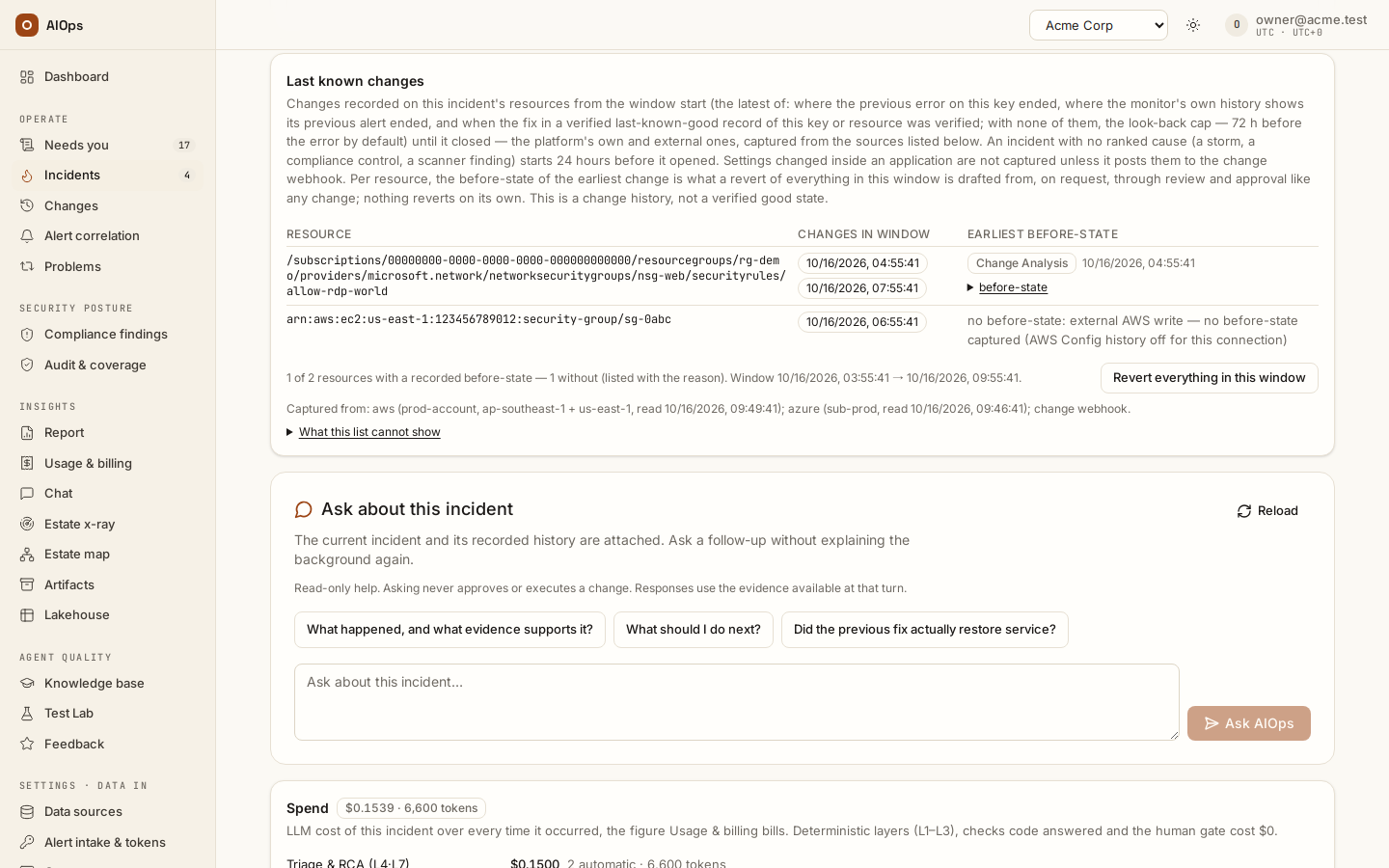
Last-known-good record and the reopened, repeated or new tag
Last-known-good record. Once an incident has stayed resolved through its one-hour post-close check, the platform writes one append-only record, on the Artifacts card: the probable cause change as the Probable cause card shows it — the analysis's pick when it is among the ranked candidates, else the platform's #1, never a change made during the incident; without a ranking, the change pinned to the incident (a pick the card refused is kept in the record's data, not as its cause) — the RCA, the steps that ran, each resource's state before and after with the diff, and the verification. Code grades it verified (a verification found the condition cleared after the platform's fix, or a person verified it), human_reported, unverified or failed. Only a verified record's after-state is a last known good, until the record is marked did not hold.
Reopened, repeated or new. Code tags each incident when it opens. Reopened: the newest incident on the same correlation key in 30 days fired the same alert (always, for a key naming the alert); the chip, recurring ×N, links it and marks its record did not hold. An incident back after its close (reopen window, or the post-close check) reads reopened. repeated (seen on <service>): none on this key, but one on another key had the same issue (the metric that fired, else the alert name; for a cloud alert, in the same cloud account and on the same resource — instance id or ARN — when the alert names one) — a link, never a judge of its fix. Else new, beside a same service ×N link when the last one there fired another alert. The RCA's ## Occurrence says the same. A fix that did not hold twice in 30 days is not a good state: the agent is told not to simply re-apply it; the pre-approved automation refuses to open that route's pull request again (audited as incident.auto_remediate_blocked; the incident stays in Needs attention and a person may still release the route by hand); its problem is no longer an automation candidate; and the Problems page shows the route blocked. With Demote a pre-approved route after one rollback on, one rollback is enough: the route loses its pre-approval, says Demoted after a rollback <date> — automatic runs stay off until an approver certifies it again, and waits on Needs you until an approver certifies it again or someone keeps it manual.
Recurred after an outside change
A recurrence that a recorded outside change explains is not one of the two: when someone wrote the same resource from outside the platform between the fix's verified clear and the recurrence (a cloud write the platform's own audit harvest recorded by a principal that is not the platform's), the mark names that change, the Problems page and the problem detail show recurred after an outside change with the count, and the fix is not blamed — the same rule that keeps a certified runbook's certification. The record itself reads recurred after an outside change on the Artifacts card and as the previous occurrence's record on the incident page, each recurrence naming the change, until a recurrence nothing explains marks it did not hold. The automatic step lane and the known-issue fast path read the same mark: neither calls such a fix one that did not hold, and the fast path says an outside change undid it with the count. Recurrences recorded before this rule keep their did-not-hold count: existing problem rows are not rewritten.
Which resource counts for repeated
For a cloud alert that names its resource, repeated needs the same issue on that same resource, in the same account: another instance with the same alarm is new. A workspace that counts the same issue on a different resource as repeated turns on Count the same issue on another resource as repeated (Settings · Data in → Alert intake & tokens, card New, reopened or repeated; repeated_other_resource on PATCH /guardrails, off by default): the resource is then not compared, and the same issue on any resource of the account counts. The account still is. Which definition is the default is still being confirmed with the customer; until then the default keeps the same-resource rule.
Reading an RCA
The RCA is written once, at the end of a run, from the agent's structured wrap-up. Seven sections are always emitted on an incident investigation; the rest appear only when the agent produced the underlying field. Read the absence as information.
| Section | Always? | What to check |
|---|---|---|
| Executive summary | Yes | Two sentences a duty manager can read: what broke, who it affected, what happens next. |
| Root cause | Yes | One statement of what actually broke, followed by a Failing component: `<name>` line naming the failing component exactly as the alert labels spell it. If it reads like a summary of symptoms, rate the RCA down and send a correction. |
| Evidence | Yes (- (none) when empty) |
The bullet list of observations supporting the root cause. Each bullet should be traceable to a row in the tool timeline. An RCA whose evidence is - (none) is a guess. |
| Blast radius | Yes | What else is affected. Use it to decide urgency. |
| Alert classification | Only with a primary alert | The primary alert plus the cascading alerts expected to clear once the primary is fixed. This is the noise-reduction claim, in writing. |
| Last change checked | Only when the agent checked one | Which recent deploy or config change it examined. A missing section means it did not check — treat the conclusion with more caution. |
| Remediation plan | Only with steps or commands | Numbered steps, a fenced command block, and a Rollback: line when the agent supplied one. |
| Proposed fix | Yes | The prose version. When a remediation route matches and the wrap-up carries no escalation reason, it is extended with Execute via route '<name>' (<mode>). |
| Verification plan | Yes | How to prove the fix worked. A post-close verification reuses exactly this. |
| Confidence | Yes | A plain Confidence: <0–1> line, not a heading. Low confidence plus a thin evidence list is your cue to escalate rather than remediate. |
| Escalation reason | Only when the agent asked for a human | A block quote. Read it before acting. A second block quote states whether the analysis named no remediation route (the Timeline, not this footer, says whether a pre-approved route matched) or the fix has not been applied. |
| Not verified by the agent | Only when the run left process gaps | A block quote listing the parts of the enforced troubleshooting process the run could not complete. Honest by design: an RCA with gaps is not a silent RCA. |
Below these sections the finished run appends the chronology, written by code from the incident's records: ## Occurrence (one sentence — new, reopened or repeated, naming the previous incident and its date; see Last-known-good record and the reopened, repeated or new tag), ## Fault domain on an incident analysis (the layer, why, and where — the triage's step 7), ## Remediation history once a fix was applied, and the incident-wide ## Timeline. Both name a person by email, never by an internal user id; a system actor (the platform, an agent) as recorded. The ticket write-back carries them too.
The plan block lists its steps in execution order, numbered Step 1, Step 2 and so on, and the verification is the last numbered step. When the plan states only typed operations, those are the numbered steps; under written steps they show unnumbered as the way those steps run. The plan block separates the fix from the checks. Run manually — copy only, run in the stated shell with your own permissions holds the human-run commands, each list carrying a Copy button; Verify and its commands only check recovery; Rollback and Limitations stay visible below. A plan whose target is not confirmed shows Confirm the target and current fault state before preparing a fix command instead. Older plans keep Recorded commands — purpose not classified, because their original command purpose cannot be reconstructed safely.
Review fix or Review pull request jumps to the Prepared change section, where the disclosure Exact changes and execution method holds the server-prepared action: the configured tool payload or repository edit, target, connection revision and review digest. This is separate from model-generated manual commands. The card also shows Rollback before the release button: the rollback plan as operator-run commands when the agent drafted them (copy-only, never executed by the platform) and, for a recovery action such as a start or restart, the explicit note that reverting it means stopping or undoing the recovered target, followed by the operator guidance; Verify recovery lists the read-only verification references, which are not run automatically. Approve & run (or Approve & create PR) releases that exact reviewed action; Approve change records your approval when the quorum still needs another person, and Request approval is what you get when your role may ask but not release. Changing the connection, execution consent, target, recommendation or source analysis requires another review. Repeat clicks cannot release the same action twice. L3 still needs distinct approvers; live actions retain their change-window checks. The Change record retains the exact reviewed payload for subsequent approval and execution.
Authentication values are shown as [credential hidden] in the review; the digest still binds the actual credentials and action. The optional pre-change state read is shown too and may perform only a policy-allowed read. A mutating, malformed or unknown pre-change read is refused before any action is dispatched.
If the reviewed plan contains private values, the pre-change file is withheld and recorded as not restorable. A redacted file cannot be used for automatic rollback. Use repository history or your operator-managed backup for a manual restore; ordinary snapshots with unchanged, safe contents retain their exact bytes.
A change with a durable execution intent but no completed receipt yet makes the summary's next step read Execution receipt pending — do not retry, and an Execution is in flight or its outcome is unknown card appears above the summary. It may be running, or its outcome may be unknown after a connection or process failure. It is never automatically replayed. Reconcile outcome requires someone with action and approval permissions to confirm the executing process has stopped and record the checked target/provider state. Reconciliation records human evidence and does not itself prove recovery. A live dispatch blocks reconciliation until it returns; an active private-agent job must release its lease first. A change waiting on its pre-change backup is not a lost receipt: until the image or snapshot is available (up to 30 minutes) the summary reads Taking the backup before the change — do not retry with the backup's id, kind and request time, nothing on the target has changed yet, and no reconcile card appears; a receipt still missing after that wait is reconciled as above.
A provider that refuses the request before acting — an HTTP 4xx other than 408 or 409, such as AccessDenied from a write role without the permission — makes the change failed with the provider's own message: the incident escalates and no rollback is proposed, because nothing changed. Timeouts, 5xx answers and a command that exited non-zero stay outcome unknown and carry the last response.
Approved tool releases on private agents use the approval-release-v1 reservation protocol. Older agents receive an explicit update requirement when attempting to resume approved calls. A close that wins before reservation prevents dispatch; a reservation that wins prevents a misleading close until the receipt or explicit reconciliation is recorded.
For SQL Server or SQLEXPRESS inside an Azure VM, the target is the VM and evidenced Windows service, not Azure SQL PaaS. Check whether a Chaos experiment is still active before choosing fault cancellation or guest-service recovery. A generated command is not proof that recovery succeeded.
One honest limitation: writes the agent proposed and the platform refused mid-diagnosis are recorded in the run's structured wrap-up, but they are not printed in the RCA markdown. They are visible only as denied rows in the tool timeline. If you want the full list of what the agent wanted to do but was not allowed to do, read the timeline, not the RCA.
Ask a follow-up about this incident
Use the incident's conversation to ask “What caused this?”, “What changed before the alert?” or “What should I check next?” The incident is already attached. The agent can consult the available attempts, approvals, changes and verification history within your permissions.
Read the streamed answer and its evidence, then continue in the same conversation. Reloading retains the thread. Stop reply requests cancellation of an active answer; a question or suggestion never authorizes remediation.
Next steps
- Approve and run a fix — act on what the page proposes, and the permission each button needs.
- How the platform finds the last-known change — the criteria behind the Probable cause card, the change sources per onboarding option and the prompt section the analysis reads.
- Verify recovery — what the Recheck card's verdicts mean and what a Still present verdict does.
- Dedupe, correlation, suppression — why an alert carries the status its chip shows.