Storms, unmapped and flapping signals
How dedupe, correlation and suppression group alerts, how services failing together are grouped by the service graph and checked, and the intake rules for unmapped and flapping signals.
Concept · Updated 2026-10-28 · Describes release 0.1.164
Ingest groups alerts before any agent runs: repeats are deduplicated, alerts that share a key join one incident, dependents fold in as related evidence, and services failing together are grouped under the one they depend on. This page owns those rules, the one-service burst, grouping by the service graph and its agent, and the two intake rules that keep an alert out of every group or mark an incident flapping. The pages they shape are Dashboard, Operate and alerts (the Service correlation page) and How incidents work (the incident list).
Dedupe, correlation, suppression
Ingest first deduplicates and correlates signals; grouping by the service graph can then refine their attribution. This section is the reference for the whole guide; other chapters link here.
- Dedupe. A fingerprint — a hash of the alert's labels — that already has a live alert row is counted and discarded. "Live" means the row is still active and either uncorrelated or attached to an active incident. No second row is written, and the incident's alert count does not increase; the count tracks stored rows, not re-fires. A repeat is counted and dropped; because correlation has no time window, a sustained storm keeps feeding the one incident regardless. If the incident was closed without the source ever clearing it, the fingerprint is free again and a re-fire opens a fresh row.
- Correlation. The alert's key is its
service. An alert with noserviceopens its own unidentified service incident while the triage queue is on (the default, see Unmapped signals); only with the queue off does the key fall back tonamespace, thenalertname, and with none of them is literallyfingerprint=<hash>. Alerts sharing a key and a pillar join the same incident however old it is — there is deliberately no time window, because one split a single ongoing problem into sibling incidents. The first one iscorrelated; the rest aresuppressed. Only active incidents are candidates, which is why a recurring problem produces a series of incidents rather than reopening an old one — unless the workspace sets a reopen window (aiops_reopen_window_h, in hours, off by default): then the same-key incident resolved most recently inside it reopens instead, except when the dependency fold below finds the open incident of a service it depends on, which it then joins.suppressedhere is the platform's doing (correlation, a cascade, a storm split), never a person's: a person closing an incident as known noise is the incident's noise chip, and the next same-key incident only carries a similar: noise hint. - Dependency fold. An alert that would still open a new incident, or reopen a resolved one, joins an unresolved incident whose blast radius holds its service through a dependency allowed to fold. See Service dependencies. Two more rules fold at the same point when the alert would open a new incident (a reopen goes before them): the same alert name on three or more services by default (
shared-cause), and an alert on a service or resource whose recent change an open incident is already pinned to (change-window). A scanner finding is keyed on its control or CVE and never folds bychange-window, nor does another alert fold into a finding's incident by it: each finding opens or joins its own incident. Each fold is audited asincident.foldedwith its rule. - Re-root on arrival. When the failing dependency's own alert arrives last, its new incident takes in the open incidents of the services that depend on it, through the same fold rules, audited as
incident.grouped. A merged incident recordsmerged_into_id; a later alert on its service follows the merge to the root, and it never counts as a previous occurrence.
A burst on one service: one incident, one page, one run
Forty alarms on checkout-svc in two minutes share the key service=checkout-svc, so the first opens the incident and starts its one analysis, and the other 39 join it: the incident lists 40 signals (Alerts reads 40) and a re-sent alarm is deduplicated, not counted again. Notifications go out when the incident opens, so a PagerDuty or Opsgenie target pages once; alarms that join later never notify. The page follows the incident: it resolves when the incident does, and if the incident reopens its page is triggered again. The count does not move the priority: the burst is P1 when one of its alarms is critical, when they are error and two or more services depend on checkout-svc (its blast radius), or when they are error on a mission-critical resource. Forty warning alarms stay P3.
Alert storm: grouped by the service graph
A burst across services is grouped by relationships, never by a count: since 0.1.147 there is no storm incident. Two failing services are related when an edge joins them in either direction (declared, traced or discovered; an observed co-occurrence is a hint only), or when both call the same dependency directly and it is not a hub (more than 10 callers). The root is the top-most failing service, the one no other failing service of the group sits below; a tie goes to the incident opened first.
- On arrival (no model, no cost): only edges allowed to fold count (declared by default, traced when the workspace opts in). The root's incident, opened or reopened, takes in its dependents' open or investigating incidents opened or reopened inside the grouping horizon:
aiops_storm_group_window_s(300 s) plusaiops_storm_spread_window_s(600 s). - The grouping wait (no model, no cost): an incident that opens or reopens on a service that depends, within 3 hops, on another service over dependencies allowed to fold keeps its analysis back for the grouping wait (
aiops_grouping_wait_s, 300 s). That dependency's own alert arriving inside the wait takes the incident in before an analysis escalates it, and the outage gets one analysis. For anappthat depends ondb, its summary reads Held for triage — grouping window: waiting up to 300 s in case db, which it depends on, is failing too; its ticket and open notification go out as usual, it still takes in what depends on it, and no periodic verification runs on it while it waits (Verify still does). The Timeline reads Analysis held — grouping wait; the analysis starts when the wait ends (Grouping wait over — analysis started), or sooner with Analyse. A service with no such dependency (a potential root, or an unrelated service) never waits, nor does a P1 (acriticalalert always is) or a concern a member raises from the Dashboard. A waiting incident starts at once when a merge or a joiningcriticalalert makes it a P1, when a member's concern joins it, or when it takes in an incident already under analysis (the merge stops that run, so the outage keeps one). A service does not wait for a dependency whose incident is already open: that dependency's alerts join its own incident and never arrive as a new one. An alert that clears inside the wait resolves its incident with no analysis; when it comes back, its analysis starts at once (an alarm that flaps faster than the wait is still analysed).aiops_grouping_wait_s0turns the wait off (at most 600 s); the group window does not change it. - The grouping agent (on by default) reads every related origin. Each scheduler minute, a related group of open or investigating incidents opened or reopened inside the horizon earns one bounded turn when it holds two or more incidents and at least 5 live alerts, its first incident is at least the group window old (a reopen counts from the reopen), and an incident no turn has seen in the last 15 minutes. The turn sees that group only, with the top-most failing service named. Its answer lands as data: the root keeps its incident, victims move to it as Related — grouped (
suppressed) and drained incidents merge in, oneincident.groupedrow per group.
Failing dependents taken in still count in the root's blast radius, so a root with two or more affected services rises one priority level (P2 to P1). Unrelated services stay separate incidents however many alert at once; only a shared alert name on 3 services folds without a relationship (Thresholds and why). Awaiting-approval, remediating, escalated and resolved incidents are never regrouped, and a held incident takes nobody in (one in the grouping wait does). Budget, pause controls and the 300-second interval per group can delay a turn. A __storm__ incident an earlier release left open gets no storm split any more and no alert joins it; it resolves when its alerts clear or a person resolves it. Notification digests limit chat/email messages separately; webhook targets receive every event (see REST API → What REST does not have).
Configure the grouping windows or disable the grouping agent
A workspace owner with members.manage sets the windows through PATCH /api/aiops/{tenant_id} with {"settings":{"aiops_storm_group_window_s":600}} (whole seconds, at most 3600; aiops_storm_spread_window_s at most 7200; the grouping wait aiops_grouping_wait_s at most 600); the PATCH refuses anything else. To keep grouping on arrival but turn off its agent, send {"settings":{"aiops_storm_agent":false}}; use a JSON boolean. The same workspace PATCH is available through MCP patch_tenant. These keys have no portal editor. A stored aiops_storm_threshold (before 0.1.147) is accepted and ignored.
Check the grouping outcome
Reading alerts and incidents requires incidents.view; the audit log requires report.view. Prerequisite: received alerts and a declared or recorded dependency graph.
- Open the root incident and its L2 Service correlation layer. How these were grouped lists each merge and fold with its edge; in the blast radius a caller with a live alert carries failing, whether its alert is grouped here or sits on an incident kept apart.
- A merged incident names its root in its resolution (
duplicate of incident … — merged). - Open Settings · Account → Audit log and filter
incident.grouped(andincident.folded,alert.suppressed). - Compare the recorded root service, victims and reason with the dependencies and signal evidence. A queue reduction does not prove recovery; follow the root's investigation and condition-clear evidence.
Expected result: one incident per failing root, with downstream signals retained as evidence. If related incidents stay apart, check that the edge between them is recorded, allowed to fold or within reach of the agent, whether the caller's incident was escalated or acted on before the root's alert arrived (a P1 does not wait, and a root arriving after the group window finds the caller's analysis started), and the workspace agent/pause settings and spend limits. Troubleshooting.
Unmapped signals

The intake rules under Settings · Data in → Alert intake & tokens → Intake rules change what happens to an alert beyond joining the open incident of its service. Send alerts that name no service to the triage queue is on by default since 0.1.133; the other rules are off until a workspace owner (members.manage) turns them on. Each rule follows the platform default until it is set here (the card says Following the platform default or Set for this workspace), and a change applies to alerts that arrive after the save.
Send alerts that name no service to the triage queue (aiops_unmapped_triage). Off, an alert with no service label is grouped by its namespace, else its alertname, with every other alert that shares it. On, an alert with no service label after the workspace label map and its mapped source (below) opens its own unidentified service incident, keyed on the alert's fingerprint (unmapped=<fingerprint>) — an app, deployment, namespace or alert name alone does not count, since grouping by one is a guess:
- it is never grouped: not with another unmapped alert, not by a shared alert name, a dependency or a change window — no other alert is ever folded into it, and it never counts toward a storm;
- it is held: no analysis, no ticket, no notification or page and never a pre-approved automatic fix, so a burst of such alerts pages nobody. The periodic recheck answers it from its own alert at no cost; if the same alert fires again inside the reopen window, the incident reopens and waits again;
- it waits under Operate → Needs you (chip Triage) and in Operate → Incidents with Triage set to Unidentified service — waiting for triage.
On the incident, the Unidentified service — map this source card offers the alert's labels that could name the service — for example Use host (db-7) as the service — never a place such as an account or a region. One click (members.manage) maps it for that source only (the webhook that delivered the alert), audited Source mapped: its label names the service: a later alert from that source with no service takes the label's value as its service and groups normally. It is never a rename: the label stays, an alert's own service is never replaced, and other sources are untouched. The card lists mapped sources and removes them. The incident itself stays as it is: Analyse starts its run and files and announces it as an open would have, or resolve it; the source's clear still closes it quietly. A concern a member raises from the Dashboard is never held this way.
A ticket sent in by the Jira, ServiceNow or Azure DevOps webhook is held the same way when it names no service, and also when it lacks another field the workspace requires (service, severity, priority, assignee and notify by default): its row in the queue reads, for example, Jira OPS-21 — asked for: severity, notify, with Open ticket OPS-21 beside it, and the incident wears awaiting info instead of unidentified service. AIOps asks on the ticket once, and the ticket's next update that names every field moves it on to its service's incident — see Tickets that come in must name five fields.
Service aliases
The name an alert carries for its service is not always the name your dependency map uses: a declared dependency, a trace service or an x-ray entity may call checkout-svc simply checkout, and then the incident, its blast radius and the suspect-change pin never meet that service. The Service aliases card under Settings · Data in → Alert intake & tokens, below Intake rules, renames it (members.manage): each row is an Alert service and the Dependency-map service it becomes. Select Add alias for a row, Remove to drop one, then Save service aliases. The alias is the last step of the service name — after the label map and the mapped source — and runs before grouping, so the alert keys, folds and reads its blast radius on the map's name. The original name stays on the alert as the service_original label, and the rename is noted in its service_alias_applied annotation. An alias is one hop: a dependency-map service cannot itself be renamed. It applies to alerts that arrive after the save; incidents already open keep their grouping.
Under its label buttons, the Unidentified service — map this source card says for each candidate name whether it is a service of your dependency map — db-7 matches a service in your dependency map or db-7 is not in your dependency map — add an alias or declare the dependency under this name — read through the saved aliases, so you know before mapping whether its incidents will meet their dependents. Declaring the dependency under the alert's own name under Service dependencies (Dashboard, Operate and alerts) works too, with no alias.
A mapping and an alias are workspace settings. An x-ray scan records entities; applying its ontology records discovered dependency edges. An inventory harvest records estate ontology, and a trace sync records traced dependency edges. None changes these settings.
Flapping incidents
Two more intake rules, on the same card and off by default.
Reopen window (aiops_reopen_window_h, hours, 0 = off). When the alert of an incident resolved inside the window fires again, that incident reopens with a fresh analysis instead of a new one opening. An incident a person closed as known noise never reopens: the alert opens a new incident that carries a similar: noise chip, and an older incident on the key is not reopened in its place.
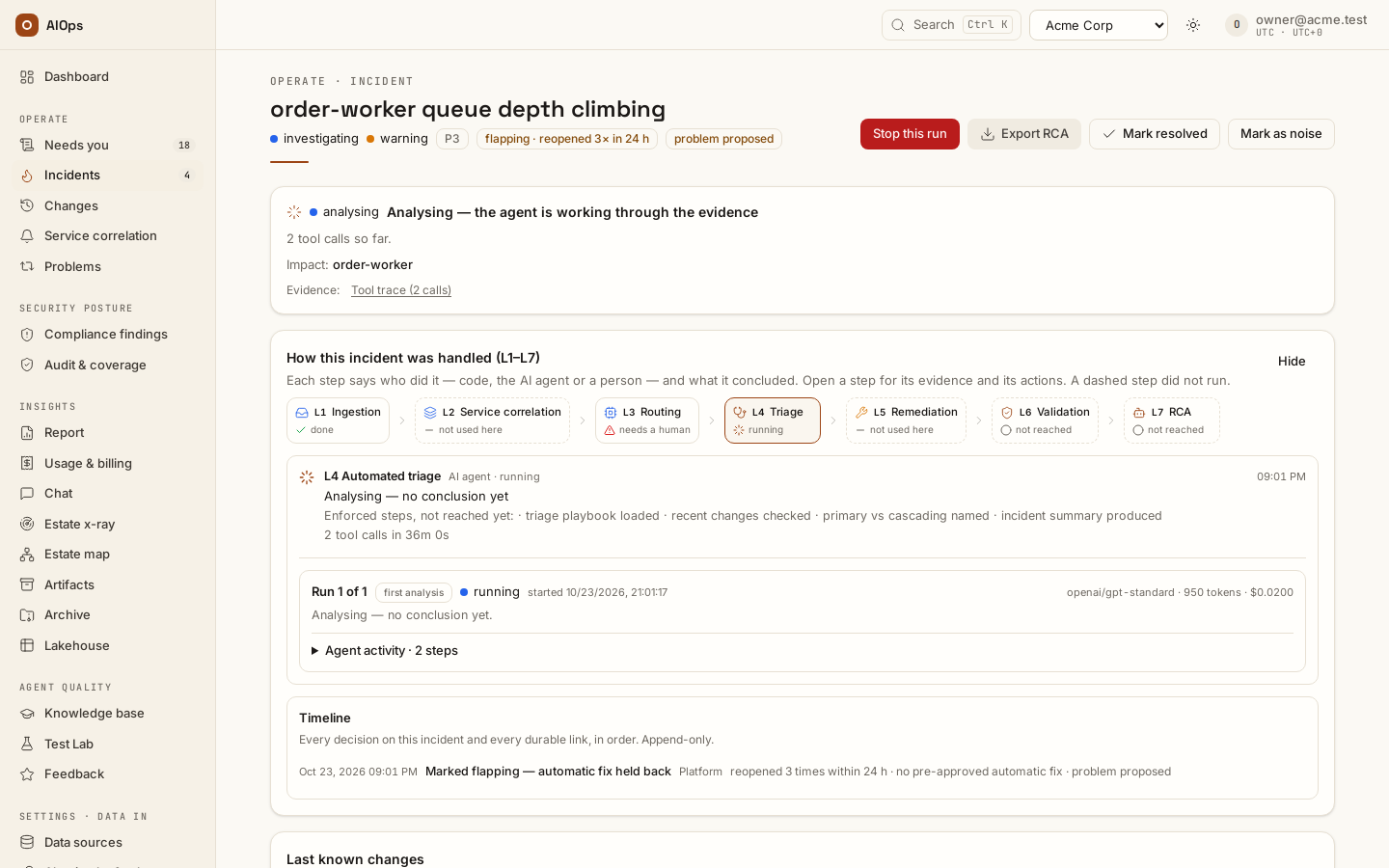
Mark an incident flapping when it keeps reopening (aiops_flap_threshold, the number of reopens, 3 when switched on, 0 = off). It counts reopens, so it needs a reopen window, and only the alarm firing again counts — a validation that finds the condition still present is not a re-fire. When an alarm resolves and fires again for the third time inside the window (with the default), the reopen that reaches the count:
- marks the incident flapping (the chip reads flapping · reopened 3× in 24 h), audited Marked flapping — automatic fix held back;
- keeps a pre-approved automatic fix from being released for it: if the auto path would have fired, the Timeline shows Automatic fix blocked with the reason, and the fix waits for a person like any other;
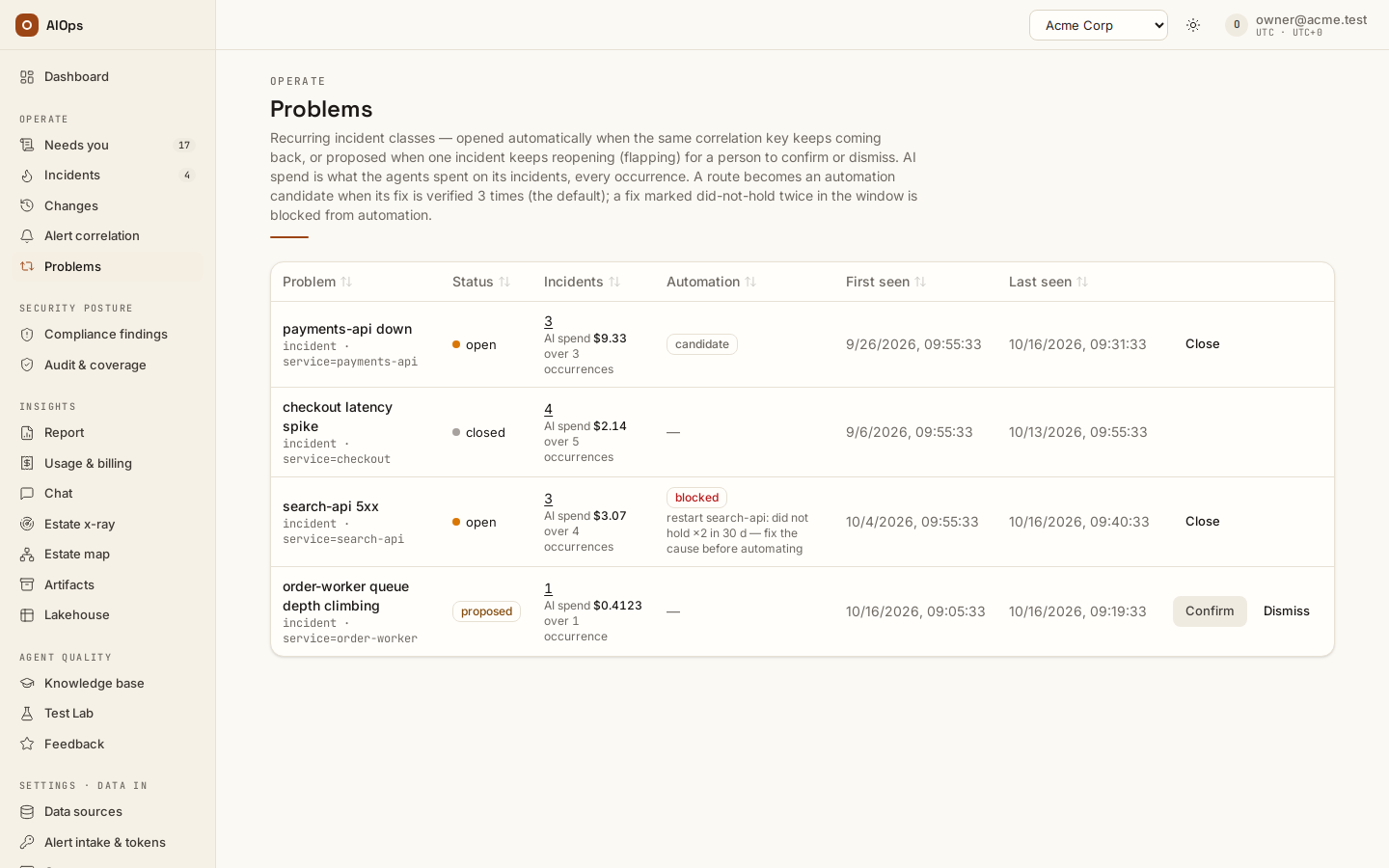
- proposes a problem record for its key, linked to the incident (Problem proposed in the audit log, problem proposed on the incident). It waits under Operate → Needs you (chip Problem); under Operate → Problems a person Confirms it (it becomes an open problem) or Dismisses it (Proposed problem dismissed). If a problem for the key is already open or proposed, the incident is attached to it instead, and the mark says so.
The incident keeps its id through every reopen; later reopens update its count, and the mark stays.