Models, tiers and routing
Which model serves each tier, what you inherit, the bring-your-own endpoint and how its models are priced, smart escalation, model residency, and the set-up procedure from the demo.
How-to · Updated 2026-10-17 · Describes release 0.1.164
AI models (/portal/settings/models) maps the four model tiers to the models your gateway serves, holds the bring-your-own endpoint and shows how each of its models is priced; the Model residency card on Guardrails & cost pins which models a run may use. This page owns routing: which call uses which tier, what you inherit, when the platform moves a run up or down the ladder, residency, and the set-up procedure from the demo. The cost cap and the budgets are on Guardrails and cost limits; the per-pillar Model override is on Configure the agents.
Model tiers
Model routing lives under Settings · Agents → AI models (/portal/settings/models). Its navigation and editing controls need pillars.manage.
It used to sit on Members & roles, which was a navigation trap: that entry needs members.manage while the card is edited with pillars.manage. On AI models the two match, and the card sits beside Bring your own LLM endpoint — the tier ids you save must be the ids that gateway serves.
Which call uses which tier
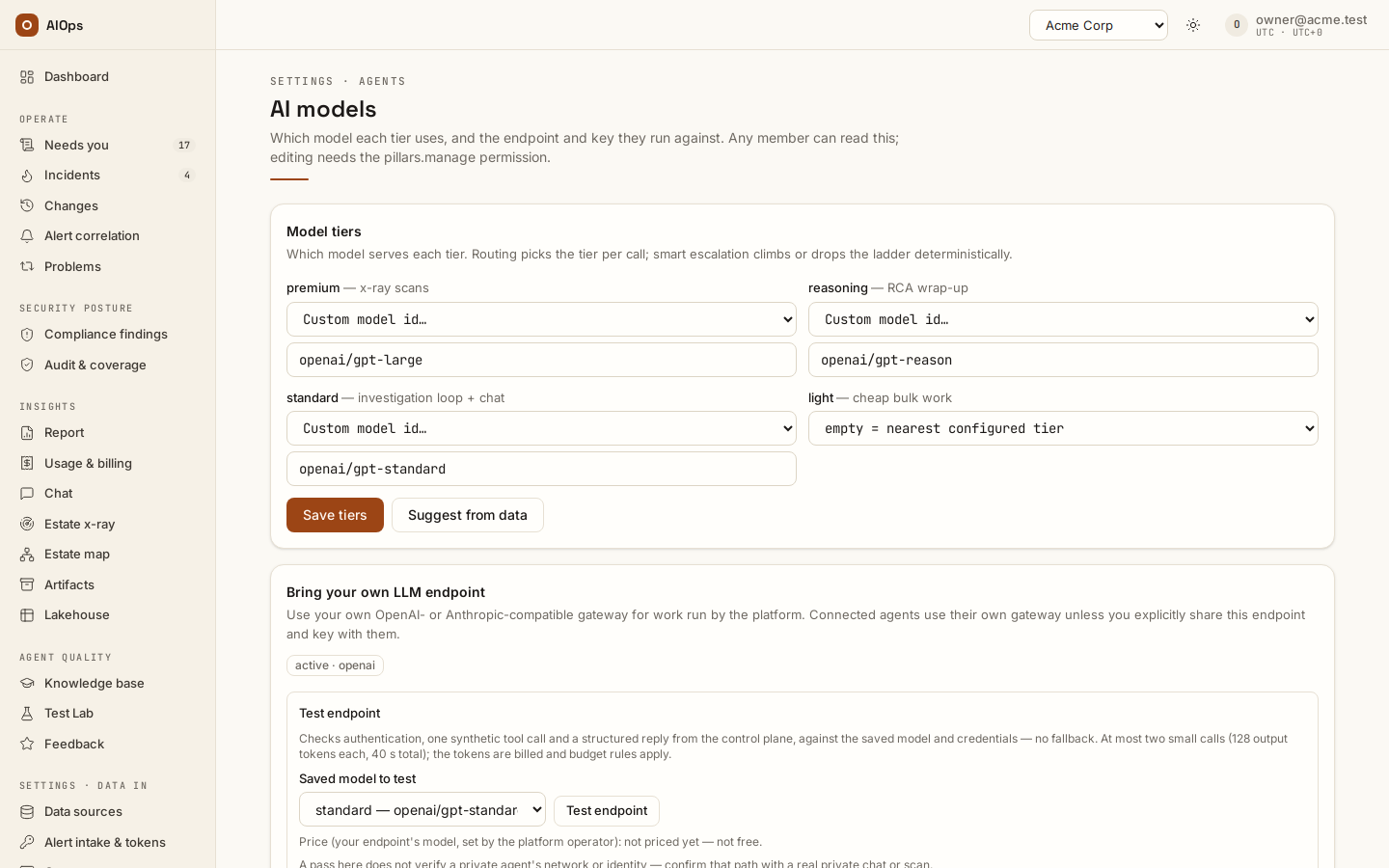
| Tier | Card hint | What actually routes here |
|---|---|---|
premium |
x-ray scans | Estate x-ray, unless the scan carries an explicit model or the platform sets an x-ray default |
reasoning |
RCA wrap-up | The structured wrap-up on every investigation; also the loop of a run pre-escalated by alert severity=critical, env=prod or a mission-critical resource |
standard |
investigation loop + chat | The investigation loop, incident rechecks, insights chat, agent-API turns |
light |
cheap bulk work | Nothing routes here by name. It is the bottom rung of the ladder — where a budget step-down lands |
What you inherit
If your tenant has set no tier at all, the card shows: Using the platform default tier map — routing and smart escalation are already active. Set any tier below to override for this tenant. That is the whole rule you need day to day: you inherit the platform default tier map until you set a tier of your own, and the moment you set one your tenant owns the entire map — it is used whole, never merged with the platform's.
A missing tier inside your own map resolves to the nearest configured tier above it (more capable), then below. Setting only standard is therefore legitimate and predictable. Saving a tier with an empty value clears it; the patch is a merge, so tiers you leave alone keep their values.
The remaining fallbacks below the two maps — a legacy single-model tenant setting, the platform's single configured model, and finally the deterministic built-in model — are platform-side knowledge and are documented once, in the platform-console guide (Platform operations → The full fallback chain), which your platform team can read. Keeping one copy means the two cannot disagree after a routing change.
Provider source and model suggestions
Use platform default is the simplest path: keep the inherited model choices and the platform-managed provider connection. The page shows the saved effective model, API/provider and configuration owner. A lab may inherit its parent workspace's model map and BYO connection.
When BYO is active, model suggestions come from that saved gateway using its
own key. The platform key is never sent to a workspace gateway. An
OpenAI-compatible catalogue returns openai/<gateway-id> values. An
Anthropic-compatible gateway, or a native provider without a supported
catalogue, uses Custom model id… with an explicit explanation. Enter the
actual provider-prefixed model or deployment ID; a visible catalogue entry is
not connection proof.
Test a saved model connection
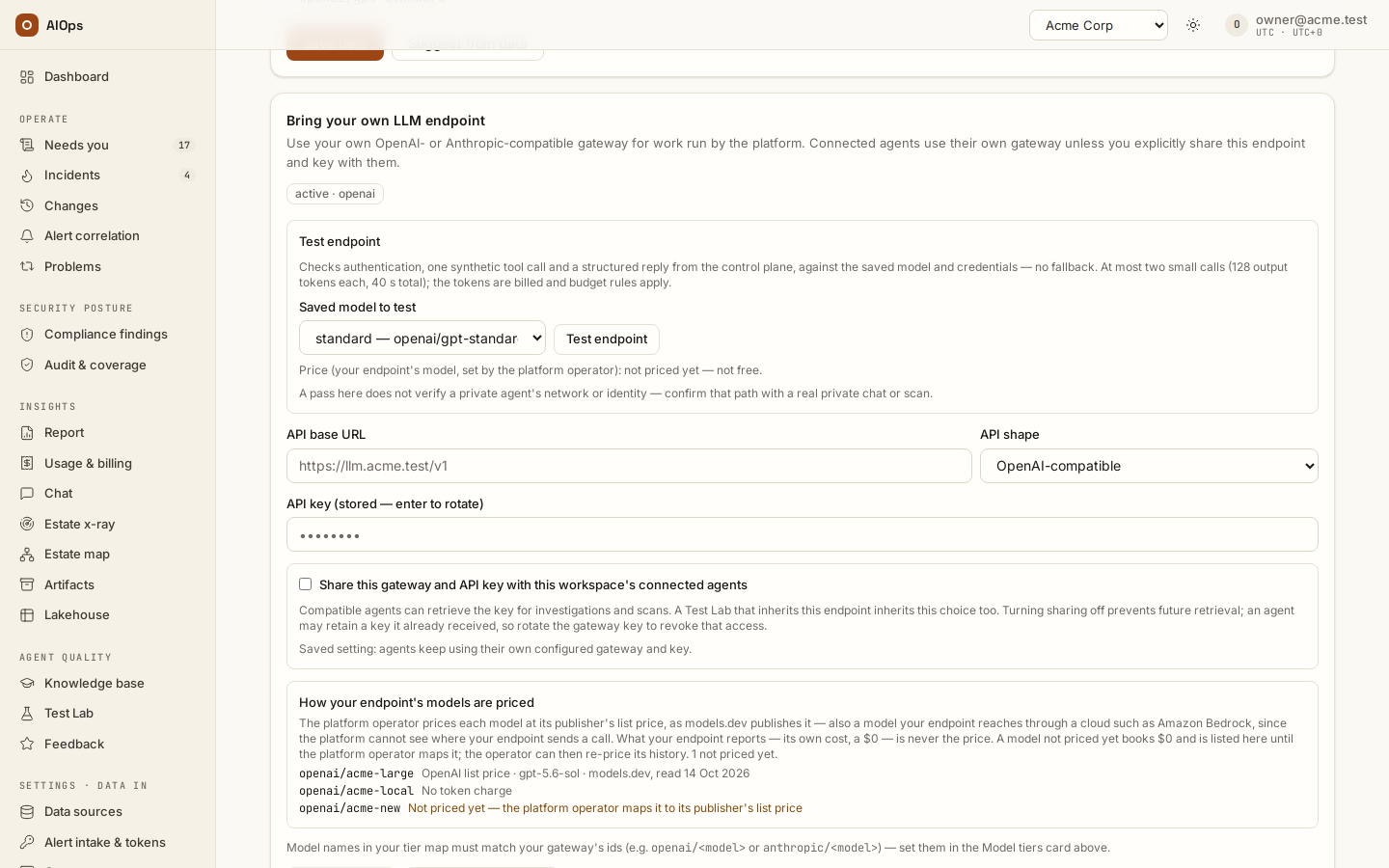
Open Bring your own LLM endpoint on AI models, save any endpoint edits,
select a saved tier under Saved model to test, and press Test endpoint.
This requires pillars.manage and performs at most two synthetic model calls:
first a tool-call response, then a strict structured reply. No estate tools or
customer incident data are supplied. The selected model is used without
fallbacks, retrying another model, or removing the structured-output contract.
Each call has a 15-second timeout and 128 output-token cap; the endpoint has a 40-second total bound. Pause-all and tenant budgets apply, and the ordinary API investigation ledger records the tokens and estimated cost. A failed second check still retains the first call's booked usage.
Control-plane check passed proves only the control-plane path. It does not prove a private agent's network, workload identity, API version or model configuration. Confirm those with a real chat or scan on that private agent. Authentication, model-ID/API-shape, tool-call and structured-reply failures remain failures; a mock model cannot pass a real connection check.
How your endpoint's models are priced
Each model your endpoint serves is priced at its publisher's list price:
the platform operator maps it to the publisher's model (from models.dev, an
open MIT-licensed dataset of publisher prices), records its own agreed rates,
or records No token charge with the reason. That holds for a model your
endpoint reaches through a cloud too: the platform cannot see where your
endpoint sends a call, so Claude served through your own Amazon Bedrock is
priced at Anthropic's list price, not the AWS Price List (a regional Bedrock
profile can cost more). What your endpoint reports is never the price — not
its own cost figure, not a $0. How your endpoint's models are priced on
AI models lists each model with its price: OpenAI list price ·
gpt-5.6-sol · models.dev, read 14 Oct 2026, No token charge, or Not
priced yet. A model not priced yet books $0 until it is mapped — a
monetary cap cannot see its calls meanwhile; once it is mapped, the platform
operator can re-price that history (Re-priced on on the statement says
when). The rate card a workspace typed before this release keeps pricing only
the runs from before it, at the rates it held then; prices sent with an
endpoint save are stored but price nothing.
Rotating a key preserves the saved provider and agent-sharing choice. Endpoint and model saves are configuration changes; use the saved connection test to check the result.
Where the money went: cached prompt reads
Every figure the platform shows — the Spend card on an incident, the spend card in the report's Appendix · Platform cost (FinOps), Usage & billing — opens into a split: fresh input, cached reads, cache writes, output, with the tokens and the per-1M rate that applied to each, per model, and where that model's price comes from: AWS price list · ap-southeast-1 · 12 Oct 2026 (the provider's published price for the region the calls are made from), <Publisher> list price · <model> · models.dev, read <date> (the publisher's own list price, read from models.dev), Provider or contract price (recorded by your platform operator), No token charge (set by your platform operator), Your rate card (the rates given for your workspace's own endpoint) or, on older runs, Gateway-listed price (estimate). Each run is priced at the rate in force when it ran; when the rate changed inside the period the split says so instead of printing one rate.
A cached read is a prompt token the gateway served from its own prefix cache instead of processing again. An investigation re-sends its whole conversation on every step — system prompt, tool catalogue, every observation so far — so by the end most of the prompt is a prefix the gateway has already seen. On real runs around 80% of prompt tokens are cached reads, and vendors bill them at roughly a tenth of the input rate. That single line is the difference between a plausible bill and a wrong one.
The platform bills a cached read at the cache_read_per_1m rate stated for that model on the price map. When the map states none, cached reads are billed at the full input rate — a deliberate over-count, because for a billing number guessing high is safer than guessing a discount nobody confirmed.
That is what the over-estimate banner means when it appears above a spend figure: one or more models in that total have cached reads and no cached-read rate, so the number shown is higher than the invoice will be. It names the models. The fix is platform-side — staff enter the cached-read rate for those model ids on the platform price map. No investigation has to run again: the tokens are already recorded on every run.
A rate applies from the date it is recorded for: runs that happened earlier keep the price that was in force when they ran, and the split prices every run at the rate in force when it ran. When the operator records a rate for an earlier date, the split of the runs it covers reflects it on the next read, but the booked total on each run does not move until someone re-prices history — that is a deliberate write against the record, not something a page load does. While the two disagree, the page says which is which: it prints what was booked, what the rates now recorded for that time put the same tokens at, and that re-pricing history brings them together. When the amounts agree but the runs were booked from an estimate that an official price now covers, the page says so too — re-pricing history only records it.
Cache writes are prompt tokens written into the provider's cache so later steps can read them cheaply. Some providers charge for the write — Anthropic models on AWS Bedrock about 1.25 times the input rate — so they have their own line. When no cache-write rate is configured they are billed at the input rate, and the page says the figure prices them that way.
Estimates. A model with no published or contract price on the card is still costed — from the model library's own price table, or the platform's fallback rate — so budgets and the cost cap keep working. That part of a figure is an estimate, and the page says how much, for which models and priced from what: $x of this figure is an estimate: no published price was configured for <models> when these runs ran. The fix is platform-side: your platform operator records the official price and re-prices history.
Models no price applied to are listed as unpriced in the split: their booked figure passes through as recorded and is deliberately not broken down, because there is no rate to break it down with.
When the platform upgrades the model for you
No model decides which model to use. Four rules, all in code, all traced, all decided by fixed rules rather than by another model:
| Rule | Decided | Effect | Recorded as |
|---|---|---|---|
severity=critical, or env/environment = prod/production on the correlated alert labels, or a mission-critical resource (declared criticality, see Severity, priority and risk tier) |
once, before step 1 | the loop runs on the reasoning tier instead of standard | routing note routing: loop escalated to <model> — severity=critical (or — env=prod, — criticality=mission-critical) plus audit model.escalated |
tool_thrash — the same tool called with byte-identical arguments 3 or more times |
at the top of any step | the loop climbs one ladder step, once per run | routing note plus audit model.escalated |
parse_failures — 3 or more assistant turns whose tool arguments do not parse |
at the top of any step | as above | routing note plus audit model.escalated |
| spend reaches 70% of the cost cap | at the top of any step | the loop drops one ladder step, once per run | routing note routing: loop downgraded to <model> — budget plus audit model.downgraded |
Rules that hold regardless:
- Pre-run escalation only fires if it changes anything. It swaps the loop onto the wrap-up (reasoning) model, so it is a no-op when standard and reasoning resolve to the same model, or when the pillar carries an override.
- Budget wins. After a downgrade, thrash escalation is disabled for the rest of that run — the ladder only goes down.
- No cap, no downgrade. The 70% rule needs a cost cap in force; with the cap at
0it never fires. - The wrap-up model is never downgraded. The RCA keeps its quality floor even on a run that ran out of money.
- A pillar model override empties the ladder. A pillar pinned to one model gets no mid-run switching at all, in either direction.
- The ladder is the configured tiers, ascending capability, deduplicated. One distinct model configured means no room to climb or drop; a loop already on the bottom rung cannot drop further.
- Resume re-applies the last recorded switch from the conversation trace, so a paused-and-approved or crash-resumed run continues on the model it was actually using.
Every switch is visible on the incident's investigation trace and in the audit log — see Audit log.
Procedure: take a tier suggestion from your own data
Requires pillars.manage.
- Open AI models (
/portal/settings/models). - In the Model tiers card, click Suggest from data.
- Read the evidence table:
Model,Quality,Human avg (n),Bench % (n),USD/1k tok,Runs. - Adjust any tier the suggestion filled in — it is a proposal, not an apply. Nothing is written until you save.
- Click Save tiers.
When it worked, the notice reads Suggestion filled in — review the evidence, then save. before step 5, and Model tiers saved. afterwards; reloading the page shows your tiers in the pickers and no longer shows the inherited banner.
The suggestion is arithmetic, not a model call:
- Quality is a weighted blend of your 1–10 RCA scores (scaled to 0–100, weight 0.6) and benchmark pass rates (weight 0.4); a missing component is skipped rather than counted as zero.
- Scores are credited to the model that did the bulk of the tokens in a run, not to the model stamped at its start — so a run rescued by an escalation does not blame the rescuer.
premiumandreasoningneed at least three human scores on the same model, so a small benchmark import cannot crown the top tiers. Both are suggested as the same model, and on benchmark-only data neither is suggested at all.standardis the best quality-per-cost among models within 20% of the top quality;lightis the cheapest still at half the top quality.- Models the gateway does not price show as
unpricedand are excluded from the cost rankings — unless nothing priced qualifies at all, in which case they are all that is left to rank. - With too little data — no model reaching three data points, counting human scores and benchmark scenarios together — you get Not enough scored runs yet to suggest tiers. Rate more RCAs and run the benchmark suites, both covered in Knowledge, x-ray and insights.
Model residency policy
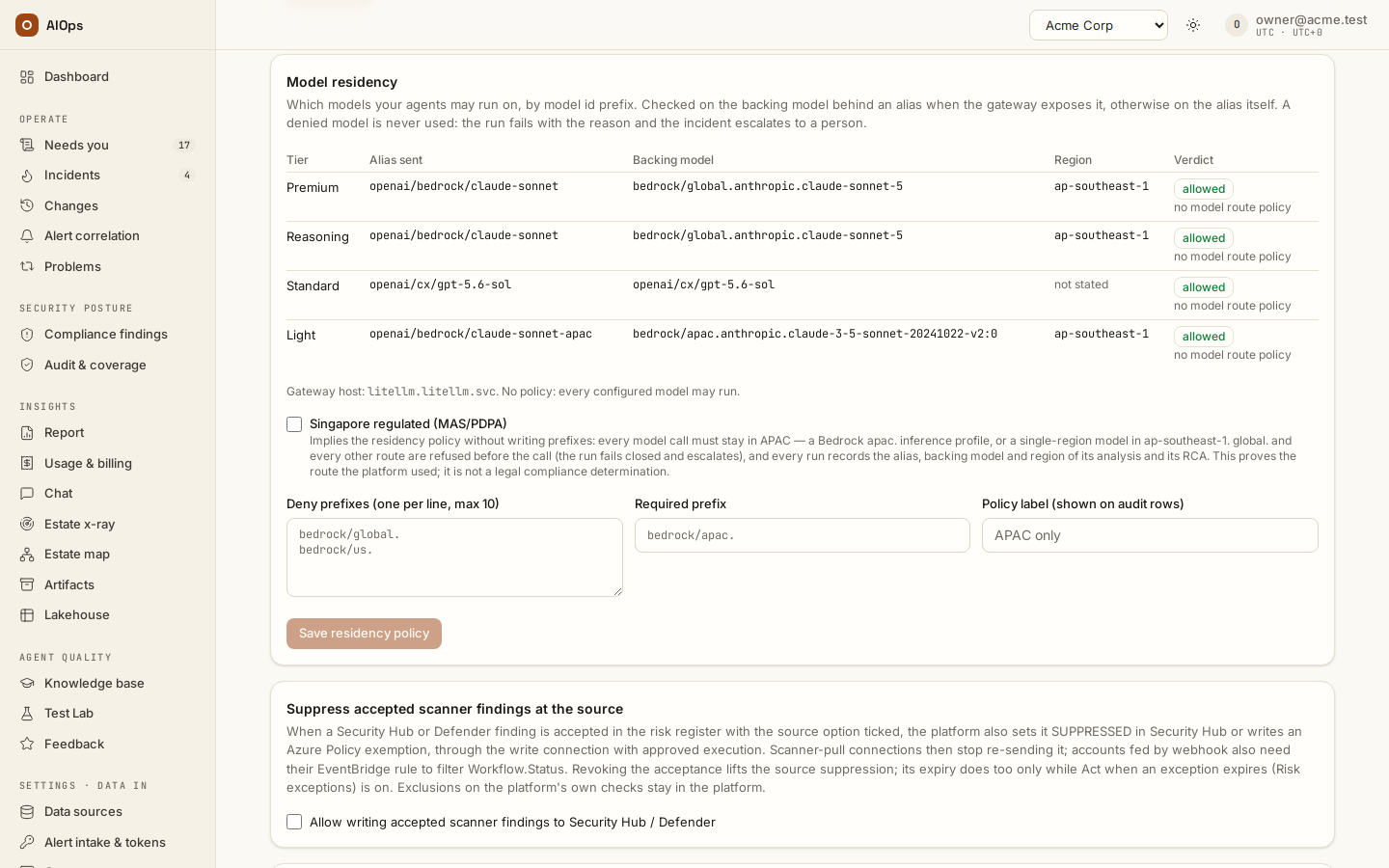
The Model residency card pins which models your agents may run on, by model id prefix. It exists for data-residency rules of the form "only in-region models" — for example a Bedrock deployment where bedrock/apac.* is in-region and bedrock/global.* and bedrock/us.* are not.
What is checked. A policy has up to ten deny prefixes, an optional required prefix and a label (shown on every audit row it produces). Before a run starts, each model the tier map resolves — the loop model, the wrap-up model and every step of the escalation ladder, plus a per-run model pin from a benchmark or the agent API — is checked against the policy:
- When the platform gateway exposes the backing model behind an alias (a litellm proxy does, through its
/model/inforoute), the check runs on the backing id:openai/bedrock/claude-sonnetis judged asbedrock/global.anthropic.claude-sonnet-5. The map is fetched before every investigation, chat turn and x-ray launch and cached for five minutes. A gateway that answers 404 has no backing ids and is checked on the alias; a gateway whose/model/infofails keeps its last fetched map, and with no map at all the policy denies every model (fail closed) until a fetch succeeds. - When it does not (a plain OpenAI-shaped gateway, or your own bring-your-own endpoint), the check runs on the alias the platform sends. The reason column says which one was used.
- A deny prefix that matches either the alias or the backing id denies; the alias is tried with and without the platform's
openai/prefix, so a prefix written as the gateway's own model name works too. The required prefix is checked on the backing id when known, else on the alias — so withrequire_prefix: bedrock/apac.an alias whose backing model is unknown is denied, because residency cannot be shown.
What "fail closed" means. A denied model is never used and nothing is substituted for it. An investigation lands as failed with the reason model route policy: <model> denied (<why>) and its incident escalates to a human, exactly like a budget refusal; an agent-API or insights-chat turn returns that reason instead of an answer; a ladder step the policy denies is simply absent, so a thrash escalation or budget downgrade can never land on it. The policy is checked, not retried: changing the tier map or the policy is the fix. The mock LLM used by the keyless demo makes no gateway call and is exempt.
Singapore regulated (MAS/PDPA). The checkbox on the same card marks the workspace as subject to Singapore data-residency rules and implies the policy, so nobody has to write prefixes for it. While it is ticked, every model call must stay in APAC:
- allowed: a Bedrock APAC cross-region inference profile (
apac.— its processing stays in APAC regions), or a single-region Bedrock model inap-southeast-1(the region is read from the model's ARN, else from theaws_region_namethe gateway states for the alias); - refused: a
global.profile (it may run in any region worldwide), every other geography (us.,eu.,jp., …), a model in another region, a model whose region the gateway does not state, an application inference profile (its ARN hides where it routes) and any non-Bedrock model — residency cannot be shown, so the platform does not guess (fail closed).
The check runs on the same subject as the prefixes (the backing model when the gateway exposes it, else the alias), after any deny or required prefix you wrote, which still apply. A refused model behaves like any other denial: the run fails before any model call, with the reason, and its incident goes to a person. The flag proves the route the platform used; it is not a legal compliance determination, and an apac. profile does not prove processing stayed in Singapore — only in APAC.
Every model call the platform makes is held to the same rule whenever a policy is in force — the flag's, or the prefixes you wrote:
- Fallbacks. When the platform's configured fallback models stand in for a model that fails (a 429 or a 5xx), only a fallback the policy allows is offered; a refused one is never sent the incident. A fallback that the gateway's own router configures is invisible to the platform — keep the gateway's router inside the same geography.
- Balanced aliases. When the gateway spreads one alias over several deployments that differ (in backing model or region), every deployment must pass; one
global.deployment refuses the alias, whatever order the gateway lists them in. - The Test button. Testing a tier the policy refuses makes no call and says why.
Under the Singapore flag, two more:
- Resumed runs. A run resumed after an approval pause or a restart is rebuilt, so it records the route it continues on again (
model.routedwithresumed: true) — the RCA model named is the one that actually ran. - Private agents. The flag is enforced where a run is built. A private-network agent older than 0.1.119 does not know it and enforces only the prefixes you wrote; while the flag is on and such an agent is live, the card names the agent so you can check its version.
How to read the evidence. The card's table is the live check, per tier: the alias, the backing model when known, the region the gateway states, the gateway host and the verdict with its reason — the same decision the next run will make. Each run started under a policy also writes one audit row, Model route recorded (model.routed: model, backing model, gateway host, policy label), so a run's residency is an audit fact rather than a guess; every refusal writes Model denied by route policy (model.denied) with the same fields. Under the Singapore flag both rows also carry the region and the verdict's reason, and model.routed adds the route of the run's RCA (wrap-up) model — alias, backing model and region — next to the analysis model's. Both appear on the incident timeline, under Audit and on each run of the incident's analysis panel (Model route: analysis … · RCA …; a resumed run adds Model route on resume: …). The region printed is the one the gateway states the call is invoked in: for a single-region model it is where the call is processed, for an apac. profile AWS picks the APAC region that processes it.
Through the API: GET /guardrails returns model_route_policy, sg_regulated and model_route_check (per tier: model, backing_model, region, api_base_host, verdict allowed|denied|unknown, reason); PATCH /guardrails with {"model_route_policy": {"deny_prefixes": [...], "require_prefix": "", "label": ""}} saves it (members.manage; prefixes must be non-empty strings without whitespace, at most ten; label at most 60 characters) and {} clears it; {"sg_regulated": true} sets the flag (a JSON boolean; null or false turns it off). Each run of an incident carries its recorded route in investigations[].route (and GET /investigations/{id} in route). A lab box inherits its parent's policy and flag, and remote agents receive both with the rest of the routing settings.
Set it up like the demo
The procedure below is the former AI models, regional routes and prices — set it up like the demo chapter, kept whole.
Goal
Choose model routes that fit the workspace's policy and budget, then verify the route and pricing evidence of an actual run. An alias name alone does not prove the processing region or a billable rate.
Prerequisites
pillars.manageto set workspace tiers or its own endpoint;members.managefor Guardrails policies and budgets.- A platform operator for gateway aliases, default tiers and the model price map.
- An approved endpoint/region, private key-handling path, and budget for any Test or real run.
Procedure
-
Open Settings · Agents → AI models → Model tiers. Review premium, reasoning, standard and light before saving. The usual assignments are standard for the loop/chat, reasoning for wrap-up and premium for x-ray; an explicit pillar override takes precedence and removes the tier ladder. You should see the saved/effective tier choices and whether they are inherited.
API:
GET/PATCH /api/aiops/{tid}/model-tiers— edits requirepillars.manage. Suggest from data usesGET /api/aiops/{tid}/model-tiers/suggestwith the same management permission.
-
Read routing changes in the run itself. Critical/production conditions can start at a higher tier; repeated identical calls can escalate, and budget pressure can downgrade the loop. A missing tier resolves to the nearest configured tier of the workspace's map, above it first; only a workspace that sets no tier at all routes on the platform default map. You should see the actual recorded route/switch notes, rather than assuming one model handled every stage.
API: incident/investigation reads require
incidents.view. A configured tier is not evidence that a run used it. -
If using Bring your own LLM endpoint, select the API shape, base URL and sharing choice, and supply the key privately. Test endpoint is a real endpoint interaction and can spend budget. You should see its Test result and the effective endpoint; the key remains write-only.
API:
PUT/DELETE /api/aiops/{tid}/llm-endpointandPOST /api/aiops/{tid}/llm-endpoint/test—pillars.manage. A model nobody priced books $0 labelled Not priced yet — not a real zero.
-
Under Guardrails & cost → Model residency, review the require/deny model-id prefixes. For the regulated-workspace policy, Singapore regulated (MAS/PDPA) requires an allowed regional route and fails closed before an unsuitable model call. You should see the policy verdict and the run's Model route recorded or Model denied by route policy evidence.
API:
PATCH /api/aiops/{tid}/guardrails—members.manage. An APAC inference profile proves the APAC route; it does not by itself prove exclusive processing in Singapore or legal compliance.
-
Have the platform operator verify the gateway alias/backing route and its declared region. A regional Bedrock alias needs the documented inference-profile/region configuration, not merely a regional-looking display name. Roll private agents with the relevant platform release before relying on forwarded policy settings. You should see a tested allowed route and matching route evidence on the actual analysis and wrap-up stages.
Operator procedure: the platform-console guide, chapter Connecting the LLM gateway. Do not copy keys, gateway hosts or raw credential configuration into a shared receipt.
-
In Platform defaults → Model price map, the platform operator fetches the released list prices, reviews suggested mappings, and confirms intended matches. A manual rate needs a source note. For a workspace on its own endpoint, open Workspace endpoints and use Re-price history (dry run) first; Re-price now applies it. You should see the price source/date, unresolved aliases under Needs attention, and truthful unpriced/estimated labels.
The control plane requires the documented AWS price-list and
models.devegress. The workspace's own endpoint must be mapped or given an evidenced rate; provider invoices remain separate from estimated operating totals. -
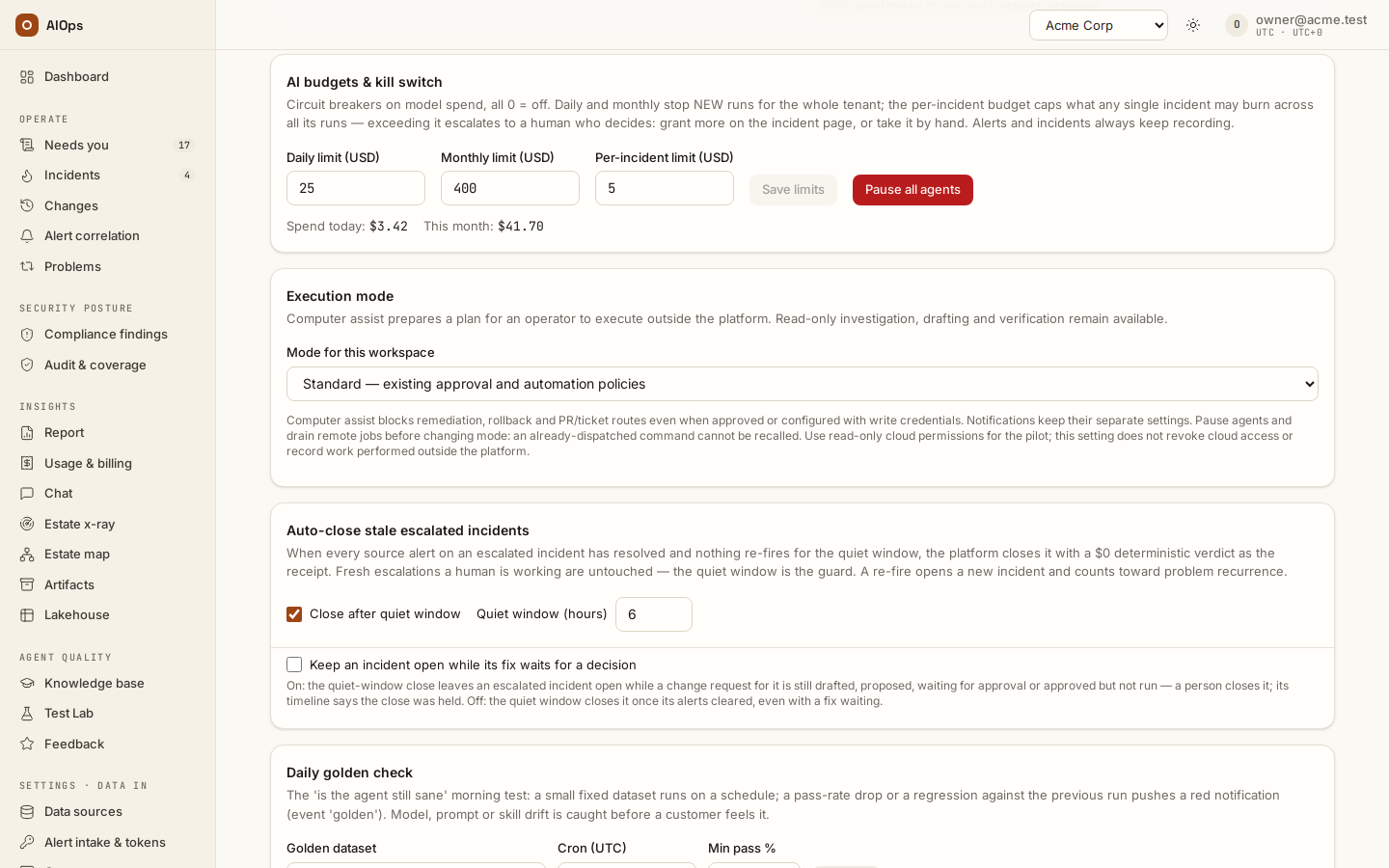
Set the intended daily, monthly and incident limits under AI budgets & kill switch, and the per-investigation cap. A saved zero per-investigation cap means uncapped, not inherited from the platform default; an empty field follows the platform default. A cost-cap stop does not promise a final wrap-up call. You should see the effective limits, pause/budget state and the actual stop result.
API: workspace guardrails use
PATCH /api/aiops/{tid}/guardrails—members.manage. Pause all agents is workspace-wide: no new agent run starts until someone resumes them.
-
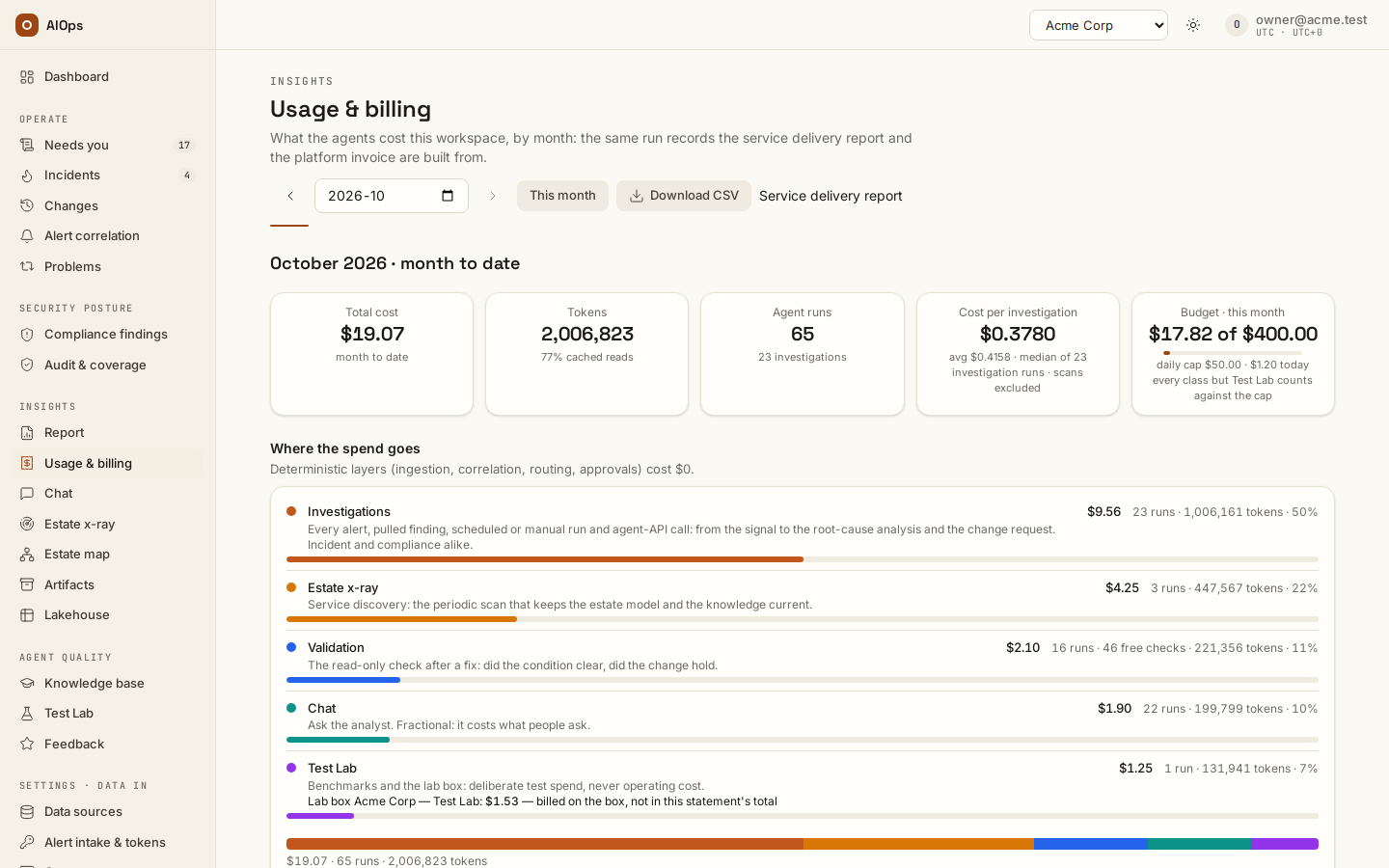
Read Insights → Usage & billing and the platform Billing statement. Match the month, price source and recorded scope. You should see cost evidence for the actual selected period; a sealed statement is not silently recomputed when detailed records age out.
On an incident, Spend sums the recorded occurrences using the same accounting as Usage & billing. Triage & RCA (L4·L7) separates automatic work and human re-runs; Validation (L6) separates completed AI runs, failed runs and free checks. An AI check that failed after spending still contributes to cost. Occurrence rows appear only when more than one occurrence has recorded activity. These are model costs; source-system or cloud charges remain separate. Do not create a run or assume a count to fill the card.
Verify
Pair the effective configuration with an actual route/Test/run receipt, its policy verdict and price-source line. If the test was not run, label the setup unverified. Restore temporary tiers/endpoints and verify the effective result; null means following the current default.
Troubleshooting
Symptoms that are specific to the AI models page and the residency policy are below. Anything that spans pages — a run stuck queued, a missing destination, a page that 404s — is collected in Troubleshooting.
| Symptom | Cause | Fix |
|---|---|---|
| AI models is missing | Model configuration needs pillars.manage |
Ask a workspace owner to configure the models or grant that permission |
The tier pickers on AI models are empty and the card prints Gateway models: <error> |
You hold pillars.manage, so this is the gateway itself: not configured, or the /models call failed. |
Use Custom model id… — saving never depends on the list. Read the source label: check that gateway, or enter its model ID manually. The BYO provider may not support a catalogue. |
| Escalation and downgrade never happen | The pillar has a Model override (which empties the ladder), fewer than two distinct models are configured across the tiers, or there is no cost cap (the 70% rule needs one). | Clear the override, configure at least two tiers with different models, and set a cap if you want the downgrade. |
Pre-run escalation never appears on incidents with alert severity=critical, env=prod or a mission-critical resource |
standard and reasoning resolve to the same model, so the swap would change nothing. |
Point reasoning at a stronger model than standard. |
| Suggest from data says Not enough scored runs yet | No model has three data points, counting human scores and benchmark scenarios together. | Rate more RCAs on incidents and run the benchmark suites. The top two tiers additionally need three human scores. |
From the set-up procedure:
| Symptom | Check | Next step |
|---|---|---|
| Route denied | Backing provider, profile, region and the effective prefix policy | Select an allowed route; do not bypass residency |
| Not priced yet | Alias mapping, rate source and successful price fetch | Map or supply an evidenced rate; retain unpriced status until then |
| Old agent ignores a setting | Actual agent and platform releases | Upgrade and run a scoped verification |
| Test succeeds but a run stops | Budget, pause or licence state, role and pillar override | Read the precise run gate and its audit |
Limits and gotchas
- A pillar model override wins outright — for the loop and the wrap-up — and disables all mid-run routing for that pillar. Use it to pin a pillar deliberately, not as a shortcut for setting tiers.
- The tier map is used whole. Setting one tier means your tenant owns the whole map; it is never merged with the platform default. Unset tiers resolve to the nearest configured tier, not to the platform's.
Related
Configure the agents · Guardrails and cost limits · Insights · Private access.