Guardrails and cost limits
The write posture, the always-on floors, budgets and the cost cap, PII patterns, egress, the switches around a fix, validation checks, risk exceptions, unmanaged changes and data retention.
Reference · Updated 2026-10-28 · Describes release 0.1.164
Guardrails & cost (/portal/guardrails) holds the always-on floors (read-only, by design) plus the knobs that are yours: the cost cap and budgets, PII patterns, the web egress allowlist and the SSRF guard, the switches around a fix, the change management agent, automatic analysis of P1/P2 compliance findings, validation checks, the automated triage, risk exceptions, unmanaged changes and the data retention window. A row of links under the page title jumps to each group of cards; every card stays on the page, so a half-typed field survives a jump. This page is that page, card by card, after the one thing to establish first: the write posture your deployment runs. Per-pillar settings are on Configure the agents; model tiers and residency on Models, tiers and routing.
Which posture your deployment runs
This is the single most important thing to establish with your platform team, because the platform ships with two possible write postures and the posture is set per deployment, not per workspace.
On the shipped default the agent's write is refused mid-diagnosis and returned to you as a remediation plan; your platform operator can switch the fleet to pause mid-run instead. Either way no write reaches your estate without a named human (the one exception, off by default, repeats unchanged a fix a named approver certified: Automatic API fixes for proven runbooks).
The posture is a platform-level setting (AIOPS_DIAGNOSIS_WRITES), not a tenant knob. It applies to every tenant on the deployment.
| Posture | What happens when the agent proposes a mutating call mid-investigation |
|---|---|
deny — the shipped default |
The call is refused before it runs. The agent is told, in the tool reply, that writes are blocked during diagnosis, not to retry this or any other mutating call, and to put the action in its final remediation plan for a human to approve. The investigation keeps going at full speed. The attempt is recorded on the trace with status denied and carried onto the wrap-up as a blocked write. Your decision point is the incident's Review fix (or Review pull request): an operator (incidents.act) chooses Request approval, and an approver (approvals.decide) releases the fix with Approve & run or Approve & create PR. |
pause |
The human-in-the-loop stop: the run pauses, an approval row appears under Needs you (/portal/approvals), and a human approves, denies or edits the command before the agent continues. An approval nobody answers is denied by timeout (24 hours on the shipped default), which fails that investigation and escalates its incident. |
The difference is where you decide, not whether: under Needs you mid-run (pause), or on the incident's remediation plan at the end (deny). Both paths are audited the same way. On the default posture awaiting_approval is rare, so an empty approvals queue is normal rather than a sign that nothing is being caught — see Incidents for what the remediation plan looks like and who acts on it.
The on-screen copy describes the default posture: the Always-on floors write-floor row says investigation tools refuse mutating operations, and the helper under Extra approval gates says a caught call is refused during diagnosis by default; only the Egress control row also names the pause outcome. Ask your platform team which posture is configured before you write a runbook around it.
Who may release a fix once it reaches a person — the risk tiers, the quorum and the roles — is stated once in Approval policy and change tiers; this page describes the floors, the limits and the switches around them.
Guardrails
The floors you cannot switch off
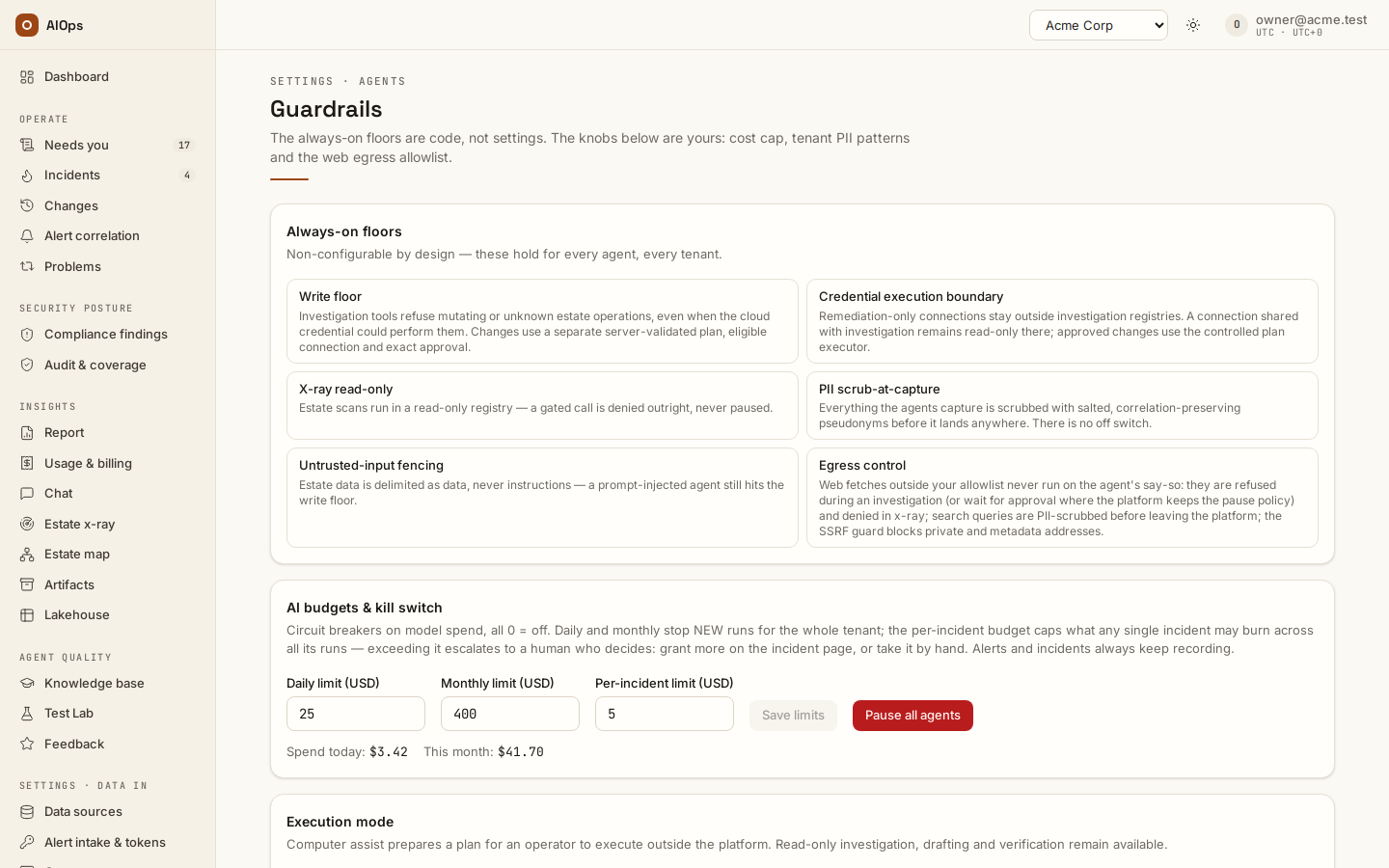
The Always-on floors card states them as the platform enforces them. This table is the canonical list; other chapters point here rather than restating it.
| Floor | What it means |
|---|---|
| Write floor | Every mutating tool call — non-GET API calls, non-read CLI verbs, cloud write actions, MCP tools not annotated read-only, any raw URL fetch — is stopped and handed to a human: refused into the remediation plan on the default posture, or paused on the Approvals queue in pause. The read allow-list is default-deny: unknown means gated. |
| Credential execution boundary | Remediation-only credentials are excluded from every agent registry — investigations, x-ray, chat, collector — and a connection shared with investigation (read + approved changes) stays read-only there. The model never sees a remediation-only credential; only the execution path writes — a plan a person approved (typed steps or a route), a pre-approved route, and the scanner write-back of an approved exclusion. |
| X-ray read-only | Estate scans run in a read-only registry. A gated call is denied outright, never queued for approval, and counted. |
| PII scrub-at-capture | Content is pseudonymized with salted, correlation-preserving tokens before it is stored. No off switch at the lakehouse ingest, the x-ray ledger, chat answers or the artifact store. |
| Untrusted-input fencing | Estate data is fenced as data, never instructions. A prompt-injected agent still hits the write floor. |
| Egress control | Web fetches outside your allowlist never run on the agent's say-so: they are refused during an investigation on the default posture (or wait for approval in pause) and denied inside an x-ray; search queries are PII-scrubbed before leaving the platform; the SSRF guard blocks private and metadata addresses. |
Which connector operations count as "mutating" is decided per connector type and is listed in Datasources → The read/write gate in detail. The gate itself, and the tiers and quorum that follow it, are stated once in Approval policy and change tiers.
What we send to the model provider
The floors above govern what the agent may do. A separate question — what estate content leaves your network on the way to the model — has one honest answer here and its full treatment in Security and your data.
In short: the investigation loop sends the alert's labels and annotations, the output of every read tool it calls, your knowledge context and your tenant prompt to whichever model the tier resolved to, on the gateway your platform team configured. Two PII chokepoints on that path are platform-level switches rather than floors, and both ship off: scrubbing alert payloads at ingest (AIOPS_PII_SCRUB_ALERTS) and scrubbing raw tool output before it enters the model context and the stored transcript (AIOPS_PII_SCRUB_TOOL_OUTPUT). With the second one off, a command's output reaches the model, and is stored on the investigation, exactly as the agent saw it — while anything that reaches the lakehouse, an artifact, the x-ray ledger or a chat answer is still scrubbed unconditionally. Ask your platform team to enable both if raw estate content in prompts and transcripts is in scope for your data policy, and read Security and your data before a security review rather than after it.
AI budgets and the kill switch
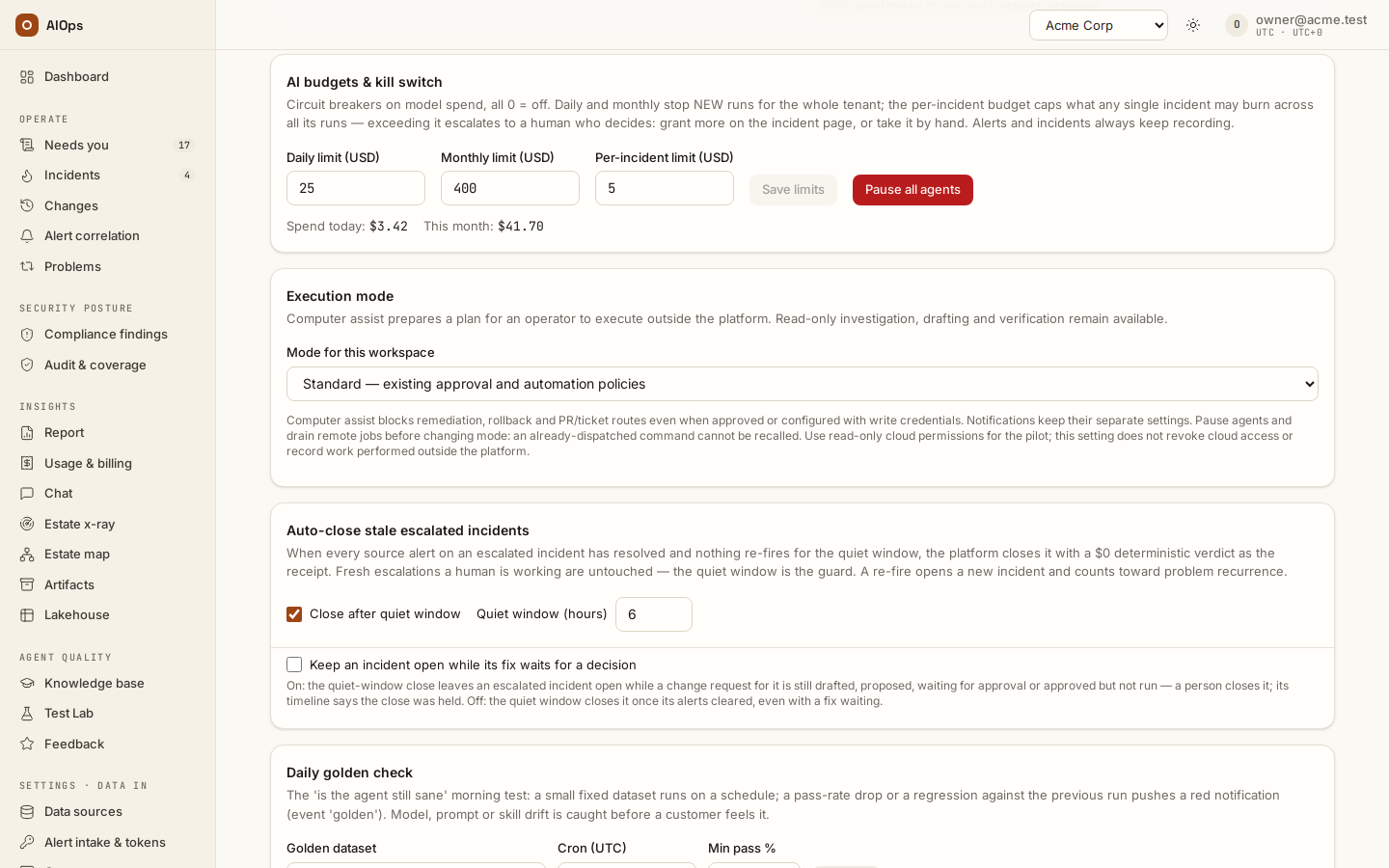
The AI budgets & kill switch card (shown with members.manage) holds the workspace-wide circuit breakers, in USD, 0 meaning off. Daily limit and Monthly limit stop new runs for the whole workspace once the day's or the month's spend reaches them. Per-incident limit caps what one incident may spend across all its runs: past it, the incident escalates to a person, who grants more on the incident (Continue analysis (+$5)) or takes it by hand. Save limits applies the three; while a limit holds, the card reads budget tripped — new runs blocked. Pause all agents stops every new agent run until someone selects Resume all agents. Alerts and incidents keep recording either way, and the incidents escalate to people. These are separate from the per-investigation cost cap below.
The cost cap, and what happens at 70%
Cost cap per investigation (USD, 0 = uncapped) on the Cost cap & PII patterns card. The whole card requires members.manage; without it you see a permission notice in its place. Leave the field empty to follow the platform default: while it is empty, its placeholder shows the default in force, for example platform default (10 USD) or platform default (uncapped). 0 removes the cap for this workspace.
How it is applied:
- The cap is checked at the top of every loop step, before the next model call.
- The figure compared against it is the run's accumulated spend across every model it used, prompt and completion, including the wrap-up call.
- At 70% or more of the cap, the loop drops one ladder step, once. The wrap-up model is untouched.
- At 100% or more, the run stops before the next model call. There is no wrap-up call — the whole point is to stop spending. An RCA document is still written, but it is a stop notice, not an analysis: its root cause reads
investigation stopped: cost budget exceeded ($x.xx >= $y.yy), evidence is empty, confidence is 0, no remediation route is attached, and the incident escalates to a human. The incident keeps the root cause of the last analysis that finished, and a ticket write-back never uses the stop notice as its root cause.
Worked example with a cap of $5.00 and a three-model ladder (light → standard → premium):
step  1..7   loop on standard              spend $0.00 → $3.42
step  8      $3.42 >= 0.70 × $5.00         → downgrade to light, note recorded
step  9..12  loop on light                 spend $3.42 → $5.06
step 13      $5.06 >= $5.00                → stop, no wrap-up call
             RCA = stop notice, incident escalated
A cap can only bite if the platform can price the tokens. Each call is priced from the platform's price card — an official price the platform read from the provider's published price list, or a contract price your platform operator recorded with its source. A model the card does not price is still costed from the model library's own price table when that table knows the model, so the cap keeps working, but that money is an estimate and every cost screen says so. When neither knows the model id — normal for a private or proxied gateway — tokens are still counted exactly, but every call prices at $0.0000. The run's accumulated spend stays at zero, so the 70% downgrade never fires and the cap never stops anything. The same zero appears wherever money is displayed: Cost per analysis in the report's AI spend appendix, the cost hero on an x-ray scan, and the USD/1k tok column in the tier suggestions, where such models are labeled unpriced.
The fix is platform-side, not tenant-side: on Platform defaults → Model price map, staff fetch the publishers' list prices (Fetch list prices), map the model to its publisher's model, or enter a contract price with a source note — a model nobody priced reads Not priced yet — after which every call is costed and the cap works normally. It is documented in the platform-console guide, chapter Connecting the LLM gateway. Until then, treat the cost cap as inactive and bound spend another way — fewer connected datasources per pillar, tighter alert routing, and a lower per-pillar step ceiling requested from platform staff — and do not report $0.0000 upward as a real figure. A zero here means "not priced", never "free".
Cost is booked per model rather than per run, so both the report and the tier suggestions attribute spend to the model that actually did the work — including the model a mid-run switch handed the run to.
Scope notes: rechecks, insights chat and agent-API turns are investigations too and carry the same cap (rechecks are additionally capped at six steps). Estate x-ray does not use this cap — each scan carries its own budget, entered at launch, and that budget replaces the tenant cap for the whole scan.
PII patterns
Three lists, across two cards on the Guardrails page:
- PII scrubbing defaults → Always on (built-in floor):
secret,email,card,phone. Informational, always applied. - PII scrubbing defaults → Recommended pack: nine curated patterns (US SSN, AWS access key ids, Google or GCP API keys, GitHub tokens, Slack tokens, JWTs, IBANs, PEM private-key blocks, MAC addresses). Each row shows its exact regex, with Add or Disable per pattern and Add all recommended when some are missing. Adding or disabling requires
members.manage; without it the rows show a read-onlyenabledoroffbadge. - Tenant PII patterns (regex, one per line, max 20) on the Cost cap & PII patterns card: the full live list, including anything you adopted above. Edit or delete any line here.
Adopting a recommended pattern copies its regex into your own list, so a later platform update never clobbers your edits — new recommendations simply surface as N recommended patterns not enabled yet. Adoption is matched on the regex text, so if you rewrite a pattern it will reappear as "not enabled".
Procedure: cap spend and adopt the recommended PII pack
Requires members.manage.
- Open Guardrails & cost.
- In PII scrubbing defaults, click Add all recommended (or Add on individual rows you want). Each click saves immediately, reports Saved — N tenant patterns active. and refreshes the textarea below.
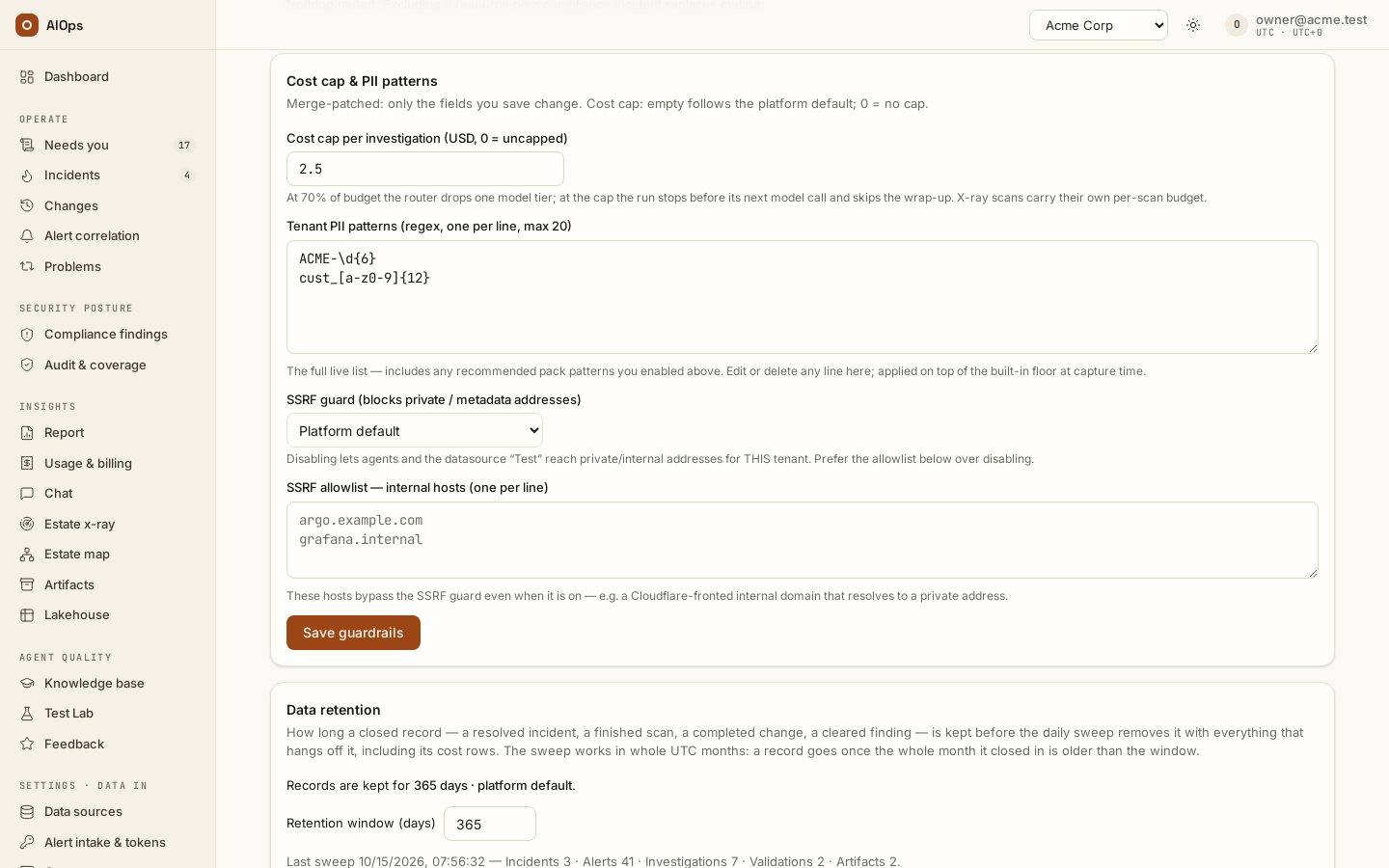
- Scroll to Cost cap & PII patterns and set Cost cap per investigation (USD, 0 = uncapped) — for example
4. Leave it empty to follow the platform default. - Review Tenant PII patterns (regex, one per line, max 20); add any identifier specific to your organization, for example
ACME-\d{6}. - Click Save guardrails.
When it worked, the card shows Guardrails saved., the recommended notice no longer counts unenabled patterns, and reloading the page shows your cap and your full pattern list. An invalid regex is rejected outright and the error names the offending pattern. A list longer than 20 lines is rejected too, with at most 20 PII patterns (N given), and nothing is saved; PII scrubbing defaults gives the same answer when Add all recommended would take the list past 20.
Saving this card writes the PII patterns, the SSRF mode and the SSRF hosts every time, and the cost cap only when you edited that field: an emptied field returns the workspace to the platform default, a number replaces the cap. A value that is not a number of 0 or more is refused on the card (Enter a number of USD, 0 or more, or leave it empty for the platform default.) before anything is sent. Reload the page before editing if someone else may have changed it since you opened it.
Egress: allowlist and SSRF guard
- Domain suffixes (one per line, max 50) on the Web egress allowlist card (requires
datasources.manage) — domainsweb_fetchmay reach without approval. Match is by suffix: the host must equal the entry or end with.plus the entry. Entries are lowercased and de-duplicated, a leading*or.is stripped, and anything containing a slash or space or lacking a dot is rejected by name. Everything not on the list stays gated, and is denied outright inside an x-ray. Click Save allowlist; when it worked the notice reads Allowlist saved. and the box shows the cleaned list. This save replaces the whole list rather than merging it, so edit the full box, never one line in isolation. - SSRF guard (blocks private / metadata addresses) —
Platform default,EnabledorDisabled (allow internal addresses), on the Cost cap & PII patterns card. Prefer SSRF allowlist — internal hosts (one per line) (max 50) over disabling the guard; that list bypasses the guard host by host while it stays on for everything else. Entries are reduced to a hostname, so pasting a full URL is safe.
Note that web_search is never gated — only the query leaves the platform, and it passes the PII scrubber first — while http_get (arbitrary URL fetch) is gated permanently and cannot be allowlisted.
Pre-approved operations
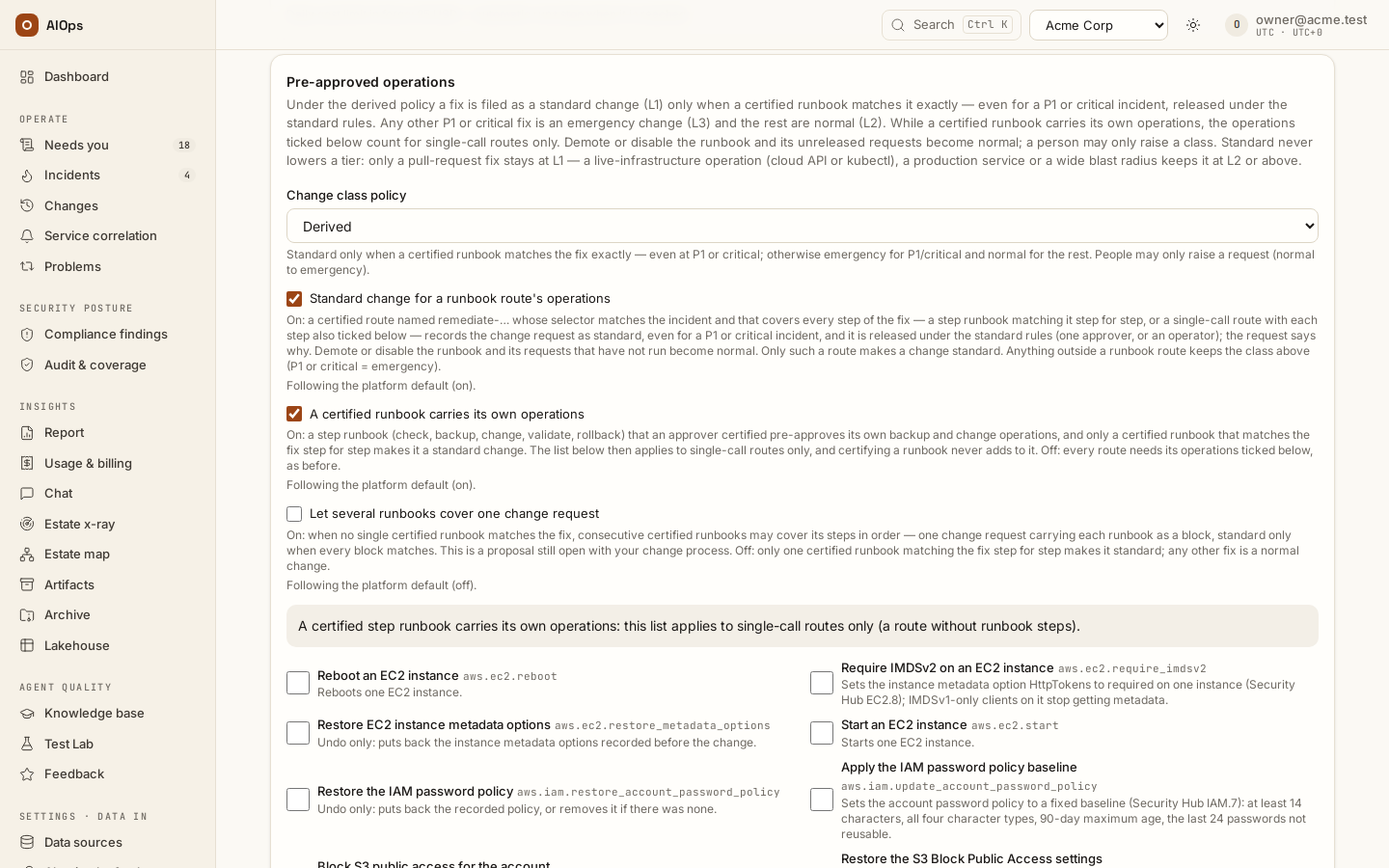
- The card also holds the Change class policy: Derived (Standard only when a certified runbook matches the fix exactly — even for a P1 or critical incident, released under the standard rules; otherwise Emergency for a P1 or critical incident and Normal for the rest; with both runbook switches below off, Standard when a runbook matched and every typed step is ticked here) or Standard by default (every request starts Standard and people raise it). Under both, a class someone set on an earlier request with the same operations is inherited, and a request's class can be raised — never lowered — on the change record (Reclassify) while nothing has been dispatched.
- The Pre-approved operations card lists every typed operation a fix plan can use, with what each one does. Tick the ones your workspace pre-approves and click Save operations (
members.manage; everyone else sees the list read-only). Through the API, an unknown operation is refused and the message lists the valid ones. - A certified runbook carries its own operations (on by default) makes this list one for single-call routes only: a step runbook an approver certified pre-approves its own backup and change operations, certifying it never adds to this list, and only a certified runbook that matches the fix step for step makes a change standard — a fetched runbook skill plus ticked operations no longer does. The card says so while the switch is on. Off, every route needs its operations ticked here and the rule below applies.
- With Standard change for a runbook route's operations on (the default), a fix is filed as a standard change only when a certified runbook route covers it (see below) — a skill the analysis read never makes it standard on its own; otherwise it is normal, and any other P1 or critical incident is emergency. With both switches off, a fix is standard when a runbook matched — the analysis read a skill other than the six process skills — and every write in its plan is a ticked operation. What each class means — its tier floor, who releases it and why standard never lowers a tier — is stated once in Approval policy → Change classes.
- The class is set when the analysis proposes the fix, so a save changes fixes proposed afterwards, never an existing change request.
Dashboard pillars
- The Dashboard pillars card (the last on the page) lists the six pillars the Dashboard can show; tick the ones this workspace shows and click Save pillars (
members.manage; everyone else reads the list). Only the listed pillars have a ring around the human gate, a Pillar health row and a section; their counts stay in the summary the page reads. The platform default is Incident & Problem, Compliance and Change Mgmt — SecOps, FinOps · Optimise and Continuous Improve are hidden until listed — and Follow the platform default returns to it. At least one pillar stays on. Through the API the field isdashboard_pillarsonGET/PATCH /guardrails(settings).
Autonomy, rollback-first and runbook changes
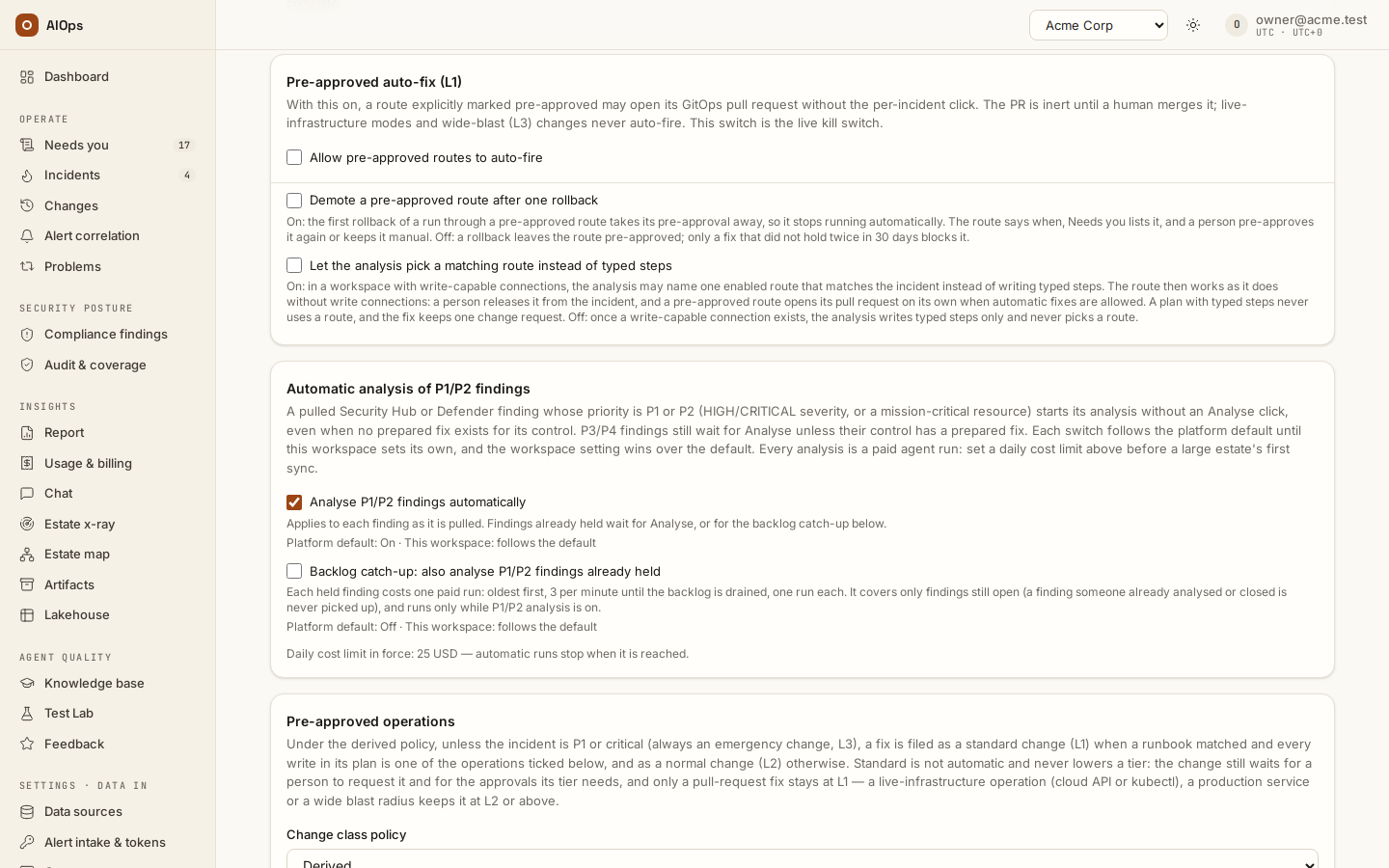
Ten switches change what the platform does around a fix. Five are on by default — Recommend rolling back the pinned change first and Standard change for a runbook route's operations since 0.1.133, A certified runbook carries its own operations since 0.1.144, Demote a certified runbook when its fix deviates since 0.1.157, Keep an incident open while its fix waits for a decision since 0.1.163 — and the other five are off until your workspace turns them on. Each follows the platform default until it is set here, and its row says which (Following the platform default (on), or Set for this workspace with the default named). The Off column is the behaviour before the switch. They are saved the moment you tick or clear them (members.manage) and every change is audited as Guardrails changed.
| Switch (card) | On | Off |
|---|---|---|
| Demote a pre-approved route after one rollback (Pre-approved auto-fix) | The first rollback of a run through a pre-approved route takes its pre-approval away, so it no longer runs automatically. The route reads Demoted after rollback <date> — automatic runs stay off until an approver certifies it again, Needs you lists it (chip Demoted), and the audit records Pre-approved route demoted after a rollback with the change and its rollback. To allow automatic runs again an approver certifies the route again (a route editor's tick of Pre-approved is a request an approver decides), or click Keep it manual to take it off Needs you. | A rollback leaves the route pre-approved; only a fix that did not hold twice in 30 days blocks the route. |
| Demote a certified runbook when its fix deviates (Pre-approved auto-fix) | A run through a certified runbook route (remediate-…) that fails its validation, or whose fix does not hold (the condition back after it validated, or the same alert back after the incident resolved), takes the runbook's certification away: its next fixes are normal changes and nothing runs on its own until an approver certifies it again. The route reads Demoted after a failed validation <date> or Demoted after a fix that did not hold <date>; the audit records Certified runbook demoted after its fix deviated; Needs you → Demoted lists it. See Demotion. |
Only a rollback demotes (the switch above). |
| Recommend rolling back the pinned change first (Suspect change across a declared dependency) | When an incident is pinned to a suspected change that can be rolled back, rolling it back is the first recommendation: a Recommended first card above the incident's pipeline, the first line of the Probable cause card, the first section of the stored report, the agent's plan and the incident's change request. For an RDS parameter-group write the before value is the one the previous recorded change of that parameter set — a write the platform's own audit-log harvest recorded; a report sent through your change feed never supplies it — derived from the ledger whether or not this switch is on (the switch decides only whether the rollback leads the recommendation); when no recorded change set it (or the group was reset in between), the card says the value is not known and offers no command. | Rolling back is recommended first only for a high or mission-critical resource when the analysis is unsure. |
| Standard change for a runbook route's operations (Pre-approved operations) | A pre-approved route named remediate-… (the product's certified runbook), with a selector that matches the incident and an operations list that covers every typed step of the fix — each step also ticked on this card — records the change request as Standard — runbook route, even for a P1 or critical incident; a person's earlier reclassification of the same operations still wins. Since 22-Oct a P1 or critical fix recorded this way is released under the standard rules — one approver, or an operator — and the line under Class says so (Approval policy → Change classes); a request recorded before keeps the emergency rules it was stamped with. A plan with a human-run command, a raw command or a file change beside its typed steps is outside the route's scope. A run through such a route that executes the route's own action is recorded as standard too; that record cannot be reclassified. |
P1 and critical fixes are emergency changes. |
| A certified runbook carries its own operations (Pre-approved operations) | A step runbook (ordered check, backup, change, validate and rollback steps) that an approver certified at its current revision pre-approves its own backup and change operations, never a revert; a change is standard only when a certified runbook matches the fix exactly; Pre-approved operations applies to single-call routes only, and certifying a runbook never adds to it. Pre-approving a fix from an incident builds a step runbook, once the incident is resolved. See Step runbooks. | Every route, step runbooks included, needs its operations ticked on Pre-approved operations, and pre-approving a fix builds a single-call route. A fetched runbook skill plus ticked operations makes a change standard only while Standard change for a runbook route's operations is off too. |
| Let several runbooks cover one change request (Pre-approved operations) | When no single certified runbook matches the fix, consecutive certified runbooks may cover its steps in order — one change request carrying each runbook as a block, standard only when every block matches. This is a proposal still open with your change process. | Only one certified runbook matching the whole fix step for step makes it standard; a fix two runbooks would cover is a normal change. |
| Run a multi-resource change one resource first (Pre-approved operations) | A released change that writes to several resources runs the first resource's steps, reads that resource back with each step's own check, and only then the rest. A check that contradicts the step stops the run before any other resource is touched; the change fails with only that resource written, so its rollback takes back that one resource (audit First resource checked before the rest). A check that cannot observe the resource does not stop it. The first resource is the one the plan writes first, and the canary applies only while its steps come first and together; this order is our proposal, open with your change process. The order is part of the approved action: the review shows Canary: … runs first, and turning the switch later changes only changes reviewed after it. Off by default: a provider that answers before it settles could read as a failed check. | Every step runs in turn, as before. |
| Keep an incident open while its fix waits for a decision (Auto-close stale escalated incidents) | The quiet-window close leaves an escalated incident open while a change request for it is still drafted, requested, waiting for approval, or approved but not run, or proposed for a fix a certified runbook matches; a person closes it. A proposal nobody requested and no certified runbook matches does not hold it. The first time, its timeline records Kept open — a fix waits for a decision with the change. | The quiet window closes an escalated incident once its alerts cleared, even with a fix waiting. |
| Let the analysis pick a matching route instead of typed steps (Pre-approved auto-fix) | In a workspace with a write-capable connection the analysis writes its fix as typed steps. With this on it may instead name one enabled route that matches the incident and leave its typed steps empty. That route then works as it does without write connections: a person releases it from the incident (Approve & create PR for a pull-request route), and a pre-approved route opens its pull request on its own when Allow pre-approved routes to auto-fire is on — still not for a flapping or unmapped incident, or a fix that did not hold — and Demote a pre-approved route after one rollback applies to its runs. The change request proposed with the analysis becomes the record of that run, so one fix has one change request. A plan with typed steps never uses a route, and a route is never picked by priority alone. A private-network agent needs this release to offer the routes to its analysis. A compliance control or a scanner finding never gets a single-call route this way: its fix is the prepared plan, and its analysis is offered only the enabled step runbooks certified at their current revision whose selector matches and whose targets come from the alert — naming one puts the runbook's steps, bound from the finding's alert, into that plan's change request, which a person approves: a finding never runs on its own, whatever switch is on. A pre-approved route that carries its own edit commits that edit and leaves out a different file change the analysis proposed (Runbook's own edit kept — proposed edit left out). | With a write-capable connection the analysis writes typed steps only and no route is selected for its fix. |
| Allow certified API runbooks with a verified precedent to run on their own (Automatic API fixes for proven runbooks) | With Allow pre-approved routes to auto-fire on too, a certified runbook route that calls a cloud API (remediate-…, mode api) may make its own call with no per-incident click when the same alert on the same service came back after this exact fix was verified by the platform and held. Never for a compliance control, scanner finding, vulnerability or security alert: a finding is fixed only after a person approves it. Every guard, the precedent rule and how to set it up are in Automatic API fixes for proven runbooks. Computer-assist mode turns it off. |
API runbooks wait for a person; only pull-request routes run on their own. |
A single-call route declares the operations it covers in its parameters, for example {"operations": ["aws.security_group.revoke_ingress"]}; unknown operation names are refused when the route is saved (a step runbook's list is derived from its steps). Editing routes needs datasources.manage, which the builtin operator holds, so a route alone never makes a fix standard: a single-call route's operations must also be ticked on Pre-approved operations (members.manage), and a step runbook needs an approver's certification, which its editor cannot give it while another approver exists. A route is pre-approved only while an approver's certification covers its current revision — who may certify, the four-eyes rule and what drops a certification are in Approval policy → Who decides — and a route the first rollback demoted stops counting until an approver certifies it again. How to set this up, step by step, is in Runbooks and automatic fixes — set it up like the demo. A runbook route's standard change is released under the standard rules even at P1 — one approver, or an operator — and a runbook demoted, disabled, uncertified or edited before the request is released turns the request normal (emergency at P1), shown as — runbook withdrawn. Every change request also carries one line saying why it has its class, shown under Class on the request and on the incident; a Reclassify replaces it with who raised it and their note, and the class reads set by a person. A runbook's standard class cannot be reclassified: demote or disable the runbook instead.
Through the API, GET /guardrails returns demote_on_rollback, demote_on_deviation, rollback_first, runbook_standard_change, hold_for_approval, runbook_routes_with_typed_plans, auto_remediation_direct, runbook_owns_operations, runbook_multi_cover and canary_execution (the values in force); PATCH /guardrails takes each as true, false or null (back to the platform default), and switch_state gives {effective, override, default} for each switch whose default the platform sets (override: null = the workspace follows the default). The workspace settings are aiops_demote_on_rollback, aiops_demote_on_deviation, aiops_rollback_first, aiops_runbook_standard_change, aiops_hold_for_approval, aiops_runbook_routes_with_typed_plans, aiops_auto_remediation_direct, aiops_runbook_owns_operations, aiops_runbook_multi_cover and aiops_canary_execution.
Change management agent
The Change management agent card holds two switches, the first on and the second off by default (members.manage changes them; everyone on the page reads them). Each follows the platform default until it is set here.
| Switch | On | Off |
|---|---|---|
| Let the change management agent draft change requests | When an analysis escalates with a fix, one short change-agent run (at most 8 steps, reading what the analysis recorded, never the estate again, no web) writes the narrative sections of the change request document: objectives, requirements, assumptions, prerequisites, why the impact and risk are what they are, and what is out of scope. Operations, write access, class, tier, approvals, scope, validation, rollback and cost stay the platform's. One paid run per change request. | The document shows the platform's own records only. |
| Let the change management agent draft the fix too | With the switch above also on, the incident or compliance analysis names the corrective mechanism and drafts no plan; the change-agent run drafts the plan with the change request, and the class and tier rules run on its plan. A private-network agent needs 0.1.144 or later. | The analysis drafts the plan, and its prompt is unchanged. |
Through the API: change_agent_cr and change_agent_owns_plan on GET / PATCH /guardrails (true, false or null = the platform default); the workspace settings are aiops_change_agent_cr and aiops_change_agent_owns_plan.
Change safety
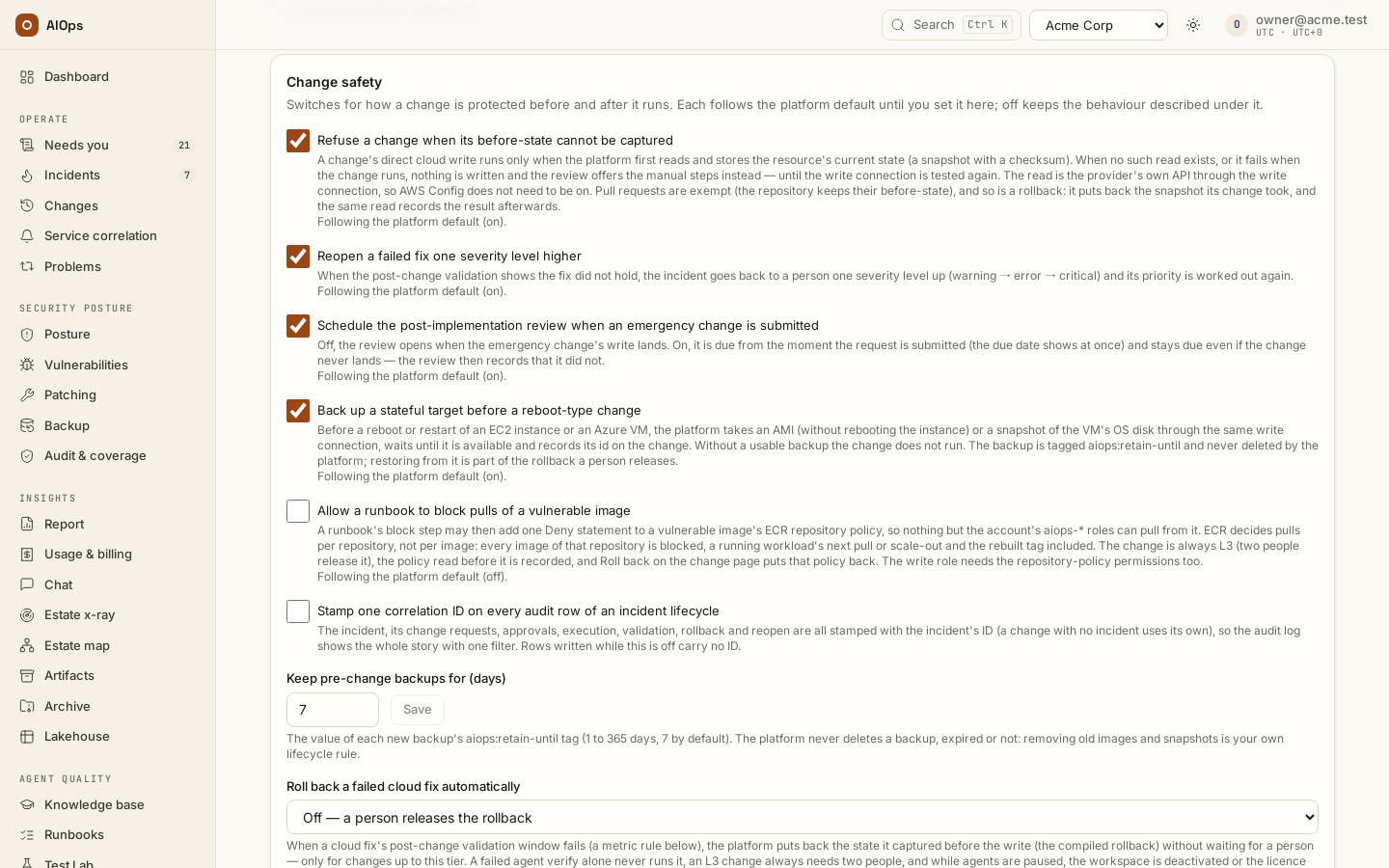
The Change safety card holds six switches for how a change is protected before and after it runs. Four are on by default — Reopen a failed fix one severity level higher and Schedule the post-implementation review when an emergency change is submitted (since 0.1.133), Back up a stateful target before a reboot-type change (since 0.1.144), and Refuse a change when its before-state cannot be captured (since 0.1.163) — and follow the platform default until a workspace owner (members.manage) sets them; the other two are off until a workspace owner turns them on. The bracket after each switch is its behaviour when off. Everyone on the page can read them.
- Refuse a change when its before-state cannot be captured. A change's direct cloud write runs only after the platform has read the resource and stored that snapshot with a checksum. When no such read exists for a step (for example over a CLI connection), its review says Manual route only and lists the commands to run yourself; when the read fails while the change runs, nothing is written, the change is marked rejected with the reason, and the next review of that step stays Manual route only until the write connection has been tested again. The read is the provider's own API through the write connection, so AWS Config does not need to be on. Pull requests are exempt (the repository keeps their before-state), and so is a rollback: it puts back the snapshot its change took, and the same read records the result afterwards. (Off: the write proceeds and its rollback is operator-run.)
- Reopen a failed fix one severity level higher. When post-change validation shows a fix did not hold, the incident goes back to a person one severity level up — warning to error to critical; a severity the platform does not rank, such as
page, counts as the lowest and becomes warning — and its priority is worked out again; the timeline says Severity raised — the fix failed validation. An incident someone already escalated during the validation window is raised too. (Off: same severity.) - Schedule the post-implementation review when an emergency change is submitted. The review is due from the moment the emergency request is submitted — requested, voted on or released — and the due date shows at once. It stays due if the change never lands, and says so. It can be closed once the change has landed or been refused, not before. A class is only ever raised, so an emergency request keeps owing it. (Off: the review opens when the write lands.)
- Back up a stateful target before a reboot-type change. Before a reboot of an EC2 instance or a restart of an Azure VM, the platform takes an AMI (without rebooting the instance) or a snapshot of the VM's OS disk through the same write connection, waits until it is available (at most 30 minutes) and records its id on the change — in the change's Rollback plan (Pre-change backup) and its rollback section. Without a usable backup the change does not run: nothing is written and the step's receipt says why. A backup needs the native API connection; over a CLI connection the review refuses the plan. The backup is tagged
aiops:retain-untilwith the date set by Keep pre-change backups for (days) (7 by default) andaiops:changewith the change; the platform never deletes it — removing old images and snapshots is your own lifecycle rule. Restoring from it is part of the rollback a person releases, never automatic. (Off: reboot-type changes run without a backup.) - Stamp one correlation ID on every audit row of an incident lifecycle. See the audit log. (Off: audit rows carry no correlation ID.)
- Roll back a failed cloud fix automatically — Off, L1 changes or L1 and L2 changes. When a cloud fix's post-change validation window fails (a metric rule below), the platform puts back the before-state it captured, without waiting for a person, for changes up to that tier. A failed agent verify alone never runs it, an L3 change always needs two people, and while agents are paused, the workspace is deactivated or the licence blocks runs, the rollback waits for a person (the change's timeline says why). (Off: a person releases the rollback on the change page.)
Post-change validation rules sit on the same card. Each rule names a read connection (Prometheus, VictoriaMetrics or AWS CloudWatch), a metric (a PromQL query, or a CloudWatch namespace, metric, dimensions, statistic and region), a threshold (and optionally op, > by default) and a glob that picks the changes it watches (matched against the change's service and every step's target, for example checkout* or *i-0123456789abcdef0); minutes no longer times anything. When a matching change's write lands — a direct write when it runs, a pull request when it merges — the change is read in rounds: Rounds (1 to 6, 3 by default) Seconds apart (60 to 1,800, 300 by default), the first once the write has settled; while they run no agent verify runs on that fix, and Verify on the change page says so. Each round reads every rule over its own span (a CloudWatch round three minutes after it closes, for CloudWatch to publish it; a rule whose period is longer than a round is not observed) plus the changed resources' compiled state: a rule fails the round when its metric is above the threshold in every minute of it (every period, for CloudWatch), passes when the latest reading is back at or below it. Every round failed means the fix failed (the change fails, the rollback rule applies and the incident reopens — even when someone escalated the incident meanwhile); every round clean, with the incident's alerts cleared at their source, validates the fix; anything else — no reading, a minute with no reading (CloudWatch publishes an error count only for minutes that had errors), rounds that disagree, a neighbour failing — hands the fix back to the usual verify. A verdict that lands on the change before the last round — a person's own verdict, say — ends the window early. The card lists each rule in words; edit them as JSON and Save rules. A rule naming a connection that is not an enabled read connection of a supported type is refused.
Automatic analysis of P1/P2 findings
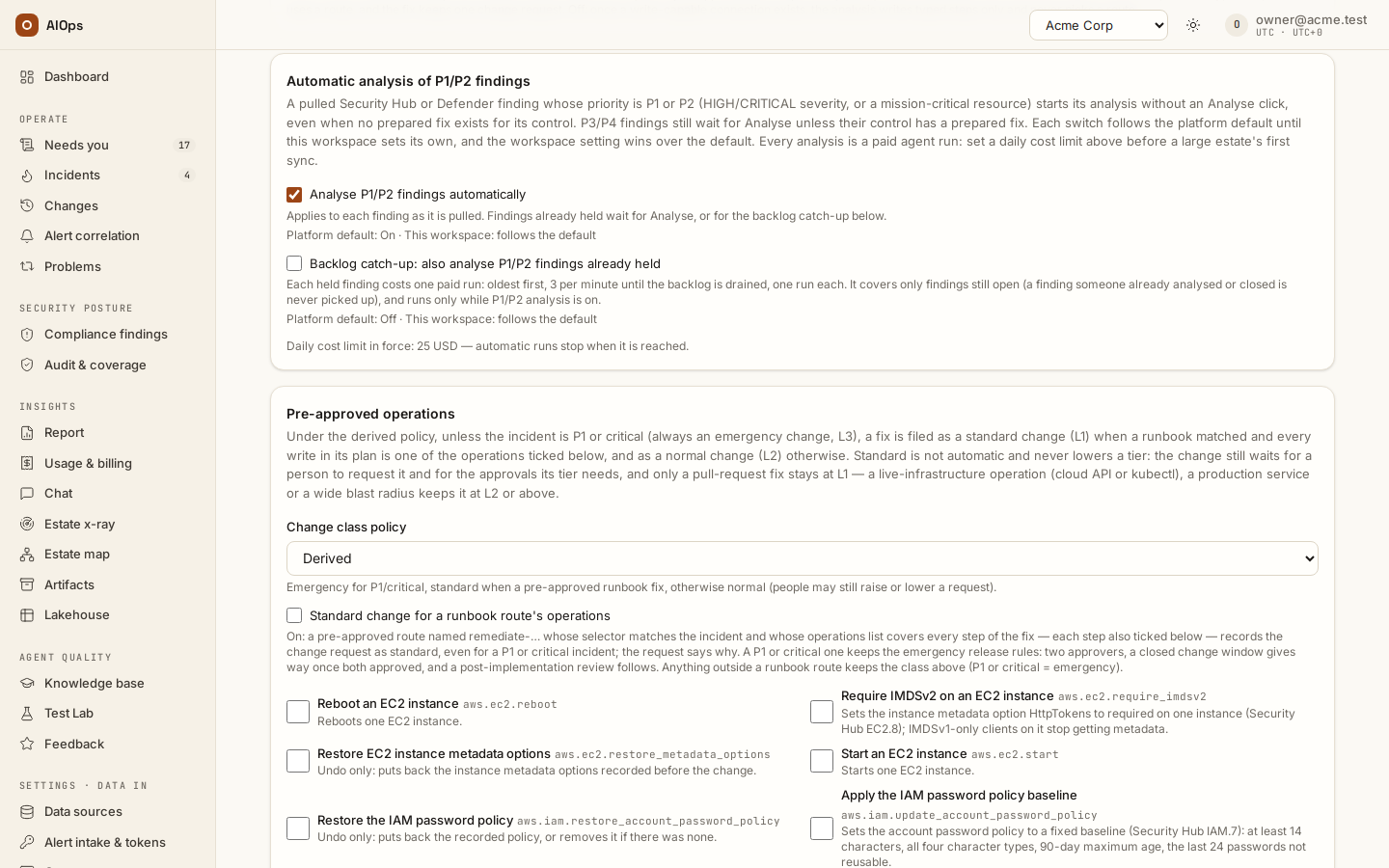
The Automatic analysis of P1/P2 findings card holds two switches for compliance findings: Security Hub and Defender findings the platform pulls or a scanner pushes by webhook to the compliance pillar, and failing platform checks of your estate. It is shown to members with members.manage, the permission that changes it.
| Switch | What it does | Shipped default |
|---|---|---|
| Analyse P1/P2 findings automatically | A new compliance finding at P1 or P2 (CRITICAL severity is P1, HIGH is P2, or a mission-critical resource; a high platform check is P2) starts its analysis without an Analyse click, even when its control has no prepared fix. P3/P4 findings wait for a person, also when a prepared fix exists: no paid run until someone chooses Analyse. Threat findings for SecOps pushed by webhook are analysed as before. |
On |
| Backlog catch-up: also analyse P1/P2 findings already held | Findings that were held at P1 or P2 before (opened before the rule existed, or while agents were paused or over budget) also get their analysis: oldest first, 3 per minute until the backlog is drained, one run each. Only findings still open are covered; one someone already analysed or closed is never picked up. It runs only while P1/P2 analysis is on. |
Off |
Every analysis is a paid agent run, and the catch-up costs one run per held finding, so set a daily cost limit before you switch it on for a large estate. The card names the daily limit in force.
Each switch follows the platform default until your workspace sets its own. The line under a switch reads Platform default: On (or Off) · This workspace: follows the default. Ticking or clearing a box sets your workspace's own value, which wins over the default, and the line then reads overridden. Use platform default drops your value, so the switch follows the default again, including any later change platform staff make to it. Platform staff set the defaults for every workspace and can also set a workspace's own value from the platform console; both show on this card, and every change is audited as Guardrails changed.
Through the API, GET /guardrails returns auto_investigate_p1p2 and auto_investigate_catchup (the values in force) and auto_investigate (per switch: effective, override and default). PATCH /guardrails accepts auto_investigate_p1p2 and auto_investigate_catchup as true, false or null; null returns the switch to the platform default.
Validation checks (L6)
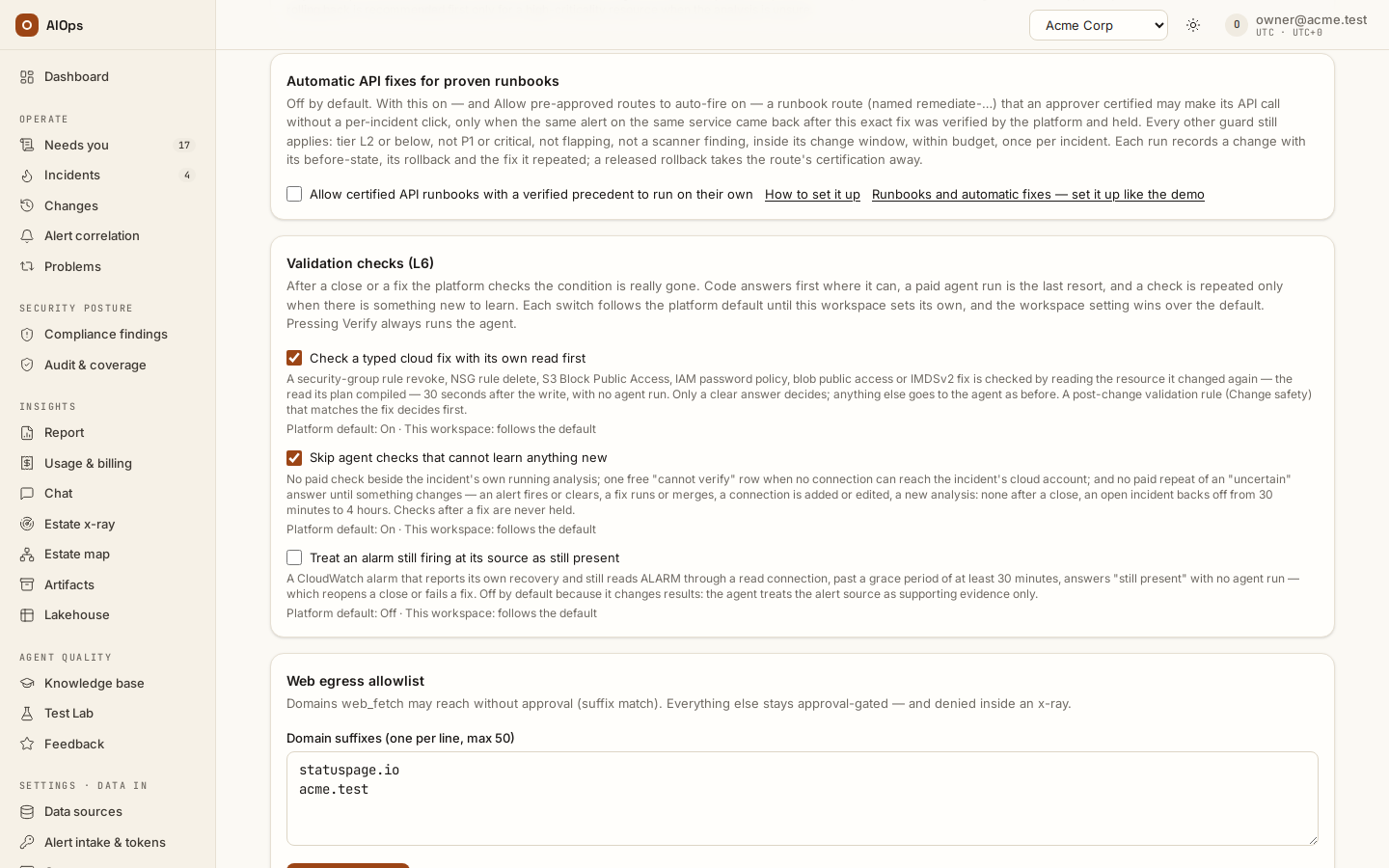
Validation is the step after a close or a fix: did the condition really go away? Each check used to be a full read-only agent run — the incident's triage agent with a verification prompt — repeated after every close, beside every reopen or Analyse, and after every fix until it had a verdict. The Validation checks (L6) card lets code answer first and spends an agent run only when there is something new to learn. It is shown to members with members.manage, the permission that changes it.
| Switch | What it does | Shipped default |
|---|---|---|
| Check a typed cloud fix with its own read first | After a security-group rule revoke, NSG rule delete, S3 Block Public Access, IAM password policy, blob public access or IMDSv2 fix, the platform reads the resource again — the read the plan compiled at review, on the fix's own connection — 30 seconds after the write, and decides at no agent cost: the opened port (or setting) is gone, or it is back. Only a clear answer decides: an incomplete listing, a failed read, a connection edited since the fix, another world-open rule that overlaps the removed one without covering it (a web server's own 443 beside a removed all-traffic rule), or an alert on another resource leaves the verdict to the agent — after an account-wide setting, any alert or finding that is not about a control that setting closes counts as another resource. The same check runs on a closed incident whose newest change is such a fix made since the incident last opened, and on a change with no incident. Any other fix — an instance or VM start, a reboot — is Cleared the same way once every alert of its incident cleared at the source after the write and every changed resource on its validation plan reads as expected (the started instance reads running) with no listed neighbour failing; the check runs as the clear arrives, never as a paid run. A Post-change validation rule (Change safety) that matches the fix decides first, through its window — the change's review card then does not promise the platform's read. | On |
| Skip agent checks that cannot learn anything new | Three skips, none after a fix: no paid check while the incident's own analysis is running or started less than one recheck interval ago (the check comes one interval later; an analysis waiting on an approval holds it only for that first interval); one $0 Uncertain row cannot verify: no read connection reaches AWS account … when no connection could observe any alert of the incident — a Dynatrace, Datadog, Prometheus or kubectl connection counts as one, so does an AWS connection that names no account or that account, and any Azure connection — then markers until something changes; and no paid repeat of an Uncertain answer while nothing changed: none after a close, while an open incident backs off 30 minutes, 1, 2 and 4 hours. | On |
| Treat an alarm still firing at its source as still present | A CloudWatch alarm that reports its own recovery (OK actions set, no insufficient-data actions, missing data treated as missing or notBreaching so it leaves ALARM when its metric stops) and still reads ALARM through a read connection to its account, past a grace period of at least 30 minutes after the close, fix or merge, answers Still present with no agent run. That reopens a close or fails a fix, so it changes results; the cached alert row alone is never enough. Other alert sources are left to the agent. |
Off |
| Watch the signals of a fix that no validation rule matches | After a start, reboot or other fix that no Post-change validation rule watches — a posture fix keeps the typed check above — the validation rounds read what its change request's validation plan names, and only that: the incident's open CloudWatch alarms (by their own metric and threshold; an anomaly band or metric math is left out) and built-in detection alerts — a round is clean only when every one of them passed, an alarm that treats missing data as breaching fails a round in which it read no data while CloudWatch reads it in ALARM, and the alarm of an alert merged or folded in from another service only flags a round, as a neighbour does — the built-in health rules of each changed resource (EC2 status checks, attached EBS, stalled I/O, RDS latency, ALB and target 5xx rates, Lambda and API Gateway errors and latency, OpenSearch red) and the target health of the target groups in front of it, then the same rules on the plan's one-hop neighbours, whose failure only holds the verdict at uncertain. CPU, memory and storage rules are never used: a restart warms up through them. Up to 20 metrics a round, read from the inventory and the CloudWatch read connection at no agent cost. When none can be read — no inventory resource, no AWS read connection, an Azure or GCP fix with no alarm — no window opens and the fix is checked as before, at once. | On |
"Something changed" means any of: an alert fired, cleared or arrived, a fix ran or its pull request merged, a read connection was added, edited or deleted, a new analysis started, the incident changed status or was closed again. Each check row stores that evidence, and a repeat is held only when it is equal. Verify (or Recheck) always runs the agent, whatever the switches say.
A skipped check is a $0 Not verified row that says why. A $0 verdict — the typed read, the coverage row or the alarm — lands exactly like an agent's: a typed Cleared resolves a fix, completes its change and marks its scanner findings as verified on the resource; a typed Still present escalates the incident and fails the change. Each switch follows the platform default until your workspace sets its own, like the switches above.
Through the API, GET /guardrails returns verification (per switch verify_typed_check, verify_frugal, verify_alert_rung: effective, override and default). PATCH /guardrails accepts the three as true, false or null; null returns the switch to the platform default. The same tenant settings are aiops_verify_typed_check, aiops_verify_frugal and aiops_verify_alert_rung.
Automated triage
The Automated triage card holds two switches. The first, Check cloud health and known issues before each analysis, is on by default (the platform default AIOPS_TRIAGE_CHECKLIST; set here, it is the workspace's own). Every incident triage takes seven steps, shown in the order they run on the incident's Automated triage card. With this switch on, code checks the known issues and the cloud provider's health before the agent's first turn; the fault domain is always named after the wrap-up. With the switch on, before the analysis's first turn the platform reads the cloud provider's own health through your read connections — AWS Health (on an account without a Business or Enterprise support plan, the public AWS Health Dashboard, which is not account-specific), Azure Resource Health and Service Health, scoped to what the alerts name and to the services, accounts and regions of the service's resources in the estate model — and the known issues: incidents on services one hop away in the dependency map, open or resolved within the workspace setting aiops_triage_related_window_h (24 hours), and open tickets naming the service in a connected ServiceNow, Jira or Azure DevOps. What it finds goes to the analysis; when it finds nothing, the analysis gets the prompt it always had. AWS Health needs health:DescribeEvents: the read role the guided AWS setup creates holds it since 0.1.144 (re-run the setup for an older role), and so does a role on ReadOnlyAccess; without it the step reads not available. Off: neither runs and the card shows the two steps not run. The fault domain (step 7) is named after the wrap-up either way. Through the API: triage_checklist on GET / PATCH /guardrails. The steps are described in Read an incident.
The second, Shorten the analysis of a known issue, is on by default (AIOPS_KNOWN_ISSUE_FAST_PATH). When code rates an alert-started incident 100 % relevant to a known issue — the same correlation key resolved in the problem window (30 days by default, AIOPS_PROBLEM_WINDOW_DAYS) by a fix with a verified last-known-good record, the same alert names, no change recorded since the fix, no open provider issue (cloud health that could not be read does not count against it, and the analysis is told it was not read), not a reopen — its analysis is capped at 3 steps: it checks that the resources the fix touched still exist and read as before, their one-hop neighbours and the current alert, then proposes the recorded fix again or says what differs. The change request still goes to a person. A P1, a Re-analyse and a run with its own step cap always run in full. The incident's Relevancy badge then reads fast path, 3 steps, and the audit log records Known issue — analysis shortened. It needs the first switch. Off: every analysis runs in full and the relevancy level is still shown. Through the API: known_issue_fast_path.
Risk exceptions
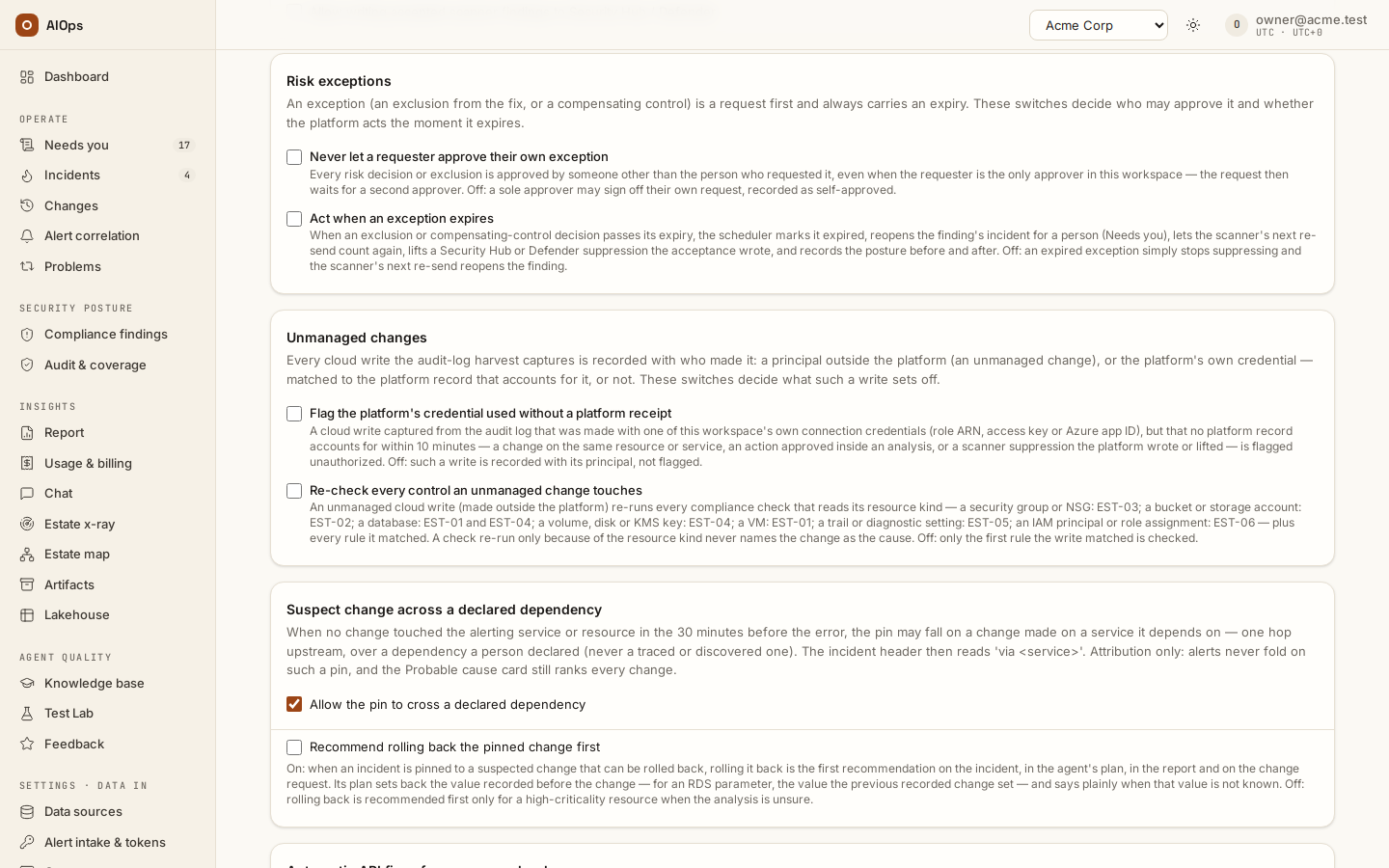
The Risk exceptions card (members.manage) holds two switches for suppressions and compensating controls — the risk decisions a person requests on a finding. Both are off until you tick them; off is how the platform behaved before they existed.
| Switch | On | Off |
|---|---|---|
| Never let a requester approve their own exception | Every request is approved by someone other than the person who sent it, even when the requester is the only approver in the workspace: their own Approve as the only approver button disappears and the request waits for a second person with approvals.decide. |
A sole approver may sign off their own request, recorded as self-approved. |
| Act when an exception expires | Within a minute of the expiry the scheduler marks the decision expired, reopens the finding — its quieted alerts fire again and its incident goes back to a person, listed under Needs you as exception expired — lifts a Security Hub or Defender suppression the acceptance wrote, and records the posture before and after (the managed-risk score and the suppressed count) on the Risk exception expired audit row and on the decision. | An expired exception stops suppressing and nothing else happens until the scanner re-sends the finding. |
What the sweep never does: it never touches an incident a person or a run is working on (only a closed one reopens), never reopens a finding the scanner has since cleared or whose fix is recorded and awaiting the scanner, and never reopens a resource another live exception still covers. A suppression on one of the platform's own checks reopens the check's newest incident when the latest evidence still lists the resource. Only the control plane's leader runs the sweep. Through the API: PATCH /guardrails with {"risk_no_self_approval": true} or {"risk_expiry_sweep": true} (JSON booleans; null or false turns a switch off).
Unmanaged changes
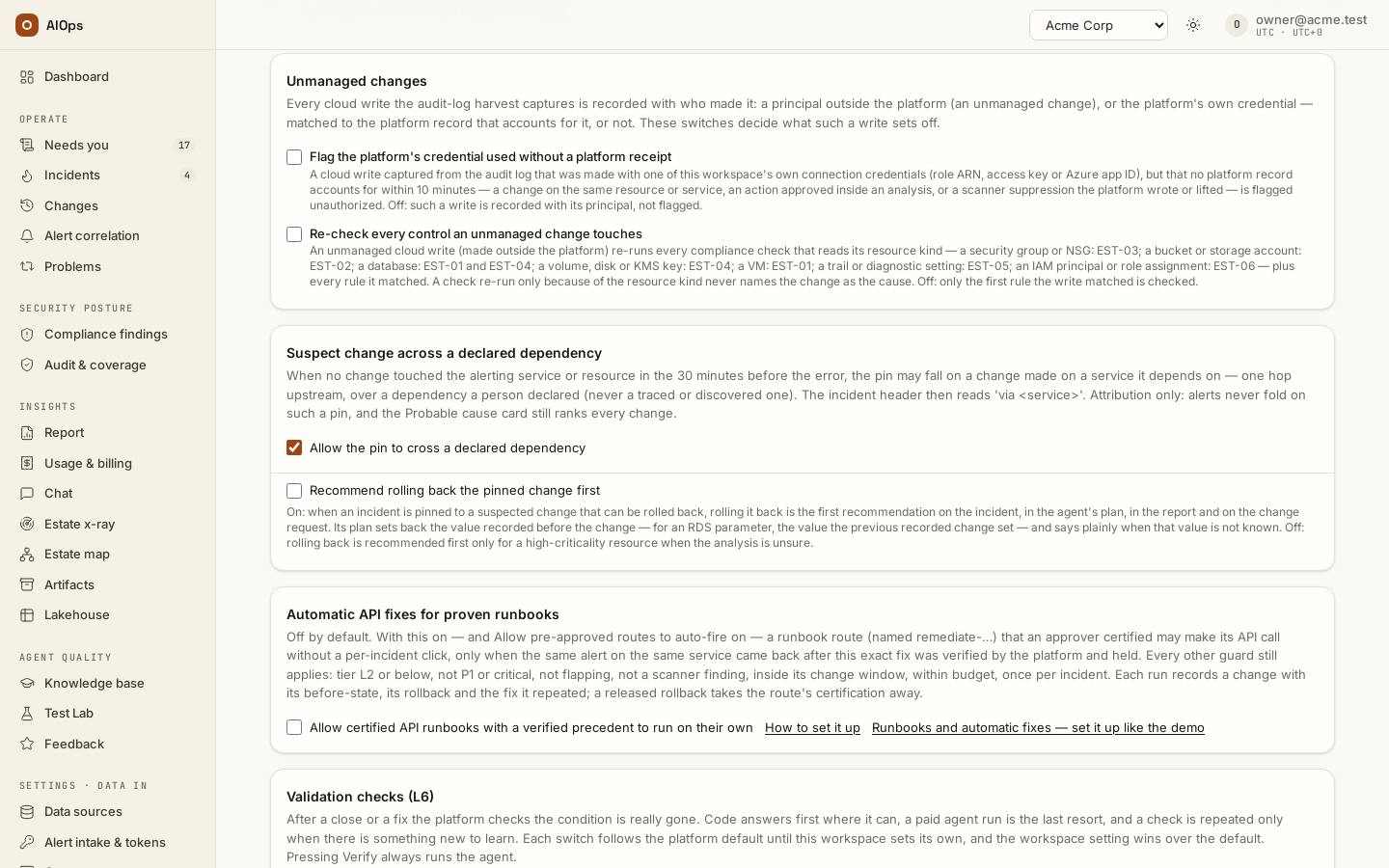
Every cloud write the audit-log harvest captures is recorded with who made it (the Observed filter on Changes (in the product: /portal/changes); stored as source: ingested): a principal outside the platform — an unmanaged change — or the platform's own credential, one of this workspace's connections, recognised by its role ARN, access key ID or Azure app (client) ID. A write the platform made is folded into its own change by the receipt's request ID and never becomes a row. One made with the platform's credential whose receipt names no request ID (Azure, S3 and JSON-protocol AWS APIs return it only in a header) is matched, within 10 minutes, to the platform record that accounts for it — a change whose step targets the same resource, a route change naming the resource or its service, an action a person approved inside an analysis, or a scanner suppression the platform wrote or lifted — and reads platform write; with none it reads platform credential. The Unmanaged changes card (members.manage) holds four switches (each follows the platform default until it is set here): the first two on by default since 0.1.133; since 0.1.144 the third off and the fourth on by default:
| Switch | On | Off |
|---|---|---|
| Flag the platform's credential used without a platform receipt | A write made with one of the workspace's own credentials that no platform record accounts for within 10 minutes — no change on the same resource or service, no approved action, no scanner suppression — is flagged unauthorized, with its own note and audit row. | Such a write is recorded with its principal, not flagged. |
| Re-check every control an unmanaged change touches | The write re-runs every compliance check that reads its resource kind — a security group or NSG: EST-03; a bucket or storage account: EST-02; a database: EST-01 and EST-04; a volume, disk or KMS key: EST-04; a VM: EST-01; a trail or diagnostic setting: EST-05; an IAM principal or role assignment: EST-06 — plus every rule it matched. A check re-run only because of the resource kind lands its verdict (and opens or closes the check's incident like a scan) but never names the change as the cause; the change shows a re-checked · EST-0x · <verdict> chip. Shown only while the platform offers SOC 2 / ISO 27001: with them off no platform check runs, so there is nothing to re-check. | Only the first rule the write matched is checked. |
| Open an incident for every change with no reference | A cloud or Kubernetes write captured from the audit log that nothing accounts for — no platform record, no principal on change_authorized_principals, no approved ITSM change ticket naming its resource or service inside its planned window, no signed change request — is flagged unauthorized and opens an incident per action (one principal and account within 10 minutes) with no analysis, a ticket to the workspace's group and a revert drafted per change. A person approves a rollback or keeps the change; nothing automatic acts on it. Fill the allowlist with your CI/CD roles first. See Unauthorized changes and denied access. |
Such a write is recorded only. |
| Report denied access attempts to SecOps | While the SecOps agent is enabled, a call the cloud refused opens or joins one SecOps incident per principal, account and clock hour, at P3, with no analysis. | Denied attempts are recorded on the Changes page only. |
The before-state of an unmanaged AWS write is read from AWS Config when the connection has configuration history on; otherwise the change page says No before-state captured and why. Through the API: PATCH /guardrails with change_principal_check, change_recheck_mapped, unauthorized_change_incidents or denied_access_to_secops set to true or false for the workspace; null returns it to the platform default.
Data retention
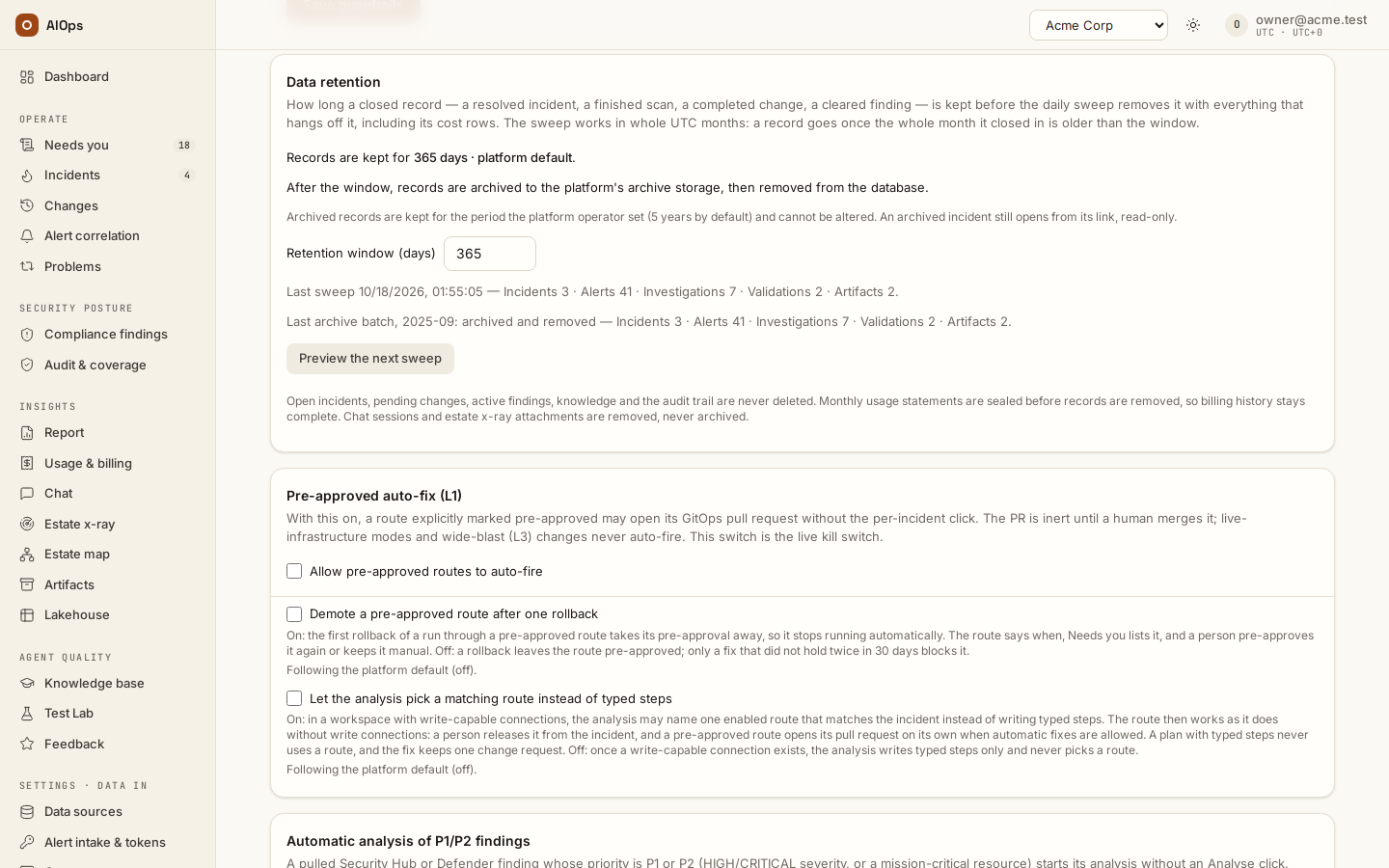
The Data retention card says how long a closed record is kept, what happens to it after that — archived then removed, or removed — previews what the next sweep would do, and lets a member with members.manage set the workspace's own window. Everyone on the page reads the card; only that permission changes it or runs the preview. It is separate from the lakehouse Retention window on the Lakehouse page, which sweeps collected telemetry rows (30 days by default), not records.
A record is closed when its work is over: a resolved incident, a closed problem, a completed, rolled-back, failed, rejected or recorded change, a cleared finding, a finished compliance or estate x-ray scan, a chat session with no turn in flight, or a finished run that belongs to no incident. Such a run goes on its own whatever started it — an API call, a manual or scheduled run, a correlation, a change plan — except a chat turn (it goes with its session), an estate x-ray or compliance run (with its scan), a benchmark run (the Test Lab keeps those) and a validation run (with the incident it validated, or the change it verified); and it stays while a kept record names it — a change's planning or verify run, the correlation run behind a merge proposal, a skill proposal's review run.
The sweep works in whole UTC months. Its cutoff is the first day of the month in which "today minus the window" falls, so a record goes once the whole calendar month it closed in is older than the window — measured from its close (resolved_at, closed_at, the change's last update, the finding's last sighting, the scan's finish, the chat session's last message), not from its creation. It then goes together with everything that hangs off it: alerts, investigation runs and their cost rows, validation checks and the verify runs behind them, approvals, feedback, merge proposals, change evidence, risk decisions, control results, estate x-ray phase runs and the attachments no kept scan reuses, chat turns, and the artifacts those records produced.
| Never removed, whatever the age | Why |
|---|---|
| Open, investigating, awaiting-approval, remediating or escalated incidents, their runs and alerts | Work in progress is never deleted under you. |
| Changes that have not ended: draft, planned, awaiting approval, approved, dispatching, executing, verifying or rolling back | A change request is a commitment until it ends. |
Active findings (open), even ones first seen years ago |
The scanner still reports them; the risk register needs the row. |
| A cleared finding with a risk decision in force (approved, not revoked, not expired) or awaiting sign-off — with its decisions and the change the decision names | The decision — and, for a whole-rule acceptance, the suppression of every finding under that rule — lives on that row until it expires or is revoked. |
| Running scans, and any record with a run still running or paused (a resolved incident, a change, a scan, a chat session), or with a run or validation in or after the cutoff's month | Still happening — or not yet a whole month old. A later sweep takes the record whole. |
| The audit trail | Append-only and hash-chained; the sweep itself writes one retention.swept row with the counts whenever it removes anything (retention.archived when it archived them first). |
| Knowledge items, skill proposals, attestations and the evidence they cite, posture snapshots | Knowledge and human statements outlive the records they were learned from; a proposal only loses its pointer to a removed run. |
| Benchmark datasets and runs, Test Lab runs, certification artifacts | They have their own lifecycle (the dataset trash, the certificate). |
| Datasources, routes, members, tokens, agent settings | Configuration, not records. |
A kept record that pointed at a removed one keeps its row and loses only the pointer: a skill proposal its source run, an intake receipt its incident, a finding the incident its acceptance resolved.
Archived, then removed. When the platform operator has configured an archive bucket, the card reads After the window, records are archived to the platform's archive storage, then removed from the database. Each closed month of the workspace's records becomes one archive batch, oldest first: every row the records own is written to one compressed file in the archive storage, together with the audit rows that name them, credentials and secrets masked on the way out (PII pseudonyms already stored stay as they are). The file is checked byte for byte after the upload, a manifest listing every record and a fingerprint of its rows goes next to it, and only then are the rows removed — in one step that also writes one Records archived and removed (retention.archived) audit row carrying the file's and the manifest's SHA-256, so the hash chain anchors the archive. A record that changed between its archiving and the removal — a new feedback correction, a revoked risk decision, a reopened incident — stays and goes with the next batch; the card's last-batch line counts it as held. Archived records are kept for the period the platform operator set (5 years by default) and cannot be altered or deleted by the platform. Chat sessions and estate x-ray attachments are removed, never archived: a private chat is promised to its owner only, and an uploaded attachment is promised deletion. Without an archive bucket, records are removed as before; if the archive was chosen and its storage goes away, retention pauses — the card says Paused: … and nothing is removed until it is fixed or the platform switches back to removing.
An archived incident or change. Its link keeps working: the incident or change page finds it in the archive index and says Archived incident or Archived change — Archived on … — closed … · title. View archived record reads it back from the archive, read-only: an incident's facts, signals, analysis reports, approvals and the sealed audit rows that name it, or a change's facts, plan, reported executions, runs and audit rows, credentials masked as on a live record; Download JSON saves what is shown. The Archive page under Insights lists every archived record with search and filters, and the owner's month batches; the card's Open the archive link goes there (Archive). Through the API, GET /{workspace}/archive lists the archived incidents and changes (kind, id, q, month filters) and GET /{workspace}/archive/{incident|change}/{id} returns one, both with incidents.view, the permission of the live record. Removals a person asks for stay immediate and are not archived: deleting an estate x-ray scan or attachment, purging a test dataset from the trash, deleting a knowledge item.
The sealed usage statement. Billing reads cost from the run and scan rows, so removing them would shrink last year's invoice. Before the sweep removes anything, in the same step, it writes a usage statement for every calendar month the removed runs, validations and scans were billed in — the month's figures exactly as Usage & billing showed them at that moment, per class and in total. Because only whole months that have ended are swept, a month is always closed before it is sealed. A month is sealed once; later sweeps leave it alone, and from then on the totals on Usage & billing, its Download CSV, the organization view and the platform invoice are the sealed statement — the page says when it was sealed — while the daily chart, the by-model split, the costliest incidents and the cost per investigation cover only the records still kept. Re-pricing history on the platform does not change a sealed month. The preview lists the months the next sweep would seal under Statements to seal.
The window. The card reads 365 days · platform default until the workspace sets its own; platform staff choose the default for every workspace that follows it, and a change there reaches this workspace on its next sweep. Type a number of days (30 to 3650) and Save to set the workspace's own window — it wins over the default from then on — or Use platform default to follow the default again. Below 30 days is refused on the field. The change is audited as Guardrails changed like every other knob on this page.
Preview and the sweep. Preview the next sweep runs a dry run and lists, per kind, what would go — Incidents 12 · Alerts 340 · Investigations 31 · …, or under the archive Would archive and remove: … and Removed without archiving: chat sessions N · estate x-ray attachments N — with the cutoff (the first day of a UTC month) and the months it would seal; a screen reader announces the answer. Nothing is removed by the preview. The sweep itself runs once a day per workspace in the control plane (at most one attempt per 24 hours, whenever the scheduler reaches it; under the archive the next month follows right after a batch, and an interrupted batch resumes after an hour); the card shows when it last ran and what it removed, and an attempt that did not complete says so and is retried. Through the API, GET /{workspace}/retention/preview is the dry run (with action and delete_only), POST /{workspace}/retention/sweep with {"dry_run": false} runs it now — under the archive it starts the archive job and answers {action, started, batch}, and while retention is paused it answers 409 — GET /guardrails returns retention (days_effective, source, platform_days, workspace_days, last_sweep with at, ok_at, counts, failed and action, plus action, archive_ready, archive_problem and last_batch) and PATCH /guardrails accepts retention_days as an integer or null to inherit. A longer window keeps records in the workspace for longer. For a data-minimisation policy, a shorter window removes records from the database sooner; with the archive on they then live in the archive for its retention period, and erasing one there is a platform-operator procedure (see Security & data).
Use cases
Platform owner: capping what an incident can spend
The owner of the acme tenant needs a predictable ceiling before enabling ingest on a noisy source. They set Cost cap per investigation (USD, 0 = uncapped) to 4, then on AI models set standard to a mid-tier model, reasoning to the strongest model and light to the cheapest, and Save tiers. Their first check is that spend is actually visible: they open a finished investigation and confirm the cost is not $0.0000. It is, so they ask platform staff to price the model on the platform's Model price map before relying on the cap at all. Once real figures appear, the result is: normal incidents run on standard; an incident with alert severity=critical, env=prod or a mission-critical resource starts on the reasoning tier; any run that burns $2.80 finishes on the cheap model; nothing passes $4, and a run that hits the ceiling lands on a human with a stop notice rather than quietly consuming budget.
Troubleshooting
Symptoms that are specific to the Guardrails & cost page are below. Anything that spans pages — a run stuck queued, a missing destination, a page that 404s — is collected in Troubleshooting.
| Symptom | Cause | Fix |
|---|---|---|
Cost always reads $0.0000 and the cap never fires |
The gateway's model ids are not in the pricing map and the platform's fallback per-1M rates are unset. Tokens are still counted. | Ask platform staff to price the model on Platform defaults → Model price map (platform-console guide, Connecting the LLM gateway). Until then the cap cannot bite and no dollar figure in the product is real. |
A run stopped with cost budget exceeded and the RCA is one line |
Expected. The wrap-up call is skipped at the cap so the run stops spending immediately. | Raise the cap, or reduce scope, and re-run. The incident is already escalated for a human. |
| A new PII pattern is rejected on save | Invalid regex — the error names the offending pattern — or more than 20 lines (at most 20 PII patterns (N given)). |
Fix the syntax, or remove patterns until the list has 20 or fewer. |
| The agent's proposed fix never appears under Needs you | The default deny posture does not queue mid-run writes; the fix arrives as the incident's remediation plan. |
Open the incident's Review fix: Request approval (incidents.act), then Approve & run or Approve & create PR (approvals.decide). Or ask platform staff whether pause is the posture you want. |
Limits and gotchas
0in the cost cap means uncapped, not inherited. An empty field follows the platform default;0is a cap of your own that removes the limit. Emptying the field and saving returns the workspace to the platform default. And the platform default itself is0unless staff set it, so without a platform setting there is no cap at all.- A cost cap on an unpriced gateway is decorative. Tokens are counted, dollars are not, so the cap and the 70% downgrade never trigger until the model is priced on the platform's price map.
- Every edit on the Agent behaviour, AI models and Guardrails pages is audited (
pillar.update,guardrails.updated,models.tiers_updated,web.allowlist_updated) — every change is attributable, see Audit log. Guardrails and tier saves are merge-patches, so untouched fields keep their values; the web allowlist save replaces the whole list. The tier suggestion is not audited; only the save that applies it is. - PII scrubbing is irreversible. Pseudonyms preserve correlation but the original value is gone; the recommended pack is deliberately conservative for that reason. Raw model prompts and investigation transcripts are only covered when the platform enables tool-output scrubbing.
- Disabling the SSRF guard is tenant-wide, covering agents and the datasource connection test. Use the internal-hosts allowlist instead wherever possible.
- The Agent behaviour, AI models and Guardrails pages are policy, not enforcement. The API re-checks every permission on every call; navigation and disabled controls guide use, and hiding a page never hides the data behind it.