Read and write roles, and the write gate
Investigate only, approved changes only or both on one credential; what counts as a write for every connector type; and the write gate as a control matrix.
Concept · Updated 2026-10-27 · Describes release 0.1.164
Every connection is used in one of three ways, and every tool call is classified as a read or a write in one place for all connector types. This page owns both rules. The connect form, secrets, Test and the row actions are on Manage connections; the write side step by step is Write connections and approved fixes.
Read role vs write role
Choose Use this connection for. This controls which platform workflows can use the credential; it does not grant cloud IAM permissions.
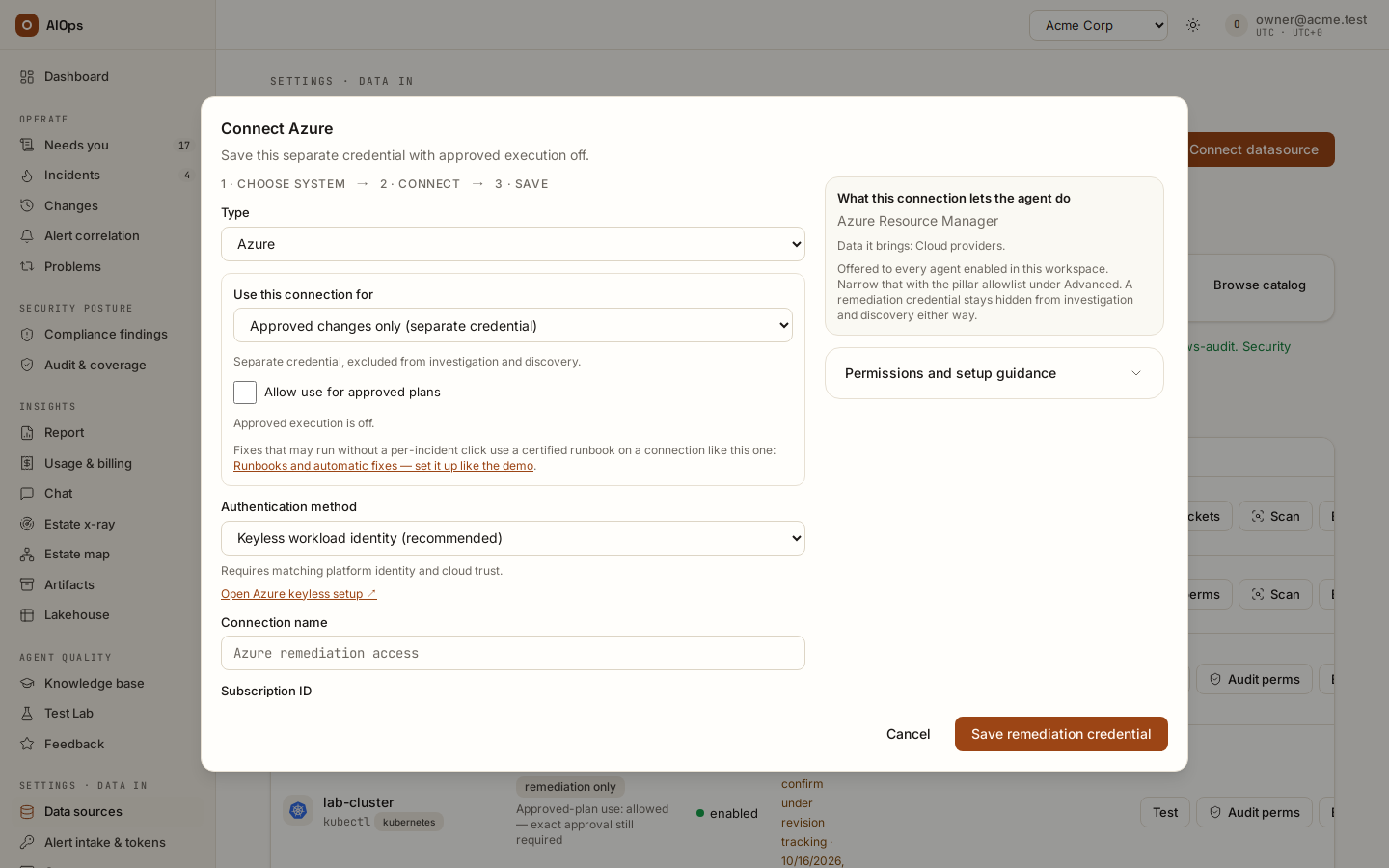
| Choice | Investigation, chat and discovery | Approved execution |
|---|---|---|
Investigate only (read, default) |
Read operations | Unavailable |
Approved changes only (separate credential) (write) |
Credential excluded | Available only after Allow use for approved plans is enabled |
Investigate and approved changes (same credential) (read_write) |
Read operations through the same read-only tool boundary | Available only after Allow use for approved plans is enabled |
Allow use for approved plans starts off. Changing the connection's use clears this consent; enabling it never approves an individual plan. Turning it off blocks subsequent execution; a shared connection remains available for investigation. Changing credential, scope, use or consent requires a fresh execution review.
Moving an Approved changes only (separate credential) connection to another use hands its stored credential to investigations and private agents, so it is a release decision: it needs approvals.decide as well as datasources.manage (of the builtin roles, only the owner holds both). Pointing such a connection somewhere else is the same decision, because Test and operation discovery send its stored credential to the address in its settings: once it holds a stored credential, a change to its settings needs approvals.decide too. An operator's change of use or of those settings is refused with 403; the operator can still rename it, describe it, replace its credential and switch it on or off.
A separate execution credential is excluded from investigation tool registries. The planner sees only capability and scope metadata. A shared credential is available to read tools, but an investigation cannot use its cloud write permissions: writes still go through the exact approved Change executor. Separate credentials also enforce this separation in the provider's IAM; shared credentials depend on the platform's read boundary as well as their provider scope.
An enabled AWS/Azure execution credential with consent can be saved with Save and check access. That runs a safe identity/read check, never a mutation probe and never proof of all future write permissions. Without consent, Save remediation credential saves it without that check. Audit perms on the connection's row in Data sources inspects grants where supported; the exact action is checked again before dispatch.
Chat reads the platform records your role allows. With chat.estate, it may also query live read-only connections; write-role credentials stay excluded and mutating calls are denied. Collected telemetry additionally requires the active lakehouse feature and its read permission.
Split a powerful credential in two
Use this when you want investigation credentials to have no provider write permissions.
- Connect the read half first. Give it a narrow viewer credential. Choose Investigate only and Connect and verify. Requires
datasources.manage. - Wait for the read check to succeed. A queued private-agent check is still waiting for a result.
- Press Audit perms and confirm the verdict reads least-privilege OK. If it reads over-privileged, scope the credential down at the source and re-check before going further.
- Connect the write half as a second datasource of the same type, with a distinct name (
prod-eks-remediate,core-switch-config). Choose Approved changes only (separate credential). - Give the write half only the permission the intended fix needs — push to one repository, restart one workload, write one device config section — and nothing else.
- Enable Allow use for approved plans when ready. Save the connection, inspect any access-check result, then return to the incident or Change to review the exact proposed action and recovery checks.
A connection can support different approved actions inside its validated scope. For the simpler setup, choose Investigate and approved changes (same credential), connect a suitably scoped identity, and explicitly enable approved-plan use. Repository access is connected separately when a configuration change belongs in Git; cloud access does not grant repository permissions.
Several connections into one cloud account
Some organisations give each job its own role: one for operations reads, one with security-audit reads for compliance, one for the audit log. Each role can be its own connection into the same AWS account, and several app registrations can each be a connection into the same Azure subscription. Fixes still run only through your separate write connection, after approval.
Add the extra role. Name it aiops-…, with no path, and give it the same trust policy as your read role: sts:AssumeRole with this workspace's External ID, and sts:TagSession, for the platform role and the workspace reader role. In any-account mode that is all it needs: the platform assumes any aiops-* role whose trust names the workspace External ID. With roles prepared by platform staff (also the case with a private-network agent, whose own role is the workspace reader), the reader is granted only the roles staff prepared, so ask platform staff to also grant it sts:AssumeRole and sts:TagSession on the new role, and the platform role too where its grants name exact roles. Test runs as the platform role and cannot check the reader's grant: until staff add it, Estate x-ray scans and investigation reads through the new connection are refused. Connect it as Investigate only under its own name. An access-key connection needs one passing Test before the platform knows its account; until then it is grouped with no other connection.
Choose what each connection runs. Under Advanced · agent access and automation credentials, Jobs this connection runs lists the account-wide reads an AWS or Azure read connection makes beside its agent tool: four on both clouds, and Service map (Application Signals / X-Ray) and Built-in detection on AWS. All of them start ticked. When the role you type reaches an account another read connection already reaches, the form names that connection and what it runs; it warns, and never refuses the second connection.
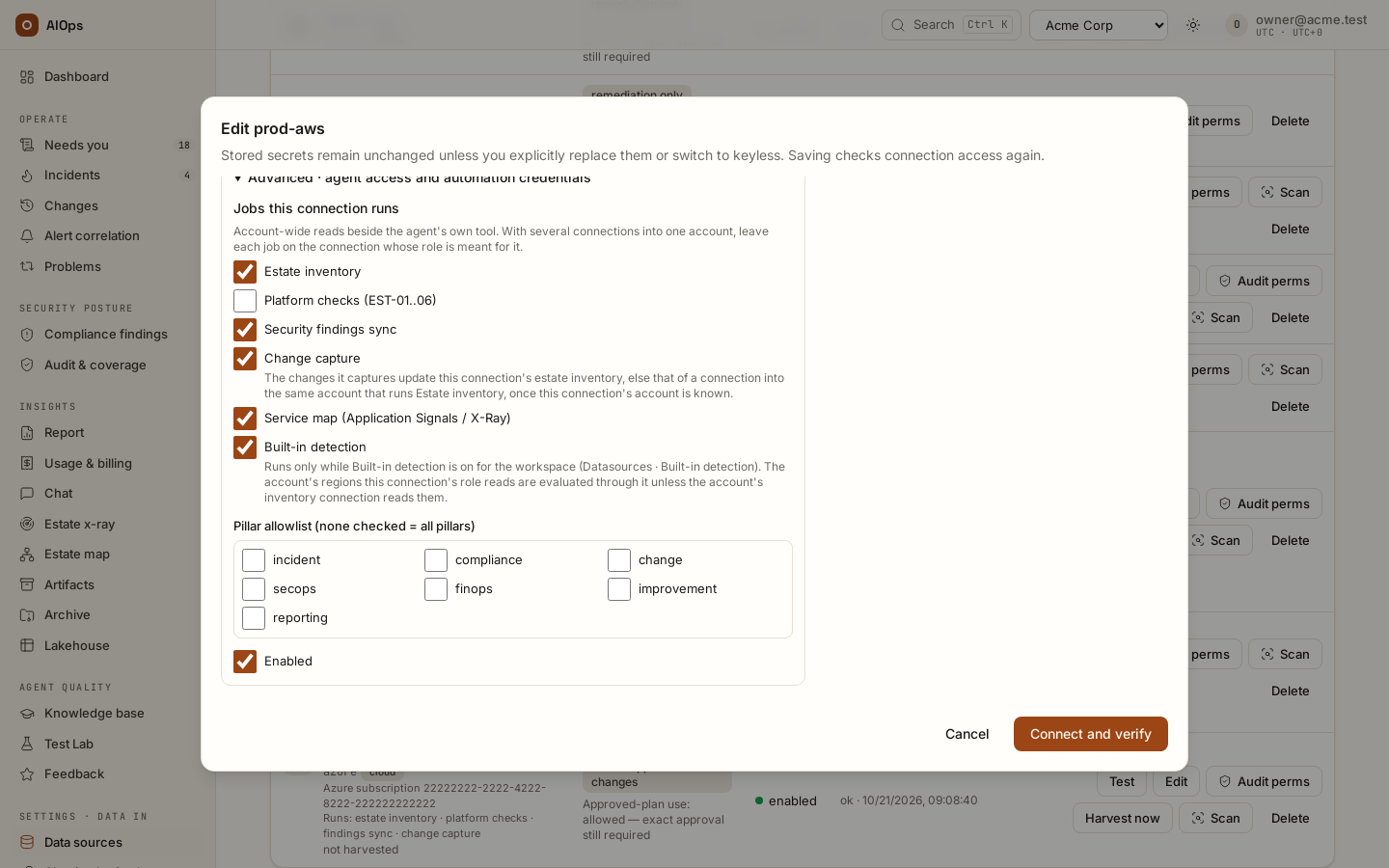
| Job | What it reads | Config key |
|---|---|---|
| Estate inventory | Every resource the account lists (on AWS: tagging GetResources, Resource Explorer ListResources in a region where its index is on, and AWS Config's recorded inventory through SelectResourceConfig; on Azure: Resource Graph) and the typed network, compute and data structure behind the estate map, into the [estate] <connection> knowledge item. config_inventory: false leaves AWS Config out |
harvest_inventory |
| Platform checks (EST-01..06) | The platform's own cloud checks: backups, public storage, open security groups, encryption at rest, audit logging and IAM hygiene | platform_checks |
| Security findings sync | Security Hub findings on AWS, Defender for Cloud assessments on Azure | sync_findings |
| Change capture | CloudTrail write events on AWS; the Activity Log and Change Analysis on Azure | harvest_changes |
| Service map (Application Signals / X-Ray) (AWS) | Application Signals ListServices and ListServiceDependencies, with X-Ray GetServiceGraph where Application Signals lists nothing in a region; hourly, into traced service dependencies, never trace content. A connection whose Pillar allowlist leaves out Incident is not read, although its Runs line still lists the job |
service_map |
| Built-in detection (AWS) | CloudWatch ListMetrics and GetMetricData for the built-in rules, in the regions this connection evaluates; runs only while the workspace has Built-in detection on |
builtin_detection |
An unticked job saves false under its key in the connection's configuration, and ticking it again removes the key. A connection without the key runs the job, so connections made before this setting keep running all of them. Saving re-tests the connection, as every edit does: on a connection that also runs approved changes, a pending approval bound to it needs a fresh review.
Divide the jobs the way your roles are divided.
- Leave Platform checks on the one role with security-audit-level reads (the AWS managed
SecurityAuditpolicy, or equivalent reads) and untick it on the others. One check reads several services; through a narrow role some of those reads are denied, and the check reads unknown instead of passing. Test an access-key connection before you untick it: an unticked connection counts as checked only through a connection the platform knows reads its account (see below). - Change capture can run on its own audit-log role. A change it captures updates the inventory item of the connection into the same account that runs Estate inventory (the first by name), once the platform knows the capturing connection's account: its role ARN or a passing Test on AWS, one whole subscription on Azure. Until then keep Change capture on the connection that runs Estate inventory: a connection with no inventory item has nothing to update.
- After you untick Estate inventory on a connection that ran it, its
[estate] <name>item is switched off at the next harvest by any connection in the workspace, or when that connection is deleted: Knowledge (in the product:/portal/knowledge) shows it inactive, and the audit log records aknowledge.deactivateby the system. Activate brings it back for good. Deactivate it by hand only when no other connection harvests. - A role that reads regions its sibling does not is a reason to keep a job ticked on both.
What the platform does with one account behind several connections. A connection's account is the account of its role ARN, else the account its last Test proved for its current settings. An Azure connection's is the one subscription its jobs read (its Scope JSON subscriptions, else its subscription ID), and only when it reads that whole subscription: several subscriptions, or a resource group, leave it grouped with no other connection. The accounts in an AWS Scope JSON are intent and never group connections. For connections sharing an account:
- Data sources shows
AWS account … · same account as …and a Runs: line on each, sorts them side by side, and adds one notice per account naming which connection runs each job, with nobody … for a job no connection runs. Saving a connection names the others in its check result. - Each connection keeps its own agent tool, and each tool's description names its same-account sibling tools. An estate x-ray says which scanned connections reach one account, and one connection's tool no longer counts as coverage for the others.
- Platform checks list a resource seen through several connections once per account. Its row names the connection it is listed from and, after also seen through, the others. A suppression covers only the copy it was approved on, and holds only while that copy's connection reads the resource: if that connection stops running the checks, is disabled or deleted, stops reading the resource's region (on Azure, its subscription), or a read there fails, the resource reopens through another connection's copy until that connection reads it again or that copy is suppressed too. Where you can, leave Platform checks on one connection per account before approving suppressions. Two resources a check cannot tell apart, such as two VMs with one name in different resource groups, stay two: a connection's first copy pairs only with another connection's first, its second with the second. Offender counts do not grow with the number of connections: where several already read one account, the counts and the posture trend step down once, on the first check that groups them. The number of resources checked still adds up every connection's reads.
- A read one connection could not make, a denied call for example, does not hold back a check when another connection into the same account ran that check with no failed read over at least the same regions (on Azure, at least the same subscriptions). The evidence still names the excused reads. A check is excused as a whole, never pieced together from two connections' partial reads, and a listing cut short is never excused.
- A connection with Platform checks unticked counts as checked only while a connection that runs them is known to read the same account in every region the unticked one reads (on Azure, every subscription it lists). Otherwise the checks read unknown, with probe pending for <name> (platform checks off; no other connection checks its account): never a pass for an account nobody checked.
- When the connections' inventory items hold the same resources, the agents read them as one merged estate inventory, each resource once with the newest harvest's values, so the cost of a prompt does not grow with the number of roles. An item with prose of its own (a hand-written ontology, a recorded x-ray inventory) keeps its own block.
The read/write gate in detail
Investigation datasource tools reject writes, even with a shared read/write credential. Supported mutations must be prepared and released through the Change executor. Approval gates for sensitive reads can still pause a run; approving one does not turn an investigation tool into a write executor. Guardrails and cost limits is the authority on which posture your deployment runs, and Configure the agents on how to add gates of your own; this section is the authority on what counts as a write.
Every connector type has a declared read surface, and the tool description tells the agent exactly what it is.
- Plain HTTP connectors:
GETandHEADonly. Argo CD, Alertmanager, Dynatrace, Opsgenie, Jaeger, Tempo, RabbitMQ, ServiceNow, GitHub, GitLab, Kubecost, the generic API and Postgres all fall here. (Dynatrace's Grail DQL endpoint is a POST that needs a platform token, so it is not a read path for the Dynatrace connector.) - Query-over-POST families: the specific query endpoints only — Prometheus
api/v1/query,api/v1/query_range,api/v1/series,api/v1/labels,api/v1/query_exemplars; Elasticsearch_search,_msearch,_count,_field_caps,_sql,_async_search; Grafanaapi/ds/queryandapi/tsdb/query; Lokiloki/api/v1/series; plus per-type sets for Datadog, Splunk, PagerDuty, Jira, Azure, Azure DevOps and Sentinel. Matching is on whole path segments against the full path or its trailing run — never a bare prefix — so a write endpoint that lives one segment deeper, such asservices/search/jobs/{id}/control, cannot ride in on a read classification. - Endpoints where the verb lies are force-gated even on
GET. The canonical example is the VictoriaMetricsapi/v1/admin/tsdb/delete_series, which accepts aGET. An Azure App Configuration key-value read through ARM (…/configurationStores/<store>/keyValues/…) is gated the same way, because it returns the value; a read of the store itself stays free. - AWS:
Describe*,List*,Get*,Head*,BatchGet*,Lookup*,Search*, plusQuery,Scan,FilterLogEventsand the policy-simulation calls run freely. Creates, deletes, arbitrary-SQL verbs such asExecuteStatement, and secret-returning reads (Secrets Manager, SSM parameters and their history, KMSDecryptandGenerateDataKey,AssumeRole,GetAuthorizationToken) are gated, and so are reads that return configuration content (AppConfigGetConfiguration,GetHostedConfigurationVersion,GetLatestConfiguration). A read-only exfiltration is still a breach. On the REST-style AWS APIs the HTTP method is the signal instead of the action name. One query runs freely: a bounded CloudWatch Logs InsightsStartQuery— the default query language, 1 to 5 named log groups without*, noSOURCEcommand, at most 24 hours. It runs in estate scans too, and AWS bills it to your account per GB scanned (about $0.005 per GB at the us-east-1 list price), outside the platform's cost cap. - GCP:
GETplus read custom methods (:list,:get,:query,:search,:testIamPermissionsand similar). BigQuery SQL throughjobsorqueriesis gated. - GraphQL: queries run, mutations and subscriptions are gated, and a request whose GraphQL document is missing, empty or not a plain string — a batched body, for instance — is gated by default.
- Vendor firewalls (drafted from the vendors' public docs; the reads were validated against FortiOS 8.0.2 and PAN-OS 11.2.15 lab firewalls in October 2026, and the refusals happen in the platform before anything is sent): FortiGate reads with
GETonly,HEADincluded in the refused methods, and its configuration backup and credential tables (admins, API users, local users, IPsec phase-1 keys, local certificates) are refused although they areGETs. On Palo Alto Networks the REST API reads withGET, but the XML API writes overGETtoo, so the request decides:type=version, oneshowcommand (not a whole-configuration dump) or the policy and route lookups, a configget/showof a rulebase, object or network subtree that names no credential node, and log retrieval run; everything else, an ambiguous request and any request with a body is refused. On both, a key in the URL (access_tokenon FortiGate,keyorpasswordon Palo Alto Networks) is refused: the key rides a header. FortiGate and Palo Alto Networks list them in full. - Zabbix JSON-RPC:
*.getmethods run, plus*.checkAuthentication,apiinfo.versionandconfiguration.export. Everything else is gated, includingscript.execute. - Two universal path triggers override the connector type entirely: any request whose path ends in
/graphqlor/api_jsonrpc.phpis classified from its body, so a GitHub or GitLab connector reaching GraphQL gets the same treatment as a dedicated GraphQL connector. - MCP:
readOnlyHint=trueruns, everything else is gated, and a mutating-looking tool name overrides the hint. - CLI and network devices: a network device's read commands, listed under Network device, run. Of the CLI connectors only
kubectlhas the platform's verified read adapter (CLI); every SSH and Generic CLI call is refused in an investigation, a chat turn and an estate x-ray, read verbs included. - Web access:
web_fetchruns freely only for domains on your allowlist;web_searchis never gated but its query is scrubbed for personal data before it leaves the platform;http_getis always gated, because it is a general-purpose exfiltration channel.
Two overrides with no portal control
Both are set on the datasource config through the REST or MCP API. Neither has a control on the Data sources page.
Tightening (gate_paths) forces specific paths to be gated even when they would otherwise classify as reads. Use it to put a sensitive endpoint behind a human decision.
Widening (read_post_paths) adds POST endpoints to the approval gate's read set for one datasource. It does not widen what an agent may call: the read floor every investigation, chat turn and estate x-ray applies classifies a call with the connector's own read set only, so in this release a POST outside that set is still refused, adopted or not. It applies to POST only, never to PUT, PATCH or DELETE, and any path containing a dangerous token (write, delete, exec, admin, control, import, bulk, restart, create, update, run and others) is rejected outright.
Widen a read set the reviewed way
Widening is deliberately a two-step, reviewed operation: the platform derives candidates from the API's own specification, and a human adopts them.
- Set an OpenAPI path on the datasource, if it does not have one. Requires
datasources.manage. - Call the discovery endpoint. It fetches the specification, derives the API's read and write surface in code, and records query-shaped POST endpoints as pending candidates — up to 50, trusted by nobody yet. It fails with a
400if the datasource has no OpenAPI path, or if the spec cannot be fetched or parsed.
curl -X POST \
  -H "Authorization: Bearer $AIOPS_TOKEN" \
  "$AIOPS_URL/api/aiops/$TENANT_ID/datasources/$DS_ID/discover-operations"
- Review the returned candidates. Adopt only the ones you have confirmed are genuinely read-only.
curl -X POST \
  -H "Authorization: Bearer $AIOPS_TOKEN" \
  -H "Content-Type: application/json" \
  -d '{"paths": ["reports/query", "search/execute"]}' \
  "$AIOPS_URL/api/aiops/$TENANT_ID/datasources/$DS_ID/adopt-read-paths"
- Confirm the behavior on a real call before relying on it.
You know it worked when the adopt response lists your paths under adopted with nothing under rejected. The next agent call to that endpoint is still refused in this release (see Widening above). Only pending candidates can be adopted — anything else is refused with a 400 — every adopted path is re-validated against the denylist, both endpoints require datasources.manage, and both are audited. Existing adopted paths are preserved when editing other connection fields.
Estate x-ray ignores widening
Estate x-ray does not use any of this. It runs on a credential-independent read-only registry where a gated call is denied outright rather than queued, it re-classifies with no operator configuration at all, it applies its own CLI read-verb floor instead of the connector's configured read verbs, and every denial is counted onto the scan as proof it wrote nothing. A scan therefore sees slightly less than an investigation does, on purpose.
The write gate as a control matrix
Investigation datasource tools reject writes, regardless of whether the connected credential has provider write permissions. Supported mutations are prepared and released through the Change executor. Approval gates may still pause sensitive read operations; approving a read gate does not allow an investigation tool to execute a mutation.
What counts as a write is decided by an intrinsic floor in code. Your per-agent approval list can only add gates on top of it; it can never remove one.
| Tool family | Runs without approval | Gated |
|---|---|---|
| Command-line connectors | kubectl reads the platform's own adapter verifies; no other binary, whatever verbs the operator declared read-only |
Everything else |
| Generic API connectors | GET |
Every POST (a path adopted as a read included), and every PUT / PATCH / DELETE |
| AWS native | Read action verbs (Describe*, List*, Get*, Query, Scan, Lookup*) — gating by HTTP method would pause every read, since AWS reads are form posts |
Credential and secret reads, statement execution, every mutating action |
| Azure native | GET, plus a small read allowlist for POST |
All other POST, and PUT / PATCH / DELETE always |
| Google Cloud native | GET |
Every other method |
| MCP server tools | Only tools the server annotates readOnlyHint=true |
Everything else — deny by default, because nothing here can know a third-party tool's semantics |
| Network devices | show / display reads |
Configuration lines |
web_fetch |
Allowlisted domains | Every other URL |
http_get |
Never | Always |
web_search |
Always (PII-scrubbed query) | Never |
lake_query |
Always | Never — see below |
These guarantees apply independently of the chosen credential mode:
- Write-role datasources are invisible to the agent. A datasource marked with the write role is never rendered into any agent registry — not investigations, not chat, not x-ray. Its tools do not exist to the model, so they cannot be attempted, hallucinated or prompt-injected into being called. That credential is exercised only by the remediation path, behind a human click. Gated means "paused for a human"; write-role means "does not exist to the loop".
- Shared credentials do not remove the read boundary.
read_writeconnections can supply reads to investigation, chat and discovery. Only the Change executor can use their write permissions, and only with explicitallow_approved_executionconsent plus a valid reviewed plan. Separate credentials additionally restrict investigation in the provider IAM policy. - Chat with live connectors is read-only regardless of credential. A member holding
chat.estatecan ask the analyst about the running estate, and the analyst answers from the tenant's real connectors — wrapped in the same read-only registry an x-ray uses. A mutating call is denied before it executes, never paused. A conversation is a read-only assistance flow, not an approval or execution channel. Write-role credentials remain invisible, a datasource allowlisted to other pillars is not rendered into chat, andhttp_get/web_search/web_fetchare removed outright, so there is no arbitrary-URL egress channel in a chat turn. - Estate x-ray is read-only regardless of credential. A gated call inside a scan is denied, never paused — there is no approval that can let it through, and no operator setting that relaxes it. Two independent guards apply: the intrinsic floor, plus a command-line guard that ignores the operator's own declared read-only verbs. Every block is counted onto the scan's denied writes figure as customer-visible proof. A write-role datasource is refused at launch. Everything a scan proposes is applied as a disabled draft a human must enable.
lake_query is deliberately ungated because it is read-only by construction, three ways: the DuckDB connection is opened read-only; external file access is disabled at connect time on every connection, so filesystem table functions cannot reach host files or another tenant's lake; and the SQL guard accepts a single SELECT/WITH statement only, rejecting DDL, writes, extensions and filesystem functions after stripping strings and comments.
Editing an agent's approval list or its toolsets requires pillars.manage, which by default only the owner role holds. Someone who merely operates or approves cannot widen the gate. Full detail: Configure the agents → Procedure: add an extra approval gate.
One thing we will not overstate. Untrusted-input fencing — every alert-derived string and every tool result enters the model inside <<<UNTRUSTED ... >>> delimiters, with a standing rule that fenced content is data and never instructions — is a mitigation, not a boundary. A determined prompt injection can still steer which reads the agent performs. The write gate and the always-gated http_get are the blast-radius limiter, and they are enforced in our code, outside the model's reach.
Review a change on the incident
An incident's Prepared change section names the change, target, connection, impact and recovery checks. For a prepared incident or standalone Change plan, the platform selects an enabled execution connection with Allow use for approved plans enabled whose capability and scope support the evidenced target, or asks you to choose between compatible connections. These steps do not need a saved remediation route. Expand Exact changes and execution method to inspect the API request, CLI arguments or repository edit. Authorized users can approve the reviewed action; other operators can request approval. Missing or ambiguous access is resolved on that incident before execution becomes available.
Review displays the actual API method/path/body, CLI arguments or repository edit that execution will use. Rollback and verification guidance is labelled separately: prose is not an executable command, and a validated restore action is shown only when available.
Unknown targets, unsupported operations and unconfirmed repository ownership require more evidence. A successful connection test is not approval, and a created PR is not a deployed fix. See Review and apply a fix.
Use cases
Proving least privilege at audit time
A compliance officer opens the page with datasources.view and, for each connector, reads the Role column: only the two remediation credentials carry a write use, and both read remediation only — kept out of every agent. He asks the platform owner to run Audit perms on the cloud connector; the dialog names the principal, lists the evaluated permissions, flags nothing as over-privileged, and states the gate classification — which read actions run freely, and that every write is gated regardless. He exports the evidence trail from Audit log, where each connect, edit, test, permission audit, operation discovery, read-path adoption and route change is recorded with actor and timestamp.
Next steps
- Write connections and approved fixes — connect and rehearse the write side.
- Approval policy and change tiers — who releases what a gated call proposes.
- Security and data handling — where every credential lives and what leaves your network.
- Manage connections — the form, the catalog and the Test verdicts.