Write connections and approved fixes — set it up like the demo
Add a write connection with consent, read the exact prepared fix, and release it through its approvals.
How-to · Updated 2026-10-27 · Describes release 0.1.164
Goal
Separate estate observation from permission to apply an exact reviewed change. A common setup has one read connection and a separate write connection into the same account, plus a repository connection for pull-request fixes.
Prerequisites
datasources.manageto configure and test connections; an authorized cloud/repository administrator to create the credential policy.- Explicit execution consent, a bounded target and an approved test/change window.
- A requester with
incidents.actand a releaser withapprovals.decide. Tiers L0 to L2 release on one approval, which the requester may give if they holdapprovals.decide; only L3 needs two different people withapprovals.decide. With the builtin roles, an owner can connect the writer, request and release an L2 fix alone; an operator can connect and request but never release; an approver or executive can release but cannot connect a writer. A team that wants the requester and the releaser to be different people needs two members: the platform enforces that only at L3. - For the API calls in this chapter, a personal API token that a person creates first in the portal under Settings · Data in → Alert intake & tokens → New API token (Personal access tokens). The token acts as that person, capped by its Scope:
readfor the GET reads,writefor every POST, PATCH and DELETE below, andadminonly for credential routes such asPOST /api/aiops/{tid}/webhook-token,/invitesand/me/tokens, and for changes to/members,/idpand an organization's workspace members. A token can create another token only withadminscope, and never one above its own scope.
Before your first release
A first fix often waits for a second approver nobody has seated. The chain starts at an analysed incident: an alert that names no service opens an unidentified service incident under Needs you → Triage with no analysis and no prepared fix (the triage queue is on by default since 0.1.133), so choose Analyse on it first (mapping its source helps only the alerts that follow). From there, link by link:
- An alert with severity
criticalopens a P1 incident. A CloudWatch alarm whose description declares noseverity=arrives ascritical. - Under the default Change class policy, Derived (Guardrails & cost → Pre-approved operations), the fix for a P1 or critical incident is an emergency change.
- An emergency change is released at tier L3.
- L3 needs two distinct approvers. With one approver, Approve change records one of the two votes and the button then reads Awaiting another approver.
A submitted emergency request owes its post-implementation review at once: Schedule the post-implementation review when an emergency change is submitted (Guardrails & cost → Change safety) is on by default since 0.1.133. From the first request, vote or release the review is listed under Needs you → Review, due in aiops_pir_due_h hours (72 by default); it can be closed only once the change has landed or been refused, and it stays due if the change never lands.
The ways out the platform supports:
| Option | Needs | Effect |
|---|---|---|
Seat a second person with approvals.decide (builtin owner, approver or executive) on Members & roles |
members.manage |
The L3 quorum can be met |
Send first alerts as warning: a CloudWatch alarm declares it in its description (severity=warning), other sources in their own severity label |
Access to the alert source | The incident opens at P3 (P2 with a blast radius of two or more services or a mission-critical resource, P1 with both); below P1 its fix is released at L1 or L2, on one approval. A fix that fails its post-change validation reopens the incident one severity level higher (on by default since 0.1.133): a warning incident whose fix fails twice is back at P1, and its next fix needs two approvers |
Certify a remediate-… runbook route that covers the fix's operations (Standard change for a runbook route's operations, on by default) |
approvals.decide to certify, datasources.manage to edit |
Its fix is a standard change even at P1, released under the standard rules: one approver, or the operator who requests it |
| Set Change class policy to Standard by default | members.manage |
Every new change request starts standard, P1 included; a cloud or cluster operation is still L2 |
Reclassify is no way out: a person may only raise a class, normal to emergency, never lower one. A fix whose blast radius reaches three or more services through declared or traced dependencies stays L3 whatever its class.
Procedure
-
For AWS, tag every EC2 instance and security group the platform may change with the key
aiops-managedand the valuetrue, in the region of the write connection. The guided setup's write role allows instance start, reboot and metadata-options (IMDSv2) changes, and security-group ingress revoke and restore, only on resources that carry this tag in that region (the policy conditionec2:ResourceTag/aiops-managed); on an untagged resource EC2 refuses the write withUnauthorizedOperation(the change's Runbook steps — What ran when it follows no runbook — show it as the provider's answer; CloudTrail logs it asClient.UnauthorizedOperation) and nothing changes. A hand-made role's own policy condition decides instead. You should see the tag on each intended resource, for example inaws ec2 describe-tags --filters Name=key,Values=aiops-managed --region <region>. -
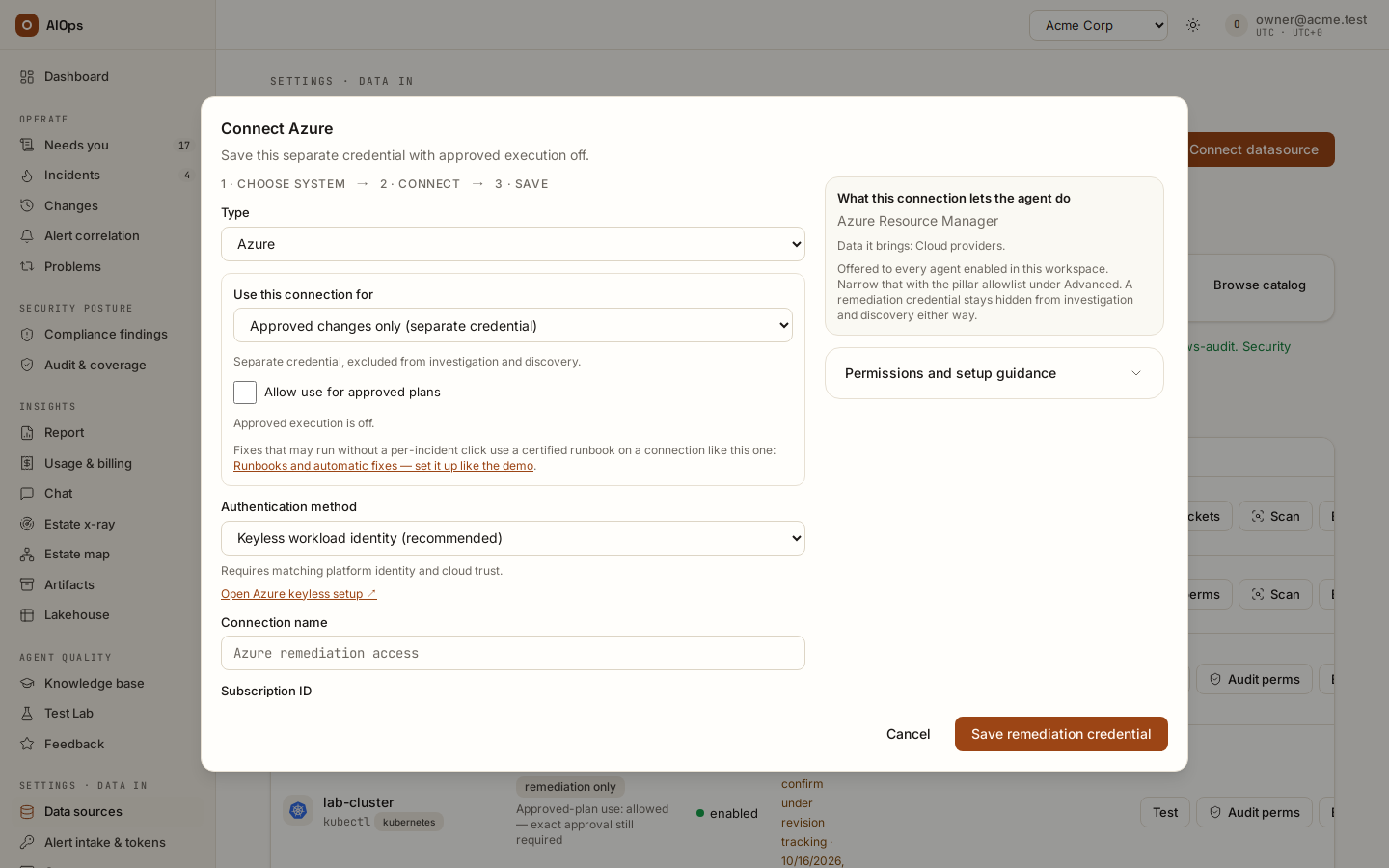
Under Use this connection for, choose Investigate only, Approved changes only (separate credential), or Investigate and approved changes (same credential). A write-role credential is excluded from agent tool registries; it is used by the reviewed execution path. Do not give an observation-only integration a broader role merely to avoid setting up the writer. You should see the correct role on the saved connection.
API:
POST /api/aiops/{tid}/datasourcesorPATCH /api/aiops/{tid}/datasources/{id}—datasources.manage.
-
From Data sources, select Connect datasource (or Connect write access on an incident that has no writer), set Use this connection for to a write use and tick Allow use for approved plans. Save through Save and check access, then read Audit perms. A role/use change can clear previous execution consent; a prior Test does not vouch for an edited credential revision. You should see the current access result and consent for the saved revision.
API:
POST /api/aiops/{tid}/datasources/{id}/testand/audit-permissions—datasources.manage.

-
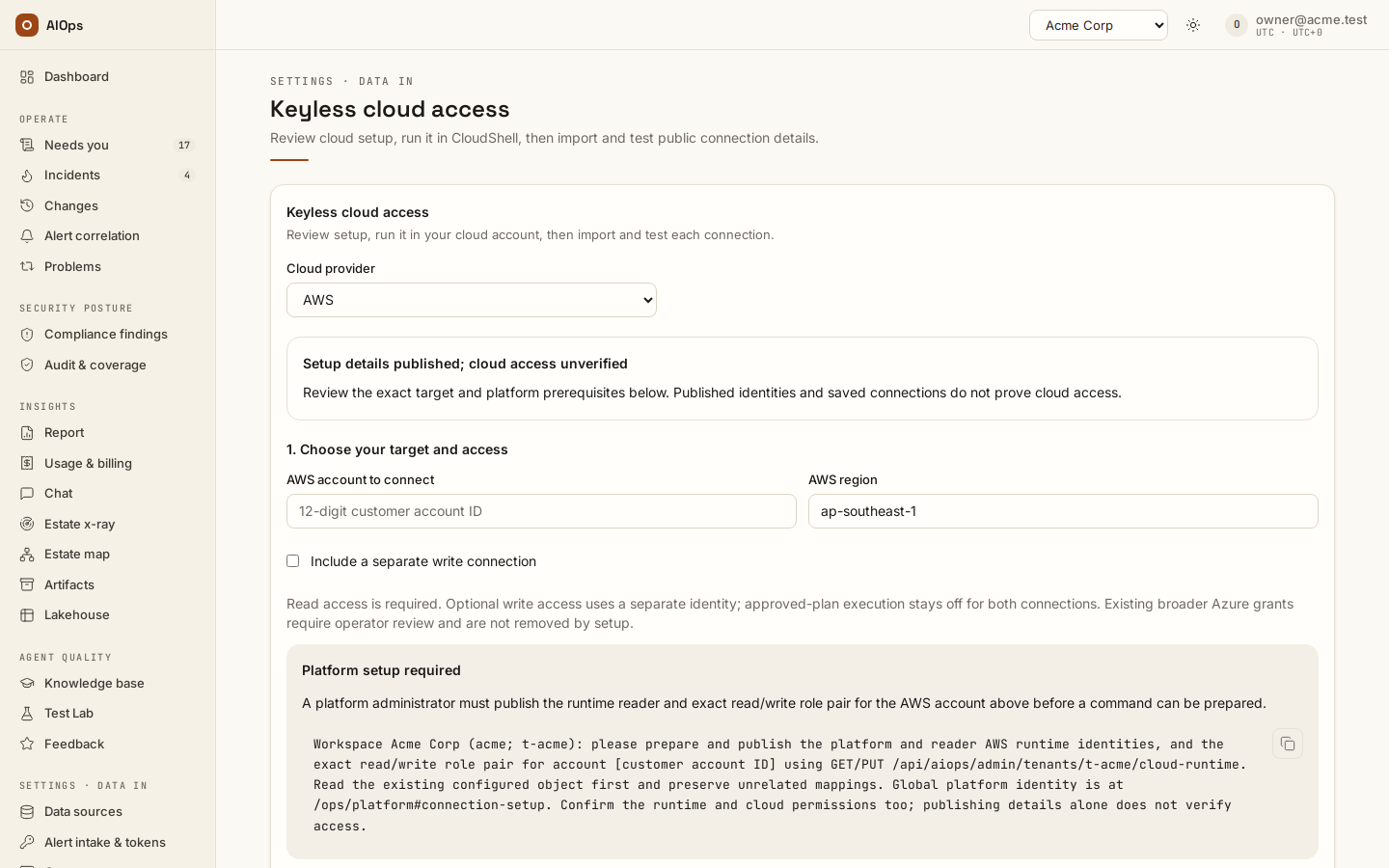
For AWS, use the current CloudShell setup for the read and write roles, and update it after releases that add permissions. Its writer's instance and security-group operations are tag-bounded to
aiops-managed=truein the selected region; the account's S3 Block Public Access, IAM password-policy changes and Security Hub workflow updates are not bounded by that resource tag. In an account other teams share, select Leave out account-wide settings (shared account) to leave those three out; those fixes then stay manual, and the writer's other account-wide reach stays (Leave out account-wide settings). Its one other IAM action isiam:SimulatePrincipalPolicyon the write role itself, for a step runbook's permission check. The policy files for a hand-made role also allow stopping a tagged instance, SSM Run Command on tagged instances and a bucket's Block Public Access, which is not tag-bounded either. You should see the exact operation's required policy and target scope, rather than a blanket claim that every AWS write is tag-bounded.Provider setup is outside the platform API and needs the source account's authorized role. The IMDSv2 fix requires
ec2:DescribeInstancesandec2:ModifyInstanceMetadataOptions; source suppression requiressecurityhub:BatchUpdateFindings.
-
For Azure, scope the writer to the intended resource group. Source suppression also needs policy-exemption write/delete permissions. For repositories, use the required contents/PR access and an explicit base branch. You should see the reviewed writer/target combination. An opened PR changes nothing in the running estate until its merge/deployment path applies it.
-
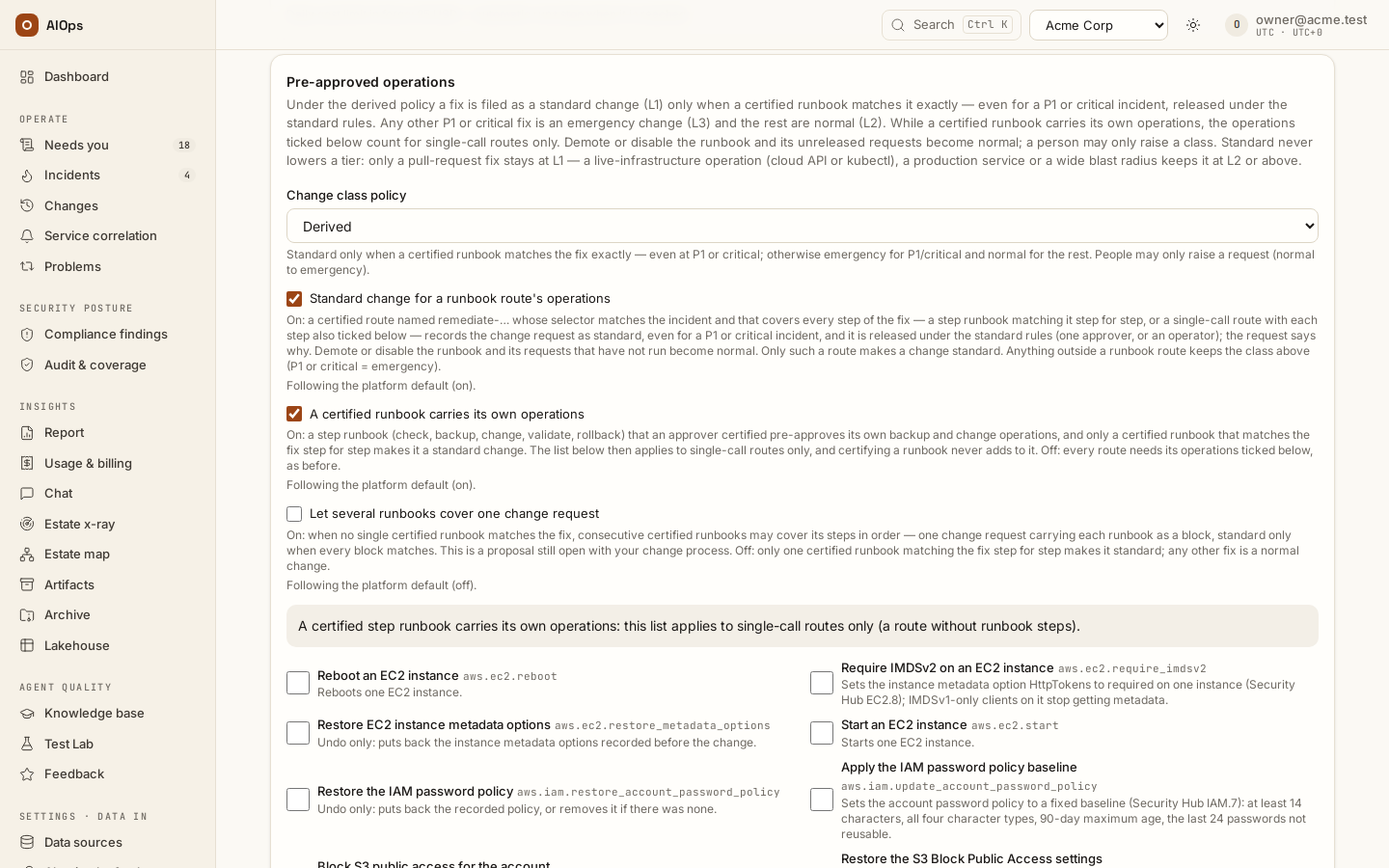
Read the prepared fix. The typed operations on the checked build are the posture fixes — security-group ingress revoke, NSG rule delete, the account's S3 Block Public Access, the IAM password policy, disabling Azure blob anonymous access and requiring EC2 metadata options (IMDSv2), each with its restore — and the recoveries: EC2 start and reboot, Azure VM start and restart, a Windows service start in an Azure VM, cancelling an Azure Chaos experiment, GCP instance start and reset, and a Kubernetes deployment restart. Pre-approved operations on Guardrails & cost lists them all; other proposals stay manual. You should see the supported operation or an explicit manual/unavailable reason.
-
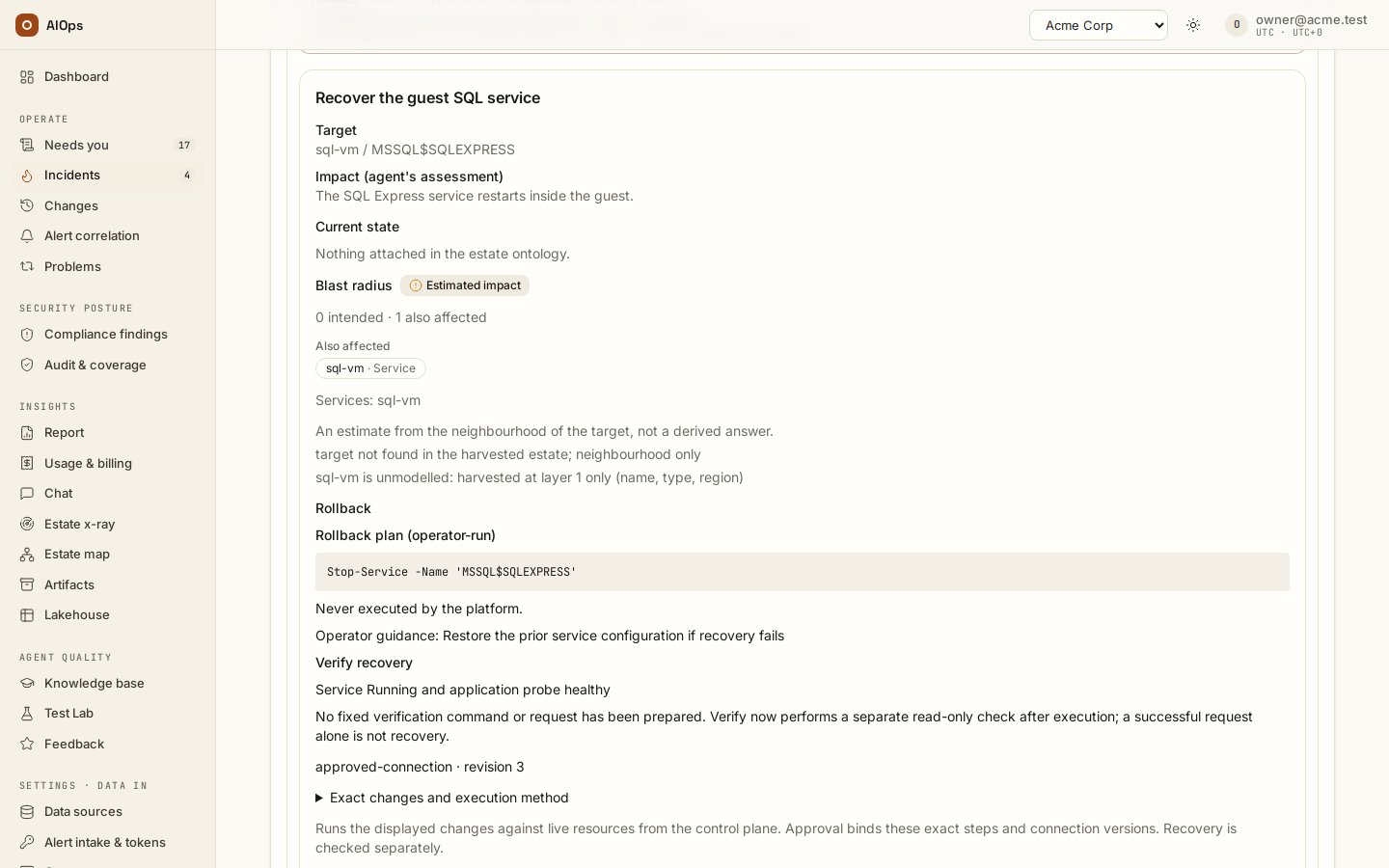
Open Review fix and Exact changes and execution method. Check the operation, target, execution connection, blast-radius basis, before-state and recovery plan. If the writer is missing, read the status listed for each write connection (ready for approved plans, not allowed for approved plans, re-test the connection …) and, only when the intended credential and consent are correct, tick Allow use for approved plans on that connection, the checkbox the incident's message names. You should see the exact action that approval will bind.
API: incident
remediation-previewor changeexecution-previewis read-only preparation. The change-page release uses a fresh review digest. Requesting work and releasing it require different permissions.
-
Use Request approval, Approve & run, or Approve & create PR as the role and action permit. The change class can raise the risk tier: normal live changes are at least L2, emergency changes L3. L3 needs two distinct approvals. A different-cloud plan is guarded; an account warning still requires deliberate review. You should see the actual quorum and release result before calling the fix executed.
API:
POST /api/aiops/{tid}/changes/{id}/approve—approvals.decide;/executeacceptsincidents.actorapprovals.decideat the door, but the tier gate releases only forapprovals.decide, subject to quorum and window checks. Do not retry an uncertain outcome without reconciliation.

-
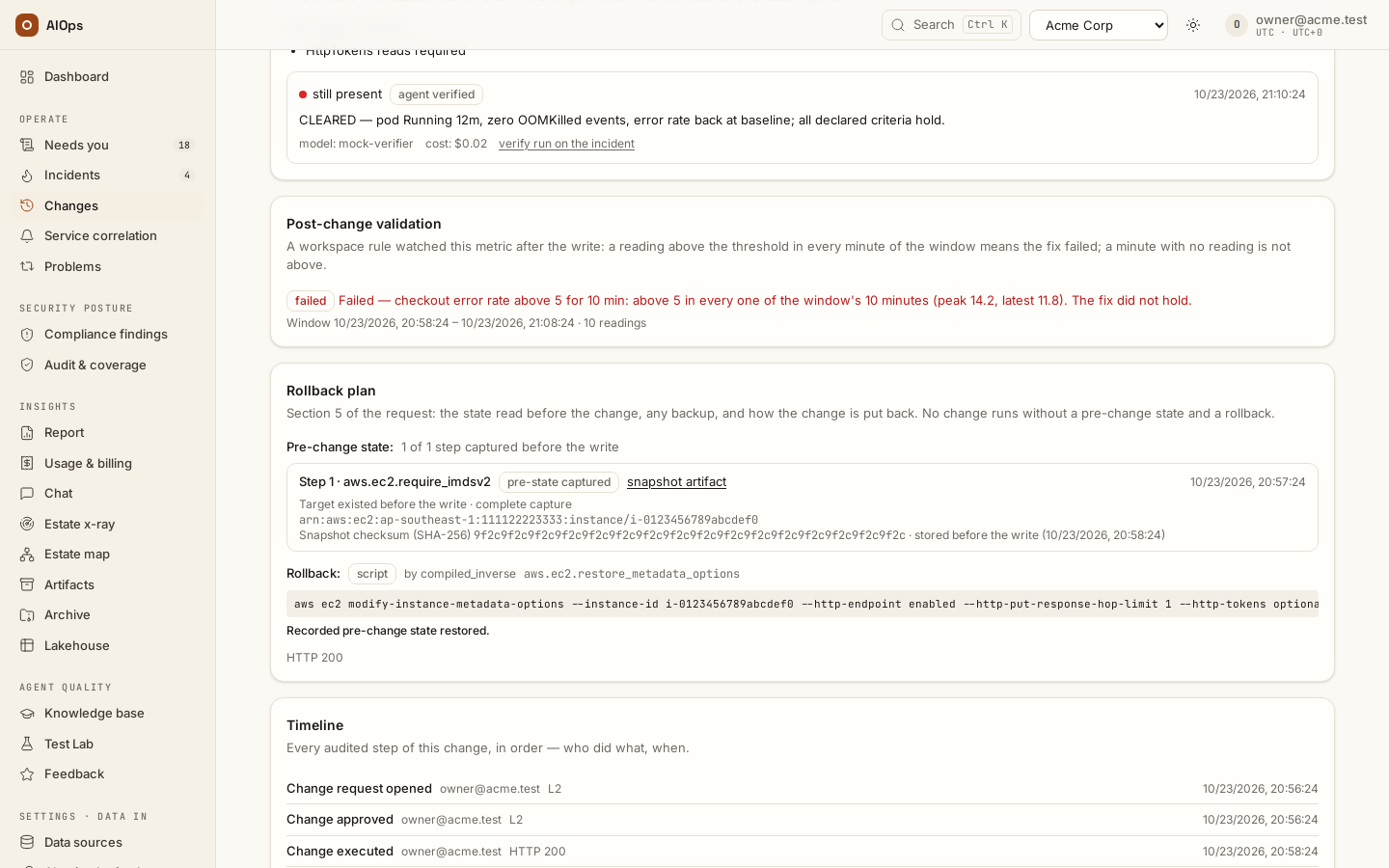
Inspect Pre-state per step, its SHA-256 evidence and the Runbook steps card (What ran when the change follows no runbook). With Refuse a change when its before-state cannot be captured enabled, an unavailable capture leads to the manual route or a pre-write refusal. Read the actual execution/verification receipt afterward. You should see the captured baseline and recorded outcome, or the precise refusal; a requested action is not proof of a write.
API: the before-state option is
PATCH /api/aiops/{tid}/guardrailswithrequire_before_state—members.manage; evidence reads require the appropriate incident/report permissions.
-
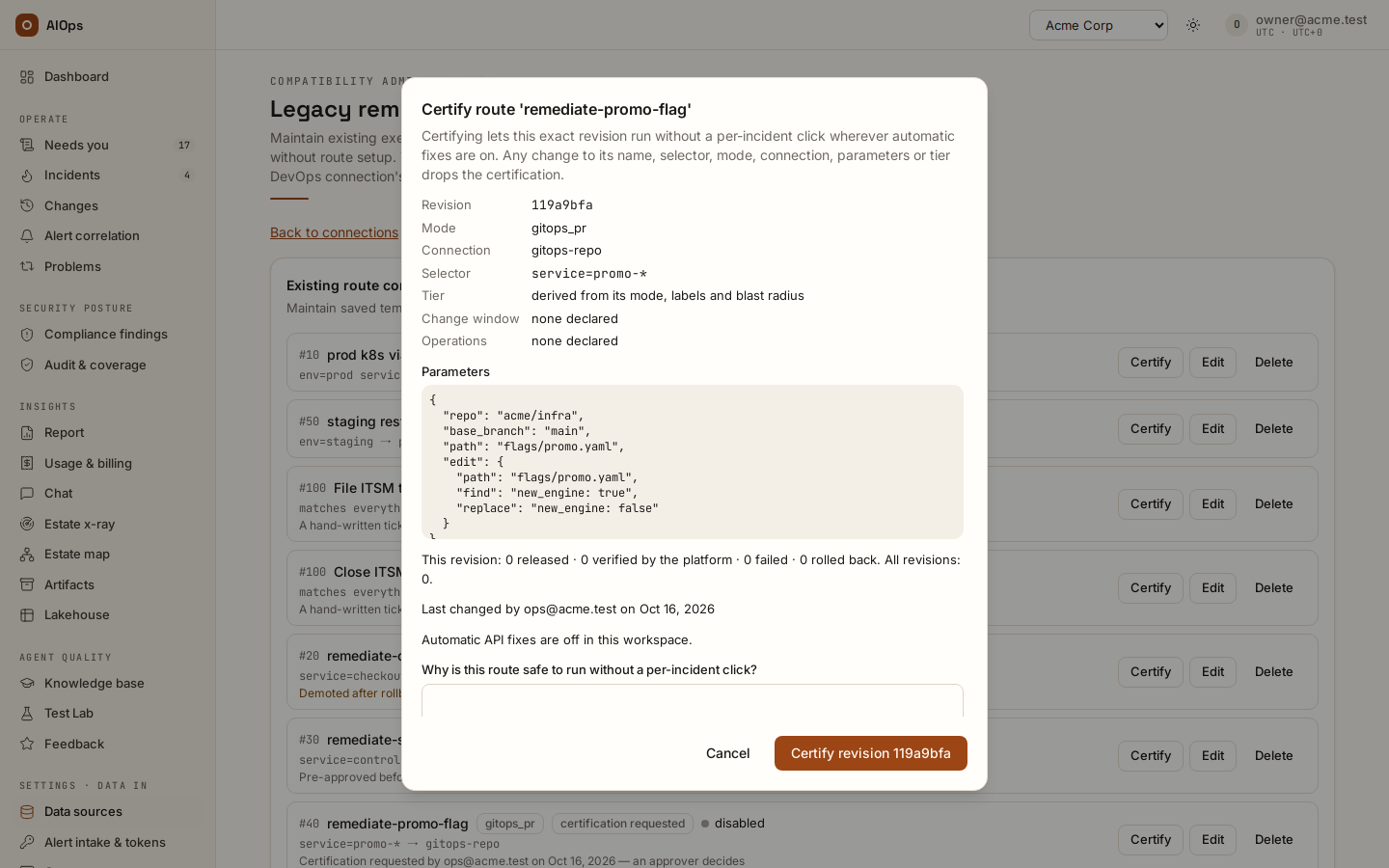
If the selected path uses a pre-approved route, review its certification under Legacy remediation routes → Certify. Read the revision, mode, connection, selector, operations, parameters and run history. An approver records Why is this route safe to run without a per-incident click?, then chooses Certify revision for the displayed revision. If the approver changed that revision and another approver exists, the other person must certify it. You should see the named certifier, time and matching revision, backed by the route-certified audit.
API: read the full revision from
GET /api/aiops/{tid}/routes, thenPOST /api/aiops/{tid}/routes/{id}/certificationwithaction: certify, that revision and a nonblank note of at most 500 characters —approvals.decide. A stale revision returns 409. Enabling/disabling a route preserves certification; edits to its certified content drop it. An old certifier unknown state records a migrated pre-approval, not an identified human certification.
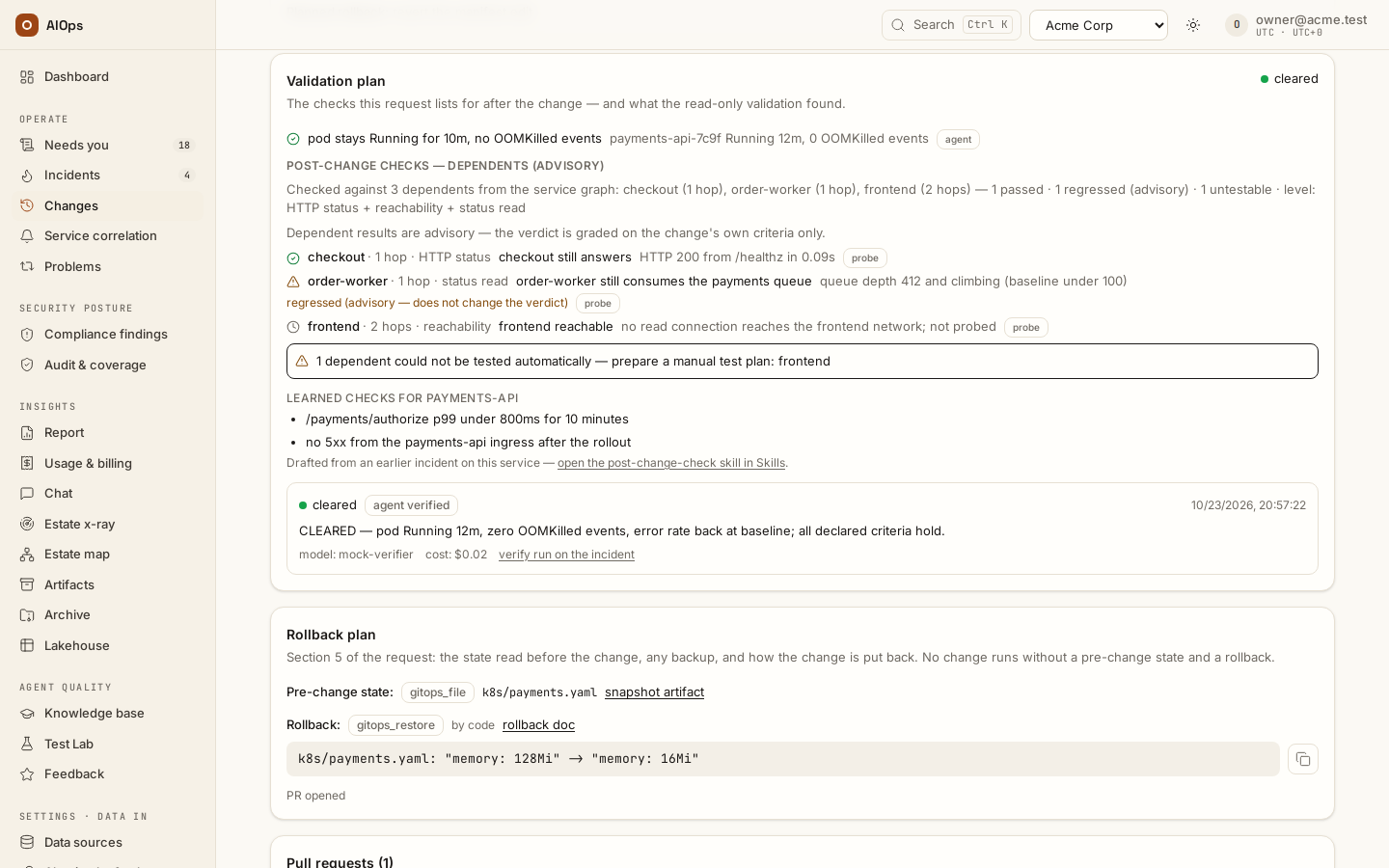
- Read the verification that followed the write. With Validation checks (L6) → Check a typed cloud fix with its own read first enabled, supported cloud fixes can be checked by their compiled resource read about 30 seconds after the write, at zero model cost. A matching Post-change validation metric rule decides first through its window. Verify now starts a paid agent check; it is not needed merely to wait for an automatic compiled check. You should see the actual check, target and verdict linked to the change — badged platform verdict when the platform decided with no agent run, agent verified when an agent did, manual verdict when a person recorded it — and the actual Spend split.
Rehearse one fix
The smallest end-to-end fix to try on a new workspace — a world-open SSH rule on a test security group that nothing uses, released through one approval, rolled back and cleaned up — has its own page: Rehearse your first approved fix.
Verify and cleanup
Verify the exact resource's intended state, retain the change/incident link and snapshot, and use the documented review path for restoration when it is authorized. Retire only credentials/routes created for the temporary exercise. Do not reuse a recorded approval for changed arguments or a different credential revision.
Certification does not by itself release a typed prepared plan or enable unattended API writes. Automatic API fixes for proven runbooks is a separate switch, off by default, with its own scoped precedent and safety requirements.
Troubleshooting
| Symptom | Check | Next step |
|---|---|---|
| AccessDenied or UnauthorizedOperation before acting | Provider response, exact operation and policy | Repair the scoped permission; preserve the failed receipt |
| Tagged resource operation refused | Target tag and policy condition | Confirm the intended tag and scope with its owner; do not widen to all resources |
| Manual route only after a failed before-read | Current writer revision and latest Test | Repair and Test the writer, then obtain a fresh reviewed plan |
| Consent disappeared | Role, use or credential revision changed | Reassess and explicitly grant consent for the intended saved use |
| Receipt pending | Timeout or uncertain outcome | Reconcile the resource before considering another release |
Related
Connections · AWS setup · Azure setup · Incidents · Change control · Runbooks and automatic fixes · Automatic API fixes.